What should you look for when buying?
First, decide how you’ll develop and test. Then check the full configuration against your monitors, test devices and any upgrades you might make later.
The figures refer to consumers choosing a desktop for this project; each person is assigned to their main purchase consideration.
| Purchase consideration |
What to check before buying |
Who it matters most to |
| Memory and storage |
Check the RAM and SSD against the full model or product number; don’t assume that every variant has the same specifications as the range in general. |
If I use a code editor, browser and local project files at the same time, I want to compare the exact RAM and SSD configuration. Consumers who prioritise this kind of multitasking are likely to account for around 36%. |
| Monitor connections and layout testing |
Check the video connections on the exact variant against your existing monitors; plan to use real mobile devices for final testing. |
If I test different layout widths and previews, I need suitable monitor connections and a reliable way to compare views. Consumers who prioritise this are likely to account for around 29%. |
| Inspecting Safari on an iPhone |
Check whether your project involves the Web Inspector workflow, and whether you can set up an iPhone, Mac and Web Inspector. |
If I want to inspect Safari on a real iPhone, the computer needs to suit this testing workflow. Consumers who prioritise inspecting Safari on an iPhone are likely to account for around 21%. |
| Future internal upgrades |
Check the slots and exact configuration; also make sure any planned upgrades will fit and be supported. |
If I want to upgrade the desktop internally later, the slots actually listed in the specifications are crucial. Consumers who prioritise future upgrades are likely to account for around 14%. |
Compact Windows desktop
A good fit if: You use Windows at a fixed workstation where space is limited, and connect your monitor and input devices separately.
Things to weigh up: A small case doesn’t guarantee the right connections for your monitors, or consistent specifications across every variant. HP lists 16 GB RAM and a 512 GB SSD for the Pro Mini 400 G9 937U0EA#ABD.
Mac mini with macOS
A good fit if: You want to inspect Safari pages on an iPhone using a connected Mac. WebKit explains how to use Web Inspector through Safari’s Develop menu.
Things to weigh up: You’ll also need a suitably set-up iOS device. Apple lists configurations with at least 16 GB of unified memory for the Mac mini with M6 chip; check the exact memory and SSD configuration.
Desktop with documented expansion slots
A good fit if: You’re specifically planning future internal upgrades. HP lists M.2 slots, as well as PCIe x16 and PCIe x1, for the Pro SFF 400 G9.
Things to weigh up: The presence of slots alone doesn’t confirm that a particular card will fit the exact configuration. Before buying, check the specifications and connections of the device on offer.
Joybuy products for your desktop workstation
The following Joybuy listings include compact Windows desktops and a tower PC. Compare the form factor, storage and available monitor connections with the way you develop and test.
 No image available
SOYO Y5Pro Mini PC, Intel Core i5 8250U/8350U, 8 GB DDR4, 256 GB SATA SSD
For a compact Windows workstation; the title lists Windows 11.
8 GB DDR4 and 256 GB SATA SSD. The description lists two HDMI outputs, one Type-C output and four USB ports.
View at Joybuy
 No image available
HP Z2 Mini G1a, Ryzen AI Max+ Pro 395, 128 GB RAM, 2 TB SSD
For a compact desktop workstation; the product description lists Windows 11 Pro.
The product title lists 128 GB RAM and a 2 TB SSD. The description lists DisplayPort and HDMI video outputs.
View at Joybuy
 No image available
HP EliteDesk AI Mini 8 G1i 623K2ET, Core Ultra 9 285T, 64 GB RAM, 1 TB SSD
For a compact desktop workstation; the description lists a mini PC form factor and VESA mounting compatibility.
The product title lists 64 GB RAM, a 1 TB SSD and Windows 11 Pro. The description lists DisplayPort and HDMI video outputs.
View at Joybuy
 No image available
HP Z1 Tower G1i A40SYET, Core Ultra 7 265, 32 GB RAM, 1 TB SSD
For a workstation where a tower form factor and the listed monitor connections suit your setup.
The product title lists 32 GB DDR5-5600, a 1 TB M.2 SSD and Windows 11 Pro. The description lists DisplayPort and HDMI.
View at Joybuy
 No image available
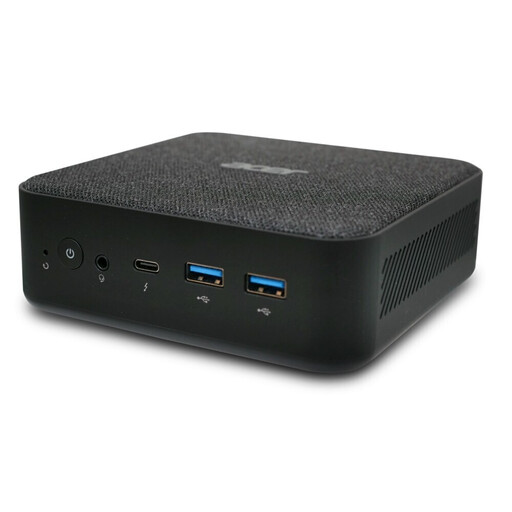
Acer Revo RB102 Mini PC, Core Ultra 5 125U, 16 GB RAM, 512 GB SSD
For a compact Windows workstation; the product title lists Windows 11 Pro.
The product title lists 16 GB RAM and a 512 GB SSD.
View at Joybuy
Frequently asked questions
Is the responsive view in a desktop browser enough for mobile testing?
Chrome DevTools is useful for comparing different viewport widths. Google points out that browser emulators don’t fully reproduce differences between mobile browsers, so test critical workflows on real devices as well.
How do I inspect a page in Safari on a real iPhone?
WebKit explains how to enable Web Inspector on the iOS device and a connected Mac. The iOS device then appears in Safari’s Develop menu; you can connect by cable or use wireless diagnostics if configured.
What rights apply when buying a desktop PC online as a private consumer in Germany?
Distance purchases generally come with a 14-day right to cancel, although conditions and exceptions may apply. Your Europe, the European Union’s information portal, explains this right for distance purchases. If goods are faulty, your statutory consumer rights are against the seller and are separate from any voluntary manufacturer’s warranty. Consumer rights don’t necessarily apply to business purchases.
What should I do with a desktop PC I’ve replaced?
In Germany, waste electrical equipment must be taken to an authorised collection point or returned to an authorised take-back provider. The Federal Ministry for the Environment lists local collection points and retailer take-back options; the requirements depend, among other things, on the retailer’s size and the circumstances of the purchase.


