Choose a desktop with an operating system, ports and specific RAM and SSD configuration that suit the tools you use at the same time. This web project alone doesn’t justify choosing a particularly powerful graphics chip. A compact Windows PC gives you a choice of cases and configurations, while a Mac mini could be a good fit if Safari is part of your development workflow. A responsive preview on a desktop doesn’t replace testing the booking process on actual mobile devices.
Which option suits which developer
Developers with a local test environment
If you check your code and booking process in a browser at the same time, compare the specific configuration with the requirements of all the tools you’ll be using simultaneously. VS Code and Docker Desktop each have their own requirements; Docker Docs sets out what you’ll need for your planned Windows setup.
Developers focused on mobile views
If you’re checking forms and layouts at different screen sizes, a desktop preview can help you make quick adjustments. However, Chrome for Developers and Apple Developer Documentation point out that previews can only approximate the experience on an actual mobile device.
Developers with limited desk space
If a compact case is important, also check the monitor connections you need, what’s included in the box and whether you may need to carry out maintenance. A small form factor alone doesn’t tell you whether your existing screens and accessories will work with the specific configuration.
What to look for when buying
Compact Windows desktop
A good fit if: Your development tools run on Windows and you want to compare cases, ports and specific specifications.
Things to weigh up: Ports, storage and service options can vary by model and configuration; a simulated mobile view is still only a preview test.
Mac mini with macOS
A good fit if: You want to include Safari and its web development tools in your workflow, and your other tools work with macOS.
Things to weigh up: Memory, SSD and display support depend on the configuration you choose; Safari’s responsive preview doesn’t replace testing on a device.
| Priority |
What to check before buying |
Who it matters most to |
| Running development tools simultaneously |
Compare the RAM, SSD, operating system and requirements of the programmes you’ll actually use. |
If you plan to run an editor, browser and local services at the same time, the specific configuration matters for your whole workflow. Around 36% of consumers prioritise being able to work smoothly with multiple tools open. |
| Responsive layouts and forms |
Decide which browsers and operating systems you need, and plan to test on real mobile devices. |
If you want to check screen sizes and the booking process, a desktop preview can help you adjust the layout, but it won’t show everything about how a mobile device behaves. Around 29% of consumers prioritise layout and browser testing. |
| Compact workspace |
Check the case size, compatible display outputs and which accessories are actually included. |
If space is limited and you want to keep using your existing monitors, the size and connections need to work together. Around 21% of consumers pay particular attention to desk space and workspace specifications. |
| Maintenance and service |
Check access to the RAM and SSD, along with the service included; distinguish between personal and business purchases. |
If access for maintenance or minimising downtime is important, take a close look at the exact model configuration and included services. Around 14% of consumers prioritise maintenance and service. |
Common buying mistakes
-
Treating a desktop device view as a complete mobile test
A simulated view makes quick layout adjustments easier, but it can’t fully reproduce how a site looks and works on a real mobile device.
Use the preview to make adjustments, then test the full booking process on the mobile devices you want to support.
Testing on actual devices takes additional time in your development workflow.
-
Assuming the same model name means the same specifications
Configurations can differ in RAM, SSD, ports and service; optional extras aren’t automatically included with the computer.
Check the exact version and what’s in the box, including the cables, input devices and services actually included.
-
Assuming the editor’s requirements apply to all your tools
The requirements for a code editor don’t automatically tell you what you’ll need for an additional local container environment.
Check the requirements for every tool you plan to use at the same time, for your chosen operating system and specific configuration.
Brands to consider
Dell
The Pro Slim Plus QBS1250 is a range of compact Windows desktops; check the specifications and options against the specific configuration.
- For the configuration viewed, Dell Germany lists a Core Ultra 5 235, 16 GB DDR5, a 512 GB SSD and Windows 11 Pro.
- These specifications apply to the configuration listed, not automatically to every model in the range. Check the ports and service options for the version you choose.
Apple
The Mac mini is a compact macOS option if you want Safari to be part of your development and testing workflow.
- Apple Germany lists a range of memory and SSD configurations for the Mac mini.
- Apple Developer Documentation describes Safari’s Responsive Design Mode as an approximation, not an exact reproduction of an actual mobile device.
Lenovo
The ThinkCentre M75q Gen 5 Tiny is a compact Windows option if you need a small workspace and access for future maintenance.
- Lenovo describes the model as offering tool-free access to the SSD and memory modules.
- The specific configuration 12RQCTO1WWDE1 lists 24 GB RAM. Check the SSD capacity separately for the actual offer.
HP
The Pro Mini 400 G9 is another compact Windows business option.
- For version 937U0EA#ABD, HP lists a Core i5-14500T, 16 GB RAM and a 512 GB SSD.
- Service packages shown as optional aren’t automatically included with the computer; check which services come with the configuration you choose.
Joybuy products for this development workflow
The models below include Windows desktops in mini and tower cases, as well as a Mac mini for workflows involving tools used in parallel or Safari testing. Check that the operating system, ports and specific specifications suit your workflow.
 No image available
HP Z2 Mini G1a Ryzen AI Max+ Pro 395, 128 GB RAM, 2 TB SSD
Could suit a Windows development workflow with lots of tools running at once and a preference for a mini case.
This configuration is listed with Windows 11 Professional, 128 GB RAM and a 2 TB SSD.
Video connections listed include USB-C and Mini DisplayPort; dimensions are 200 × 85,5 × 168 mm.
Joybuy
 No image available
HP Z1 Tower G1i, Core Ultra 7 265, 32 GB DDR5, 1 TB SSD
This tower model may be worth considering if you’re looking for a Windows desktop with the listed monitor connections.
This configuration is listed with Windows 11 Professional, 32 GB DDR5 at 5600 MHz and a 1 TB M.2 SSD.
Video outputs listed include DisplayPort and HDMI.
Joybuy
 No image available
Apple Mac mini M6, 24 GB unified memory, 512 GB SSD
Could suit your workflow if you use macOS and Safari; Safari’s responsive preview doesn’t replace testing on actual mobile devices.
This configuration is listed with 24 GB unified memory, a 512 GB SSD and macOS.
Connections listed include HDMI and three Thunderbolt 4 ports.
Joybuy
 No image available
SOYO S5Air Mini PC, Ryzen 5 7535HS, 16 GB LPDDR5, 512 GB NVMe SSD
A mini PC configuration for a Windows workspace where the listed video outputs need to work with your existing monitors.
Specifications include Windows 11 Pro, 16 GB LPDDR5 and a 512 GB NVMe SSD.
Video outputs listed include HDMI, DisplayPort and USB-C.
Joybuy
 No image available
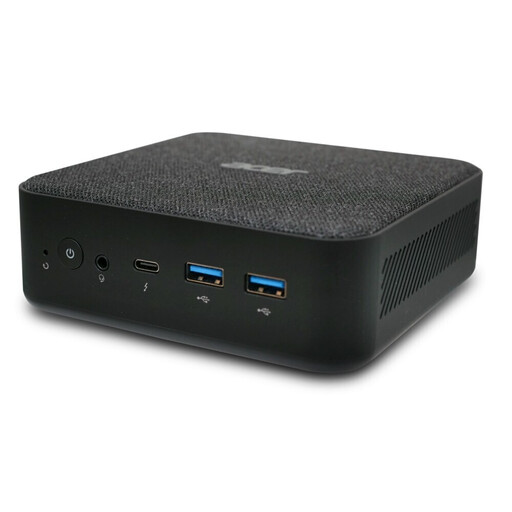
Acer Revo RB102 Mini PC, Core Ultra 5 125U, 16 GB RAM, 512 GB SSD
Could be an option for a compact Windows development setup; also check that the ports work with your monitors.
The product name lists Windows 11 Pro, 16 GB RAM and a 512 GB SSD.
Joybuy
Frequently asked questions
Is a responsive preview on a desktop enough to test a booking website?
No, not as your only test. Chrome for Developers and Apple Developer Documentation describe the preview as an approximation of how a site appears on a mobile device. Also test the full booking process on the devices you want to support.
Does my desktop need to be able to run Docker Desktop?
Only if Docker is part of your planned workflow. If it is, check the documented requirements for your operating system and version of Docker; the requirements for a code editor alone won’t answer this question.
What should I check before buying for monitors and future maintenance?
Check that the actual video outputs work with your monitors and see which accessories are included. If access for maintenance matters, compare the exact model range: Lenovo describes the ThinkCentre M75q Gen 5 Tiny as offering tool-free access to the SSD and memory modules.
Are manufacturers’ service packages the same as statutory rights for faulty goods?
No. According to the European Union’s consumer information, when you buy as a consumer from a business seller, you generally have at least two years of statutory rights for faulty goods from the date you receive them; these rights are against the seller. An additional voluntary guarantee is separate. If you’re buying for a business, check the specific terms and conditions.
Will a particular desktop automatically make a booking website accessible or legally compliant?
No, your choice of computer doesn’t determine that. The German Federal Accessibility Agency explains that the German Accessibility Strengthening Act (BFSG) may apply to e-commerce services from 28 June 2025, if the legal requirements are met. It notes an exemption for microenterprises providing services if they have fewer than ten employees and an annual turnover of no more than two million euros. Whether your planned website falls within the scope of the Act depends on the actual service and provider.


