For product photos with consistent colours, start with a suitable monitor, the right colour profile and, if possible, steady lighting at your workspace. More computing power won’t correct a misleading display, as Adobe explains. A mini PC leaves you free to choose your monitor, an all-in-one combines the computer and display, and a larger desktop is worth considering when you have a specific need for expandability. Also check that the operating system, software requirements, connections, storage and included items suit your workspace.
Which desktop setup is right for you?
Students working with colour-critical product photos
If you need to assess product colours on screen, it’s important to set up your monitor correctly and keep lighting consistent. Adobe notes that an inaccurate monitor profile can lead to unnecessary adjustments, so choose a computer that suits your editing software.
Photo editors with a small desk
If you need to leave room for product setups, a camera or study materials as well as your computer and screen, you could consider a compact computer with a separate monitor or an all-in-one with a built-in display.
Students working on larger image projects
For large files or projects with multiple layers, check the RAM, available SSD storage and potential upgrade options against the requirements of the specific software version you use.
Which buying criteria matter most?
Mini PC with a separate monitor
A good fit if: You have limited space or want to use a monitor you already own or have chosen specifically.
Things to consider: You’ll need to have or allow for a separate screen and, where necessary, input devices.
All-in-one
A good fit if: A computer and screen in one unit will fit on your desk, and the built-in display suits your colour workflow.
Things to consider: You’re tied to the display that comes with the device. On the iMac, True Tone can adjust the display to match the ambient light, which is worth bearing in mind when comparing colours consistently.
Larger desktop or tower
A good fit if: Your specific software or files require a particular connection or room for expansion, and you have the space for it.
Things to consider: More space or computing power won’t replace a suitable monitor profile or consistent lighting at your workspace.
For colour-critical product photos, your monitor profile and workspace lighting matter just as much as a computer configuration suited to your image-editing software. Adobe recommends the sRGB colour space for documents intended to be viewed exclusively on the web.
| What matters |
What to check before buying |
Who should consider this? |
| Assessing colours |
Check the monitor profile and calibration options, and aim for consistent lighting at your workspace; Adobe recommends sRGB for web-only output. |
If I’m matching product colours on screen, I need a reliably profiled display and, if possible, consistent lighting; around 31% of consumers put colour matching first. |
| Space and monitor choice |
Measure the space available for your computer, display and product setup; if you choose a mini PC, check its video output against your monitor’s input. |
If I also need room on my desk for products and study materials, I pay particular attention to the form factor; around 25% of consumers prioritise the space it takes up. |
| A complete workspace |
Check whether a monitor, keyboard, mouse and operating system are included; allow for any devices you’ll need to buy separately. |
If I need a ready-to-use workspace rather than just a computer case, I check all the components included; around 25% of consumers focus first on the total cost of their workspace. |
| Software and projects |
Check the software version, operating system, RAM and available SSD storage against the exact configuration. Adobe lists 8 GB as the minimum for Photoshop 27.x and recommends 16 GB or more. |
If I’m editing larger files or working with multiple layers, my computer and storage need to suit my software; around 19% of consumers put image editing and project size first. |
Common buying misconceptions
-
Assuming computing power means colour accuracy
An inaccurate monitor profile can lead to unnecessary colour adjustments, however fast your computer is. Before upgrading for more power, consider your monitor, profiling and, if possible, consistent lighting at your workspace.
You may also need to buy a suitable monitor or set up your colour workflow.
-
Assuming a mini PC case is a complete workspace
A monitor isn’t automatically included with a mini PC. Check what’s in the box and whether you have the peripherals you need for that specific configuration.
A monitor or input devices bought separately can mean extra purchases and additional setup.
-
Assuming similarly named models have the same specifications
Components can vary between configurations, even within the same product family, as HP explains for the Pro Mini 400 G9. Check the full model name and specifications before applying details from one listing to another.
An incomplete configuration may require extra components or a separate operating system.
A guide to relevant brands
Apple
The Mac mini and iMac are worth considering if your software and accessories are compatible with macOS. The Mac mini is paired with a separate display, while the iMac has a built-in screen.
- For the base configuration of the Mac mini (2024) with M4, Apple lists 16 GB of unified memory and separate display connections.
- Apple describes the iMac display as supporting P3 and True Tone. These manufacturer specifications alone don’t confirm colour accuracy in your own workspace; with True Tone, remember that the display adjusts to ambient light.
Lenovo
The ThinkCentre M70q Gen 5 Tiny is a compact Windows desktop designed for use with a separately selected monitor.
- For configuration 12TD0083EZ, Lenovo lists 16 GB RAM and a 512 GB SSD, as well as access for servicing memory components.
- The monitor is sold separately; the configuration specifications don’t confirm the colour performance of a connected display.
HP
The Pro Mini 400 G9 is a compact Windows PC range. Check the exact specifications before buying.
- The range offers a compact desktop option for a workspace set up with a separate monitor.
- HP notes that features and components may vary by individual configuration, so you shouldn’t apply details from one version to another without checking the model.
Dell
The Pro Micro QCM1250 is a compact, configurable Windows desktop for a workspace with a separate monitor.
- For the listed German configuration, Dell specifies 16 GB DDR5 and a 512 GB SSD.
- Dell notes that images and features depend on the configuration; the product specifications don’t confirm the colour accuracy of the complete workspace.
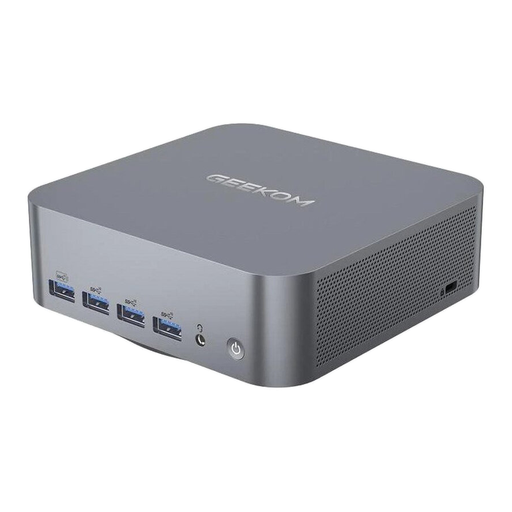
GEEKOM
The A5 Pro 2026 Edition is a compact Windows mini PC that may be a good option if you already have a suitable monitor.
- For the listed version, GEEKOM specifies a Ryzen 5 7530U, 16 GB RAM and a 1 TB SSD, along with upgrade options.
- Check the exact version and what’s included before buying; manufacturer claims about noise levels or suitability for image work aren’t independent measurements.
Joybuy products for a mini PC workspace
This selection features mini PCs for a workspace where you choose your monitor separately. Check the specific computer configuration and what’s included against your image-editing software and the accessories you already have.
 No image available
Beelink Mini PC EQ7, 16 GB RAM, 512 GB, Grey
As a mini PC, it lets you choose your monitor separately; check the connections on the specific device against your display.
Listed in the product name: 16 GB RAM and 512 GB storage.
View at Joybuy
 No image available
Beelink Mini PC EQ5, 16 GB RAM, 512 GB, Grey
The mini PC form factor gives you the freedom to choose your screen; check that the connections suit the setup you have or are planning.
Listed in the product name: 16 GB RAM and 512 GB SSD.
View at Joybuy
 No image available
HP Z2 Mini G1a Ryzen AI Max+ Pro 395, 128 GB, 2 TB
This compact mini workstation may suit larger image projects, provided the software and monitor connections are compatible with the specific configuration.
Listed in the product name: 128 GB RAM and 2 TB SSD.
View at Joybuy
 No image available
Apple Mac mini M6, 12-Core CPU, 12-Core GPU, 16 GB Unified Memory, 256 GB SSD
The Mac mini is a good fit if your image-editing software runs on macOS and you want to use a separate monitor.
Listed in the product name: 16 GB Unified Memory, 256 GB SSD, Thunderbolt 4 and HDMI. According to the setup information, a keyboard and mouse are required separately.
View at Joybuy
No image available
Apple Mac mini M6, 12-Core CPU, 12-Core GPU, 24 GB Unified Memory, 512 GB SSD
This version suits a compact workspace with a separately selected monitor, provided your image-editing software is compatible with macOS.
Listed in the product name: 24 GB Unified Memory, 512 GB SSD, Thunderbolt 4 and HDMI. Check whether the display, keyboard and mouse are included with the specific version for sale.
View at Joybuy
Frequently asked questions
Is a fast PC enough to make sure product colours look right?
No. For colour-critical work, start by calibrating your monitor and setting up a suitable profile, then aim for consistent lighting at your workspace. Adobe notes that an inaccurate monitor profile can lead to unnecessary image adjustments.
What should I check before connecting a separate monitor?
Check that the video output on the specific computer matches the monitor’s input, then set up a suitable monitor profile. If you’re using a compatible Apple display, also bear in mind that True Tone adjusts colours and intensity to match the ambient light.
Is 16 GB RAM required for every product photo project?
No. Adobe lists 8 GB as the minimum for Photoshop 27.x and recommends 16 GB or more; requirements may differ for other programmes and versions. Also check the available SSD storage and graphics support requirements.
What are my rights in Germany if a newly purchased computer is faulty?
When you buy from a business seller, statutory consumer rights generally apply; Your Europe gives a two-year period for consumer goods. These rights are separate from a voluntary manufacturer’s guarantee, and your specific rights depend on the circumstances of the fault and purchase.
Can I put an old PC or monitor in household rubbish?
No. The German Environment Agency explains that electrical waste must be collected separately from mixed household waste. One option is to use a local collection point; whether a retailer must take it back depends on the legal requirements and the return route.


