Students working on local test projects
If you write code and run tests locally, the specs should match the tools you use. An editor alone has different requirements from a more fully featured IDE.


A fully equipped mini PC could be a good fit for an editor, browser and smaller local tests, provided its operating system, ports and included accessories suit your workspace. If you use a more demanding IDE or additional local environments, compare the requirements of the tools you actually use with the RAM and SSD specifications. A barebone is only a good choice if you want to select and set up the missing components yourself.
If you write code and run tests locally, the specs should match the tools you use. An editor alone has different requirements from a more fully featured IDE.
If you also need room for a monitor and study materials, consider the case size, ports and noise levels during your usual use.
Compare not just the computer, but also any components you’ll need to buy, the monitor and peripherals, and the time it takes to set everything up. This will help you budget for a complete workspace.
| What to consider | What to check before buying | Who should consider this? |
|---|---|---|
| Development tool requirements | Check the operating system, IDE version, CPU, RAM and available SSD space against the requirements of the tools you actually use. JetBrains lists 8 GB of total memory and a four-core CPU as the system requirements for the documented version of IntelliJ IDEA. | If I use an IDE or local services alongside an editor, I check their requirements against the exact specifications. Around 33% of consumers prioritise having suitable development tools. |
| Space and noise | Allow for the dimensions of the computer, power supply and cables, as well as clear space around the ventilation openings. Only compare noise figures measured under similar conditions. | If my desk also needs to accommodate a monitor and study materials, I plan for the overall footprint and airflow. Around 27% of consumers pay particular attention to desk space and noise. |
| Complete workspace | For the exact configuration, check off the operating system, RAM, SSD, power supply, monitor, keyboard, mouse and compatible cables. | If I want to know what else I’ll need before my workspace is ready to use, I include all the required components and setup in my budget. Around 27% of consumers prioritise the overall cost. |
| Future upgrades | Check the installed RAM, the number of genuinely free slots and whether the specific model variant supports upgrades. | If I might want to add RAM or storage later, I first check whether the exact configuration allows for it. Around 13% of consumers prioritise future upgrade options. |
A barebone may be sold without RAM, an SSD or an operating system. Comparing prices alone can therefore leave out important components and the work involved in setting everything up.
Before buying, make a list of everything you’ll still need for the exact configuration and your workspace.
A COMPUTER BILD test rating does not automatically reflect how your project, IDE or concurrently running test processes will perform.
Compare the requirements of the tools you actually use with the specifications of the exact configuration.
Configurations in the same range can differ in their specifications and model codes. The HP model code listed for Germany, 6D3E9EA#ABD, is not the same as the D6B240EA model tested by COMPUTER BILD.
Check the full model code and what’s included before applying a test result to a specific offer.
The examples below refer to specific product lines and configurations. Mentioning a brand does not mean that a particular model is available.
The A5 Pro with Ryzen 5 7530U is one example of a fully equipped mini PC.
The Cubi NUC 1M range has a compact case, several monitor connections and a choice of storage options.
The M6 Ultra is available both as a fully configured model and as a barebone.
The Pro Mini 400 G9 is a compact business PC range with several configurations.
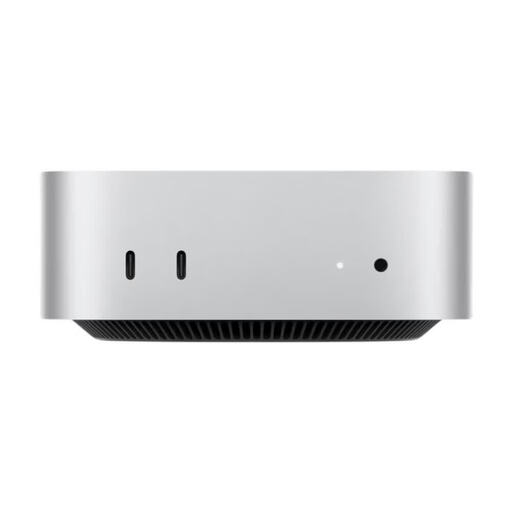
The Mac mini is a compact macOS option, provided your development tools and course requirements suit the configuration you choose.
This selection includes mini PCs and a Mac mini for development tools and local tests. Check that the specific configuration is compatible with your needs. For a device covered by relevant EU rules requiring CE marking, the mark is not an independent quality seal.
 No image available
Could be suitable if your development tools can run on the configuration offered; check their requirements first.
Listed in the product title: Windows 11, 8 GB DDR4, 256 GB SATA SSD and Intel Core i5-8250U/8350U.
 No image available
Before buying, check that the tools you use and your operating system requirements are compatible with this configuration.
Listed in the product title: 128 GB LPDDR5X RAM at 8000 MT/s, 1 TB SSD and Wi-Fi 7.
 No image available
An option if your development tools and course requirements are compatible with macOS on this chip architecture.
Listed in the product title: 12-core CPU, 12-core GPU, 32 GB Unified Memory and 1 TB SSD. Check that your specific tools are compatible before buying.
 No image available
Before planning to use this computer for local tests, compare the requirements of your tools with the listed specifications.
Listed in the product title: Intel N4100 up to 2.4 GHz, 8 GB LPDDR4, 256 GB SSD and two HDMI ports. Use the supplied power adapter and keep the ventilation openings clear.
 No image available
Check that the configuration on offer suits your development tools and local test projects.
Listed in the product title: 12 GB LPDDR5 and 512 GB NVMe SSD.
It depends on your project and which tools you need to run at the same time. Microsoft Visual Studio Code recommends 1 GB of RAM for the editor alone; JetBrains lists 8 GB of total memory and a four-core CPU for the documented version of IntelliJ IDEA. These individual figures do not cover the requirements of all tests running at the same time.
Check the operating system, monitor connection and everything included in the box. If the computer is sold as a barebone, you’ll need to buy missing components such as RAM and an SSD yourself. JetBrains also lists a separate JDK as a requirement for Java development with IntelliJ IDEA.
Allow for the power supply and cables, keep ventilation openings clear, and only compare noise figures measured under similar operating conditions. A compact case on its own does not guarantee quiet operation while tests are running.
The Verbraucherzentrale explains that, in general, you can make a claim against the seller under your statutory rights if newly purchased goods are faulty, within two years of receiving them. For goods ordered online, you generally have 14 days from receipt to cancel. The right to cancel a purchase when there is no fault is separate from your statutory rights if the goods are faulty.
CE marking is only required for products covered by relevant harmonised EU rules that require it. It is not an independent quality seal, so check the information for the specific configuration and the requirements that apply to it.