Who is this advice for?

Desktop users with unsaved work

If you want to save your files and shut down your PC safely, runtime at your actual load and a properly configured shutdown function are important factors when choosing a UPS. Eaton notes that its runtime figures can vary depending on the equipment, configuration and battery age.

Users short on desk space

If you have limited space at your workstation, check the unit’s dimensions, plug type and the number of battery-backed outputs. Manufacturer specifications for APC and Eaton models show that plug types and backed-up outputs vary by model.

Users with a more powerful desktop

For a higher PC load, the combined wattage and whether the output waveform suits your specific PC configuration both matter. Manufacturer specifications for the CyberPower PR1500ELCD and PowerWalker Basic VI 850 SB differ in both wattage and waveform.

What should you look for when buying?

What matters What to check before buying Who is it important to?
Runtime to shut down Combined wattage of the devices that need to stay on and runtime at that load; if needed, check USB communication and operating system support. If I want to save files during a power cut and shut down my PC safely, even when I’m away, runtime at my actual load matters. Around 33% of consumers put safe shutdown first.
Space and suitable connections Check the unit’s dimensions, input plug, Schuko or IEC outputs, and the number of battery-backed connections. If every bit of space counts on a small desk and my PC and monitor need suitable, backed-up outputs, the form factor and connection type are key. Around 27% of consumers prioritise space and connections.
Power and output waveform Compare the wattage limit with the combined load; check the waveform in battery mode if you have specific requirements. If my desktop has a high load or its power supply requires a particular output waveform, the UPS must suit that configuration. Around 20% of consumers prioritise power or compatibility.
Battery replacement and maintenance Check the full model number to see whether the battery is replaceable and what guidance applies to replacing it. If I want to use the UPS for longer and consider battery replacement as a maintenance option, the details for the specific model matter. Around 20% of consumers prioritise battery replacement and maintenance requirements.

Common buying misconceptions

  • Assuming the VA rating tells you the wattage or runtime

    The VA rating alone doesn’t tell you whether the combined load is within the wattage limit or how long the PC will keep running during a power cut.

    First, work out the load of the devices you want to keep running. Compare it with the wattage limit, then check the runtime curve for the specific model at that load.

  • Assuming every socket has battery backup

    According to Eaton, three of the six Schuko outputs on the Eaton 3S550D provide surge protection only and don’t have battery backup.

    Connect your PC and, if needed, your monitor to the outputs labelled as battery backup in the manual.

  • Overlooking plug type and battery maintenance

    The APC BR650MI has IEC-C13 outputs, while other models covered here use Schuko connections. Information about replaceable batteries applies only to the specific model concerned.

    Check that the outputs match your existing device cables, and find the right battery using the full model number.

    Depending on the connection type, you may need suitable cables. If you replace the battery later, make sure you use one that’s compatible with your model.

Key UPS brands at a glance

APC by Schneider Electric

The Back-UPS models covered here cater for different connection and space requirements.

  • Schneider Electric lists the BE850G2-GR at 850 VA and 520 W, with Schuko outputs; this model is specified with a replaceable battery.
  • The BR650MI is specified as a tower unit with six IEC-C13 outputs and a rating of 650 VA/390 W. The connection type and power ratings apply to this model, not the entire range.

Eaton

Eaton offers compact models with Schuko connections, as well as the Ellipse PRO as a line-interactive alternative.

  • Eaton specifies the 3S550D at 550 VA/330 W, with three battery-backed outputs and three with surge protection only. For the ELP650DIN, the manufacturer lists 650 VA/400 W and three battery-backed Schuko outputs.
  • For both models, check runtime at your actual load. On the ELP650DIN, an additional Schuko output provides surge protection only.

CyberPower

The line-interactive range covers everything from desktop use to more powerful models.

  • CyberPower specifies the PR1500ELCD at 1500 VA/1350 W, with eight IEC-C13 outputs and a pure sine wave.
  • These specifications apply to the PR1500ELCD. Its size doesn’t automatically make it a suitable choice for a small workspace.

PowerWalker

The Basic VI 850 SB is a line-interactive UPS with Schuko outputs and AVR.

  • The manufacturer’s datasheet lists 850 VA/480 W, a simulated sine wave and HID support. Runtime is specified as 4.5 minutes at half load.
  • The runtime figure applies to the stated load and isn’t a guarantee for a different PC configuration. Check the waveform in battery mode for the specific model.

Legrand

The Keor Multiplug is a line-interactive range with Schuko connections, designed for compact setups.

  • For the variants described, Legrand lists 600 or 800 VA and 360 or 480 W.
  • The brochure gives backup times of up to 15 minutes under optimal operating conditions. Check runtime separately for your own desktop load.

Joybuy products

The following Joybuy products are 12 V inverters whose product details mention a UPS function. They’re only suitable if you plan to use a compatible 12 V battery setup at your workstation.
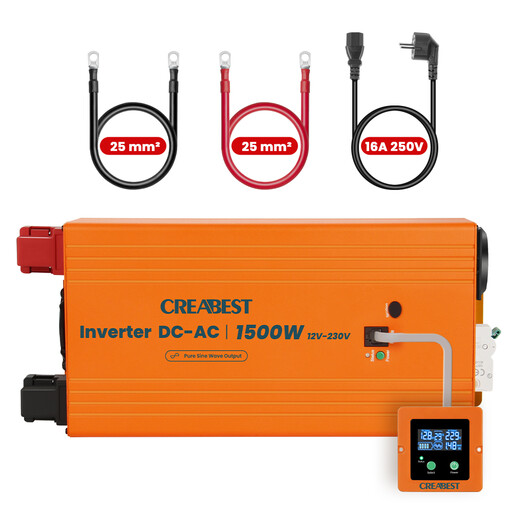
12 V pure sine wave inverter with UPS function, 1500 W

12 V pure sine wave inverter, 1500 W

Only suitable if you’re planning a 12 V battery setup for your desktop. The product description mentions a UPS function and advises professional installation and use in a dry, well-ventilated location.

The product description lists 1500 W continuous power, a pure sine wave and an RCD circuit breaker. The product title states that it converts 12 V to 240 V.

Joybuy
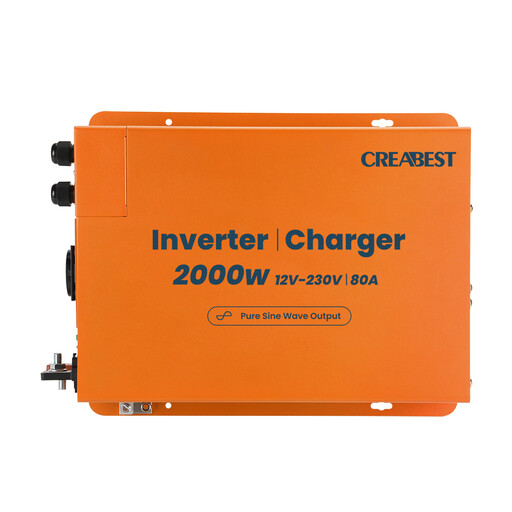
12 V pure sine wave inverter, 2000 W, with 80 A charger

12 V pure sine wave inverter, 2000 W

Only suitable if you’re planning a 12 V battery setup for your desktop. The product description mentions a UPS function and requires a compatible battery and DC wiring.

The product description lists 2000 W continuous power, an 80 A charger and 35 mm² DC cables. A pure sine wave is also specified.

Joybuy

Frequently asked questions

Is 850 VA enough for my desktop?

You can’t tell from the VA rating alone. Compare the combined load of the battery-backed devices with the wattage limit of the specific model, then check its runtime at that load. Eaton notes that runtime depends, among other things, on the equipment, configuration and battery age.

How do I set up automatic shutdown?

Choose a model with a communication and shutdown function supported by your operating system, connect your PC according to the manufacturer’s instructions, and set up the function. Test it afterwards. Eaton lists USB-HID and a shutdown function for the ELP650DIN, while PowerWalker specifies USB-HID for the Basic VI 850 SB.

What should I bear in mind when replacing the battery later?

Check the full model number to see whether the battery is replaceable and which replacement battery is compatible. Manufacturers specify this option for certain models only; also follow the relevant replacement instructions.

Can I put an old UPS in household waste in Germany?

No. Under the statutory requirements explained by the German Environment Agency, electrical waste must be collected separately from household waste. Local collection points are one way to return it. If the battery can be removed easily, handle it separately in line with the return instructions before handing in the appliance.