Editing 4K holiday videos
If you edit 4K footage or work with multiple tracks, base your choice on the requirements of your editing software and the exact configuration. For Premiere, Adobe recommends at least 32 GB RAM for 4K footage.


Start by choosing a desktop that suits your editing software, resolution and footage format, then check the RAM, storage drives and ports. A mini PC takes up little desk space; a tower may be a better choice if internal upgrades matter to you. Adobe’s recommendation of at least 32 GB RAM for 4K applies to Premiere and isn’t a general minimum requirement for all video editing.
If you edit 4K footage or work with multiple tracks, base your choice on the requirements of your editing software and the exact configuration. For Premiere, Adobe recommends at least 32 GB RAM for 4K footage.
If you switch between sitting and standing at an adjustable desk, make sure your computer, cables, monitor and drives are sensibly arranged at both desk heights. The Federal Institute for Occupational Safety and Health describes alternating between sitting and standing as dynamic sitting and standing.
If you want to keep footage and projects from several trips, check the storage capacity, available ports and upgrade options for the specific model.
| Priority | What to check before buying | Who it matters to |
|---|---|---|
| Editing hardware | Decide which editing software and version you’ll use; compare the CPU, RAM, GPU and operating system in the exact configuration with the software requirements. | If I edit 4K footage or work with multiple tracks, I want to compare my software’s requirements with the computer’s specifications. Around 33% of shoppers say suitable editing hardware is their top buying priority. |
| Storage for projects | Estimate how much space you need for footage and projects; check the SSD ports and options for adding extra or external drives. | If I want to keep original footage and projects from several trips, I need enough storage and the right ports. Around 27% of shoppers put space for projects first. |
| Space at your workstation | Check the location, cable lengths and display ports at both desk heights; keep ventilation openings clear. | If I use my desk sitting and standing, I want to arrange the computer and cables so the setup works at both heights. Around 20% of shoppers prioritise desk space. |
| Accessories and extras | Check that your existing monitors, drives and adapters are compatible with the ports; check which editing software you need and what’s included in the box. | If I’m putting together a usable editing setup, I want to know what works with my existing equipment and what else I need. Around 20% of shoppers focus mainly on these extras. |
Requirements depend on your editing software and footage. Adobe sets out different Premiere requirements for HD and 4K; for 4K, it specifies at least 32 GB RAM.
Before buying, note down the resolution you’ll be editing and your editing software and version. Then compare the requirements with the CPU, RAM and GPU in the configuration you’re considering.
For Premiere, Adobe recommends a fast internal SSD for the programme and cache, plus a separate fast drive for media files. Ports and storage capacity vary by model.
Compare the ports listed for the specific offer with your existing monitors, drives and other devices, and check which software you plan to use.
The Federal Institute for Occupational Safety and Health describes dynamic sitting and standing as alternating between the two. Apple also notes that blocked ventilation openings can affect device performance.
Plan your cable management and computer placement for both desk heights, and keep the computer’s ventilation openings clear.
The Mac mini is a compact macOS option if your editing software and connected devices work with macOS.
The Z2 Mini G1i and Z2 Tower G1i offer compact and upgradeable Windows options respectively.
The ThinkStation P3 Tower Gen 2 is a configurable Windows tower range for buyers who want to consider internal upgrades.
The Pro Max Tower T2 is a configurable tower range for a dedicated Windows editing setup.
The NUC 15 Pro+ is a compact PC alternative when desk space is limited.
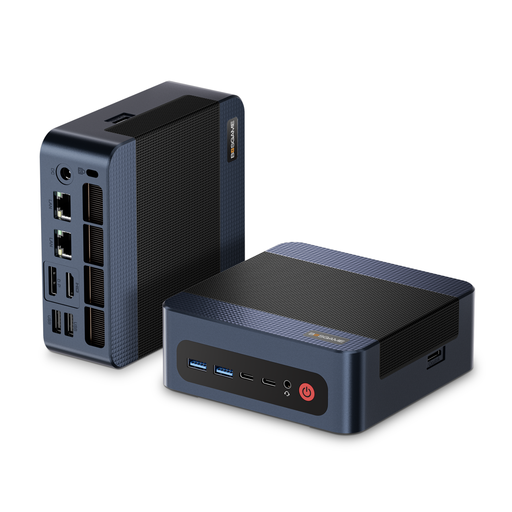
The following Joybuy offers are compact Windows mini PCs for a space-saving editing setup. Compare the specifications of each with your editing software and the formats you record in.
 No image available
This mini PC format may suit you if you want to keep your editing setup compact.
The product name lists an AMD Ryzen 9 7940HS, 32 GB DDR5 RAM, a 1-TB PCIe 4.0 SSD and Windows 11 Pro.
For Premiere, Adobe specifies at least 32 GB RAM for 4K; also check the processor and graphics requirements for your particular software.
 No image available
This compact format may suit you if you’re looking for a Windows computer that takes up little space and its specifications meet your software requirements.
The product name lists 16 GB DDR5 RAM, a 512-GB SSD, Windows 11 Pro, Wi-Fi 6 and USB4.0.
For Premiere on Windows, Adobe recommends 16 GB RAM for HD and at least 32 GB for 4K. This RAM specification therefore falls short of Adobe’s recommendation for 4K.
No, it depends on your editing software and footage. For Premiere on Windows, Adobe recommends 16 GB RAM for HD and at least 32 GB for 4K, as well as 8 GB of GPU memory. Check the specific requirements for other programmes.
Plan where your computer, cables and peripherals will go at both desk heights, and keep the ventilation openings clear. The Federal Institute for Occupational Safety and Health describes alternating between sitting and standing; Apple notes that blocked ventilation slots can affect device performance.
For Premiere, Adobe recommends a fast internal SSD for the programme and cache, plus a separate fast drive for media files. Check the capacity and connection you need for your footage, and don’t keep original files only in your current project.
For a typical online purchase from a trader in the EU, you generally have a 14-day right to cancel from the date of delivery; statutory exceptions may apply. Goods are also covered by a statutory minimum two-year guarantee. Your Europe explains the right to cancel, and the Council of the European Union explains the minimum guarantee. Check the terms of the specific offer before placing your order.