Video editors working with separate audio
You film allotment projects and record speech or ambient sounds separately. First, look for editing software that can bring your recordings together; Adobe describes synchronisation features in Premiere.


First, choose editing software that can synchronise video and separately recorded audio. Then match your computer’s specification to the resolution and recording format you use. An upgradeable Windows tower is worth considering if you use Windows and may want to upgrade its internals later; a compact macOS desktop is an alternative if your software and accessories are compatible with macOS. Allow for working files and a separate backup, too: you can’t infer how quickly your clips will preview from a model name or a few technical specifications alone.
You film allotment projects and record speech or ambient sounds separately. First, look for editing software that can bring your recordings together; Adobe describes synchronisation features in Premiere.
If you often edit high-resolution footage, compare your software’s requirements with the exact desktop configuration. For Premiere on Windows, Adobe recommends at least 32 GB of RAM for 4K footage or higher.
If you want to keep your originals and finished projects, or have limited desk space, check the SSD capacity, ports and options for a separate backup. Apple documents different Mac mini configurations; Microsoft explains how to back up files in Windows to external drives or network storage.
Best suited to: If you use Windows video-editing software and may want to add components such as storage or a graphics card later, check the upgrade options for the specific configuration.
Things to weigh up: A tower takes up floor or desk space, and specifications and upgrade options vary by model. HP describes graphics, storage and memory options in the Z2 Tower range.
Best suited to: If your editing software and accessories support macOS and you have limited space. Apple lists different storage options for the Mac mini with M6, along with support for H.264, HEVC and ProRes.
Things to weigh up: Before buying, check the storage and ports on your chosen model, and whether you’ll need external drives for working files and backups. Format support alone doesn’t tell you how smoothly your own clips will play back.
| Buying priority | What to check | Who it matters to |
|---|---|---|
| Editing software and synchronisation | Check that the software version and operating system support your video and audio files. Make sure the software can synchronise them in the way you need. | If I want to bring video and separately recorded audio together in one workflow, choosing compatible software is essential. Around 36% of consumers put synchronisation and software first. |
| Specifications for video preview | Compare the resolution and recording format with the requirements of your software. For Premiere 26.x on Windows, Adobe recommends 16 GB of RAM for HD and at least 32 GB for 4K or higher, plus 8 GB of GPU memory for the recommended graphics specification. | If I often edit higher-resolution footage, I want to choose a specification that suits my files rather than a gaming label. Around 29% of consumers prioritise a preview experience that suits their footage. |
| Storage and backup | Check the SSD capacity and ports available for your media. For Windows, Microsoft describes backups to external drives or network storage; you may need to include your project folders in the backup. | If I want to keep original videos, audio files and finished projects, I need a separate backup location as well as a working drive. Around 21% of consumers prioritise archiving and backup. |
| Space and upgrade options | Check the dimensions and the monitor and drive connections you need on the specific configuration. HP lists graphics, storage and memory upgrade options for the Z2 Tower range. | If I have limited space or want to upgrade internally later, I compare the form factor and the options actually listed for the model. Around 14% of consumers prioritise space or future upgrades. |
Synchronisation depends on your editing software’s features and the reference points available in your recordings. A graphics card can’t replace those features.
First, confirm your recording format and synchronisation method. Then compare your software’s hardware requirements with the exact configuration.
Configurations in the same desktop range can differ in memory and graphics. For example, Lenovo lists ThinkStation P3 Tiny Gen 2 models with 32 GB of RAM and integrated graphics, as well as models with 8 GB of RAM and an RTX A400.
Before buying, check the full product number, memory, graphics and SSD for the specific model on offer.
A working drive and a separate backup serve different purposes. Microsoft describes Windows backups to an external drive or network storage.
Plan for a separate backup and check that your video, audio and project folders are actually included.
You’ll need an additional backup drive or network storage.
The Mac mini with M6 is a compact macOS desktop for editing software that’s compatible with macOS.
The Z2 Tower G1i range is designed for a fixed Windows workstation, with documented upgrade options.
The ThinkStation P3 Tiny Gen 2 is a compact range of Windows workstations.
The Tower ECT1250 is a range of Windows desktops with different graphics options.
The Joybuy models below include compact desktop PCs and tower configurations. Compare memory, SSD, operating system and form factor with your editing software and workflow.
 No image available
The small form factor may suit you if you’re looking for a compact Windows workstation; check that the specification works with your editing software.
The product details list 32 GB DDR5-5600-MHz RAM, a 1 TB M.2 SSD, RTX A400 with 4 GB and Windows 11 Pro.
The product description recommends leaving at least 10 cm of clearance on all sides for ventilation.
 No image available
This tower configuration may suit you if you’re considering a tower setup with the listed memory and graphics specification.
The product description lists 32 GB DDR5 RAM, a 2 TB SSD and an RTX 5080 with 16 GB; it specifies Windows 11 Home.
The product description gives the device weight as approximately 15–20 kg. Place it securely on a stable, low surface and keep the ventilation openings clear.
 No image available
This mini PC may suit you if you need a compact form factor; compare its memory and SSD capacity with your projects and software.
The product title lists 16 GB DDR5 RAM, a 512 GB SSD, Windows 11 Pro and USB4.0.
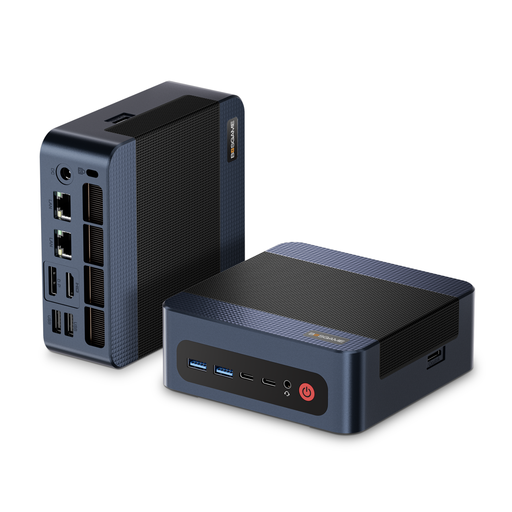 No image available
The compact form factor and stated option to add a second PCIe SSD may be useful if you have limited space and want to add more internal storage.
The product description lists 32 GB DDR5 RAM, a 1 TB PCIe 4.0 SSD and integrated AMD Radeon 780M graphics. Check the configuration against your editing software’s requirements.
No. Synchronisation depends on your editing software’s features and the reference points in your recordings. Adobe describes features in Premiere for combining and aligning clips; check the graphics specification separately against your software’s requirements and your video footage.
In Premiere, you can align clips manually or use the ‘Synchronise’ feature, for example by matching a shared timecode or a clip marker, as Adobe describes. The right method depends on the reference points in your recordings; check the result before continuing with your edit.
For a separate backup in Windows, Microsoft describes File History using an external drive or network storage. Check that your project folders are actually included; the working copy on your internal drive alone isn’t a separate backup.
Check whether you’ll also need drives, a monitor, accessories or software. For online purchases from a business seller, consumer information from the Council of the European Union states that you generally have a 14-day right to cancel, with some exceptions; statutory rights relating to faults are separate. The Verbraucherzentrale notes that statutory consumer rights are not the same as a voluntary guarantee.
The Bundesnetzagentur lists CE marking, product and manufacturer identification, and any necessary German-language instructions and warnings among the points it checks when monitoring the market. These can help you check the product information, but they don’t replace assessing whether the specific configuration suits your editing workflow.