
Lieferung heute & morgen

Qualitätsgarantie

Willkommens-Angebote freischalten: KOSTENLOSE Lieferung | Bis zu 80 % RABATT | Kostenlose 30-Tage-JoyPlus-Testphase
App herunterladen
If you’re looking to buy a desktop PC, you’ll find a huge choice of processors, graphics cards, memory capacities and case designs. Product names often sound similar, but the technical differences can be significant. A budget PC may be enough for office tasks, while a gaming PC for the latest games needs a dedicated graphics card and suitable cooling.
The most common buying mistakes aren’t simply down to a lack of performance, but to components that don’t suit your needs. Check these three common pitfalls before you buy:
A modern mid-range processor is enough for office work, streaming and everyday applications. An Intel Core Ultra PC may be a good choice for multitasking and compatible applications, thanks to its multiple cores and integrated AI features. Depending on the model, a Ryzen 7 PC is also suitable for demanding software and games.
For gaming, the architecture and cache matter as well as the number of cores. The AMD Ryzen 7 7800X3D in Captiva gaming PCs has 8 cores, 16 threads and 3D V-Cache. These details describe the technical specification, but don’t guarantee a particular level of performance in every game.
Local AI workloads have different priorities. An AI supercomputer with an NVIDIA GB10 Grace Blackwell Superchip, 128 GB of Unified Memory and pre-installed NVIDIA DGX OS is aimed more at developers, AI researchers and technical users than at typical office users.
The label ‘gaming PC’ alone tells you little about its actual graphics performance. Check for:
A PC with an RTX 5070 Ti may be designed for demanding gaming and graphics-intensive applications. The Captiva R89-503 pairs this graphics card with an 850-watt power supply, 32 GB DDR5 and a 2-TB NVMe SSD. The Captiva R90-463 also offers 64 GB DDR5 and an X670E motherboard.
A PC with an RTX 5080, such as the Dell Alienware Aurora ACT1250, is aimed at users who need high graphics performance, plenty of connections and headroom for creative applications. Its specification includes an Intel Core Ultra 9 285K, 32 GB DDR5, a 2-TB SSD and 240-mm liquid cooling.
A desktop PC with 32 GB of RAM is a good fit for many games, photo editing, video editing and extensive multitasking. For large local AI models, however, RAM isn’t the only consideration: memory architecture and the software environment matter too.
An NVMe SSD uses PCIe and is usually more suitable than a traditional hard drive for starting up your system and loading large applications. A combination of SSD and HDD, like the 1-TB SSD plus 1-TB HDD in the Acer Nitro 20, can be a good choice for your operating system, programmes and large archives.
The form factor should also suit where you plan to put your PC:
Also check the external dimensions, weight and distance from the wall. Powerful desktop PCs need an unobstructed airflow. Many devices require at least 10 cm of clearance; always follow the manufacturer’s specific guidance.

Why it’s a good fit: This PC combines 32 GB DDR4, a 1-TB SSD and an additional 1-TB HDD with Windows 11 Home. That makes it suitable for gaming, school, university and everyday applications.
The SSD and HDD combination means you’re less likely to need to move games or files straight to external drives. Its RAM capacity is higher than that of basic entry-level configurations.
32 GB DDR4, 1 TB SSD plus 1 TB HDD, RTX graphics card with 8 GB GDDR7 and two RJ45 ports.

Why it’s a good fit: This tower is aimed at gamers, creative professionals and users who run demanding applications. Its specification includes an Intel Core Ultra 9 285K, RTX 5080, 32 GB DDR5 and a 2-TB SSD.
The specification clearly lists the GPU, video memory, RAM, SSD and cooling. This makes it easier to check whether the components are right for the way you plan to use your PC.
RTX 5080 with 16 GB GDDR7, 240-mm liquid cooling, Wi-Fi 7 and multiple USB-C ports.
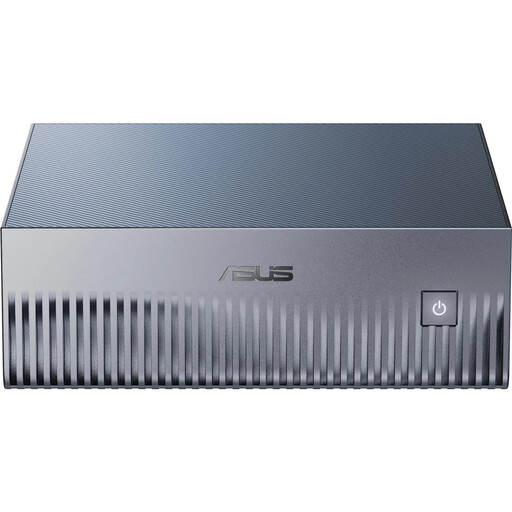
Why it’s a good fit: This compact AI supercomputer is designed for local model development, inference and technical environments using Linux. If you use Windows, make sure you’re happy with the DGX OS environment before buying.
The 128 GB of Unified Memory and pre-installed NVIDIA software environment make its intended AI use clear. This helps you avoid confusing it with an ordinary mini PC.
NVIDIA GB10 Grace Blackwell, 128 GB LPDDR5X, 4-TB PCIe 5.0 SSD, 10GbE and Wi-Fi 7 in a case measuring approximately 150 × 150 × 51 mm.
We’ve put together a complete, regularly updated list of products that meet these strict selection criteria and fully comply with the safety regulations in force in the EU.
Place your PC on a stable, hard surface and don’t block its vents. A carpet can obstruct airflow underneath the case. Good ventilation is particularly important for powerful models with an 850-watt power supply or liquid cooling.
Actual power consumption depends on workload, components and power-saving settings. A mini PC usually takes up less space and may use less power for light tasks, while a gaming PC with a powerful graphics card needs more energy under load. The power supply rating isn’t the same as its continuous power consumption.
Before switching on your PC for the first time, remove all the transport locks inside the case. Clean the fans and heatsinks carefully, and follow the manufacturer’s instructions. At the end of their useful life, electronic devices should be taken to a designated WEEE collection point, not put in household waste.
For office work and basic multimedia tasks, 8 to 16 GB may be enough. For gaming, photo editing, video editing and extensive multitasking, 32 GB of RAM is a good fit. Local AI applications may need considerably more.
A 2-TB SSD gives you space for your operating system, programmes, several games and larger files. For video projects, datasets or extensive game libraries, this capacity can reduce the need for external drives. Still, check whether the PC has additional storage bays or upgrade options.
A PC’s useful life depends on how hard you use it, how well you maintain it, its surroundings and whether it can be upgraded. Regular dust removal, good ventilation and careful handling of power connections can help keep it running reliably. Before you buy, also check whether you can replace the RAM, SSD or graphics card later.