
Lieferung heute & morgen

Qualitätsgarantie

Willkommens-Angebote freischalten: KOSTENLOSE Lieferung | Bis zu 80 % RABATT | Kostenlose 30-Tage-JoyPlus-Testphase
App herunterladen
Whether you’re looking for a gaming PC, an office computer, a compact PC or a local AI workstation, the processor name and storage capacity aren’t the only things that matter. What’s important is whether the case, cooling, ports and operating system suit the way you’ll actually use it. Our selection highlights what home users, gamers, creative professionals, business users and developers should look for before buying.
A specification such as “up to 5.7 GHz” sounds impressive, but it only describes a potential peak speed. In practice, core count, cooling, RAM and power consumption also matter. A powerful desktop PC with inadequate cooling may slow down under sustained load.
For a gaming PC, the graphics card should also match the resolution you play at. A PC with an RTX 5060 may suit many games and creative applications, while a PC with an RTX 5080 offers more headroom for demanding 4K gaming. However, actual frame rates also depend on the game, graphics settings and monitor.
512 GB is enough for office software, a few applications and a modest games library. However, large games, 4K video projects, photo collections and local AI models can quickly fill up your storage. Check whether the PC has a second slot, additional SATA ports or external connections.
For example, a device with a 1 TB SSD plus a 1 TB HDD offers a different storage setup from a mini PC with only a 256 GB or 512 GB SSD. An SSD speeds up start-up and loading times, while an HDD can provide extra bulk storage.
A mini PC saves space, but usually offers fewer options for future upgrades. If the RAM is soldered or the storage is fixed, choose the right specification when you buy. Also check the number and position of the ports: HDMI, DisplayPort, USB-C, USB-A, Ethernet and a card reader may be more useful day to day than an especially small case.
16 GB of RAM is often enough for office work, streaming and web applications. If you use lots of browser tabs, virtual machines, photo-editing software or development environments at the same time, you’ll benefit from 24 or 32 GB. Local AI models can require considerably more memory.
An Intel Core Ultra PC may include an integrated NPU alongside its CPU cores for certain AI tasks. However, the stated NPU performance is no substitute for a dedicated graphics card for 3D gaming or GPU-accelerated rendering.
For gaming and 3D work, a dedicated GPU is usually more important than integrated graphics. Check:
If you’re buying a 4K PC, don’t just look for the “4K” label. Check that it supports the refresh rate you want and has the connections you need.
A Windows 11 PC gives you access to a wide range of games, business software and accessories. A macOS desktop such as an Apple Mac mini or Mac Studio is a particularly good fit if you already use an iPhone, iPad or other Apple devices. An AI PC with NVIDIA DGX OS, on the other hand, is designed for users working with Linux, CUDA, PyTorch or TensorFlow.
For modern workspaces, Wi-Fi 6E or Wi-Fi 7, 2.5 Gigabit Ethernet, USB-C and Thunderbolt are also worth considering. The speed you get will always depend on your network, cable and connected device too.

Why this product suits this profile: Measuring 128 × 128 × 47.6 mm, this compact mini PC takes up very little desk space. It has 24 GB of LPDDR5 RAM and a 512 GB NVMe SSD for everyday tasks, studying and working from home.
Its memory specification is higher than the typical entry-level setup of 8 GB RAM and 256 GB storage. Check the operating system and exact SSD configuration before buying.
24 GB LPDDR5 at 6400 MHz, Radeon 780M, HDMI 2.0, DisplayPort 1.4 and USB-C.
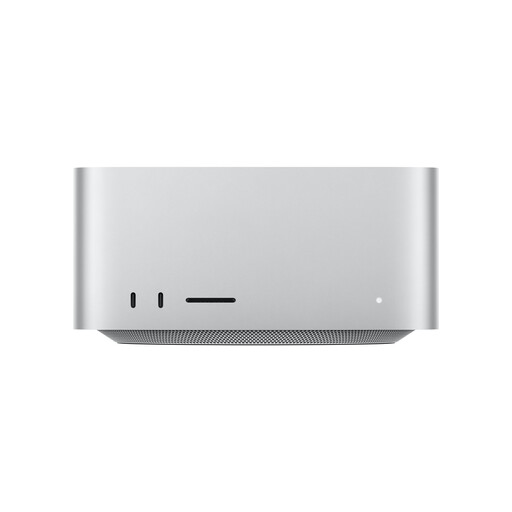
Why this product suits this profile: This compact macOS system is designed for creative professionals and content creators who need 36 GB of unified memory, a 512 GB SSD and plenty of Thunderbolt 5 ports.
The specifications clearly list the CPU, GPU, memory, ports and support for up to five external displays. Remember to budget separately for a keyboard, mouse and monitor.
18-core CPU, 32-core GPU, 36 GB Unified Memory, four Thunderbolt 5 ports and an SDXC card reader.
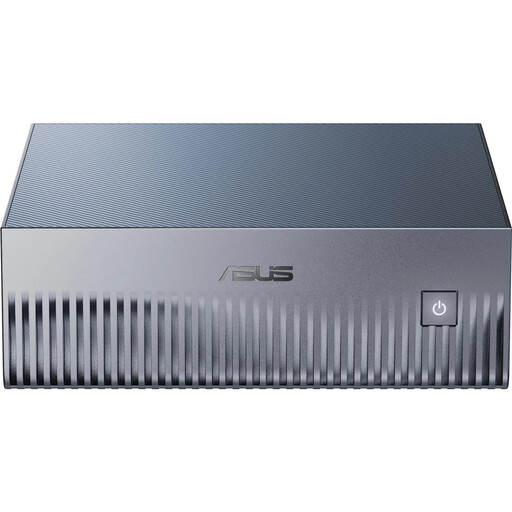
Why this product suits this profile: Developers, data scientists and AI researchers get a very compact system with NVIDIA GB10, 128 GB of unified memory, a 4 TB SSD and NVIDIA DGX OS pre-installed.
This device is specifically designed for local AI workloads. Note that it comes with NVIDIA DGX OS pre-installed, not Windows.
128 GB LPDDR5X, 4 TB PCIe 5.0 NVMe SSD, 10 GbE and pre-installed CUDA, PyTorch and TensorFlow environments.

Why this product suits this profile: This tower combines an Intel Core Ultra 9 285K, 32 GB DDR5, a 2 TB SSD and an NVIDIA GeForce RTX 5080 with 16 GB GDDR7.
The dedicated graphics card, 240 mm liquid cooling system and 2 TB drive are all clearly specified. Make sure you have enough room and good ventilation for the tower.
24 CPU cores, 16 GB of graphics memory, 32 GB DDR5, a 2 TB SSD and several DisplayPort connections.
We’ve put together a complete, regularly updated list of products that meet these strict selection criteria and the safety regulations in force in the EU.
Its lifespan depends on the components, workload, dust, cooling and software support. You can upgrade some parts, such as SSDs, RAM and graphics cards, in many tower PCs. Repairs and upgrades for a mini PC often depend more on the specific model. Good ventilation and regularly cleaning the external air vents can help it run reliably over time.
Power consumption is mainly determined by the processor, graphics card and how long you use the PC. A gaming PC with a dedicated GPU generally uses more power under load than an office mini PC. For a rough estimate, multiply the power consumption in kilowatts by the hours of use and your electricity price. The power supply’s rated output is not the same as the PC’s actual power consumption.
First, check whether a monitor, keyboard, mouse and, if needed, an operating system are included. Place the device on a stable, well-ventilated surface and don’t block any air vents. With a Windows 11 PC, follow the setup wizard; a macOS desktop will usually require an Apple ID. Users of NVIDIA DGX systems should be familiar with Linux and developer tools.