What should you look for when buying?
First, compare the controller support for your games with the controller’s platform compatibility and connection type. If desk space is limited, also consider whether you can route a cable neatly or whether a receiver will use up a USB port.
| Buying priority |
What to check before buying |
Who it matters most to |
| Game and platform compatibility |
Check the platform, operating system and controller connection, as well as the details for each game you want to play. |
If I want to make sure my controller works with both my device and my adventure game, I check each one separately. Around 36% of consumers prioritise this. |
| Clear desk space and cable management |
Check the cable route and available USB ports. For wireless models, make sure the listed connection works with your platform. |
If I want to keep cables to a minimum on my small desk, I check whether a receiver will take up a port and where I can charge the controller. Around 29% of consumers prioritise keeping their desk clear. |
| Clues, menus and text entry |
Check how you select clues, enter text and navigate menus in the games you play most. |
If I often enter text or search for clues in my detective game, I want to know whether these tasks are comfortable to do with a gamepad. Around 21% of consumers focus primarily on ease of use. |
| Charging and ongoing upkeep |
Check the power source, what’s included and where you can charge the specific model. |
If I don’t want to keep changing batteries or remember to recharge after playing, I compare how each model is powered. Around 14% of consumers put low-maintenance operation first. |
Joybuy product selection
This selection includes wired and wireless controllers for PC and Xbox, as well as models for Nintendo Switch and PS5. The key thing is whether your specific game supports the controller.
 No image available
BIGBIG WON GALE HALL Wireless Controller
For PC players who want to play wirelessly and customise extra buttons.
The product details list PC, iOS and Android, as well as four customisable rear buttons. Check the connection for your particular device.
View at Joybuy
 No image available
Nintendo Switch Pro Controller, Black
For players looking for a wireless controller for Nintendo Switch.
The product details list motion controls, HD Rumble, a built-in lithium-polymer battery and USB-C charging. Check that your game supports it.
View at Joybuy
 No image available
Microsoft Xbox Wireless Controller, Pulse Red (Xbox One, Xbox Series X|S, PC)
For players who want to switch between a compatible Windows PC and an Xbox.
The product details list Xbox Wireless and Bluetooth. The controller requires two AA batteries; check what’s included with the offer.
View at Joybuy
 No image available
PlayStation DualSense Wireless Controller, Midnight Black, with USB cable
For PS5 players who also want to use the controller with a compatible PC.
The product details list PC, PS5 and Bluetooth. Haptic feedback and adaptive triggers depend on game support; Sony also specifies a USB connection for haptics on PC.
View at Joybuy
 No image available
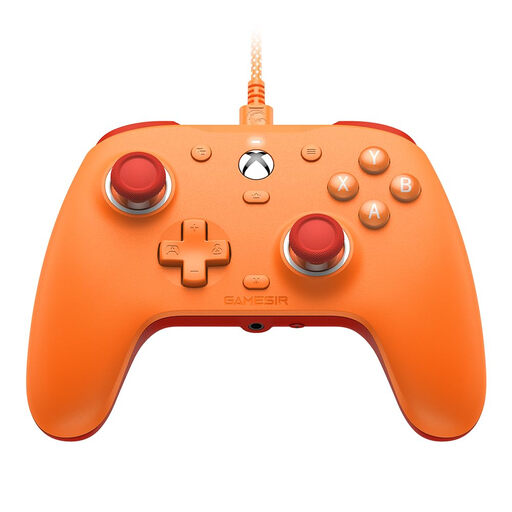
GameSir G7 SE Wired Gaming Controller, Orange
For players using a supported Windows PC or Xbox who prefer a wired connection.
The product details list USB-C, Windows 10/11, Xbox One and Xbox Series X|S, as well as Hall Effect sticks. You’ll need to route the cable across your desk.
View at Joybuy
Frequently asked questions
Is it enough for my PC to recognise the controller?
No. Also check the details for the specific game you want to play. Steam lists controller support for Return of the Obra Dinn and The Case of the Golden Idol, but that doesn’t tell you anything about other detective games.
How do I connect the 8BitDo Ultimate 2C Wireless to a Windows PC?
For Windows, 8BitDo lists the 2.4 GHz USB receiver or a wired connection. Bluetooth is listed for Android with this model, so check that you have a free USB port on your PC.
Do I need to connect the DualSense by cable for PC games?
For connections to supported Windows PCs, Sony lists USB and Bluetooth. According to Sony, haptic feedback on PC requires both game support and a USB connection.
What are my rights when buying online in Germany if I change my mind or the product is faulty?
For a typical distance sale to a consumer, there is generally a statutory 14-day right to cancel, subject to legal exceptions. For goods, the period generally starts when you receive them. If a product is faulty, you also have statutory rights against the seller, which are separate from any voluntary guarantee. The relevant requirements are set out in the German Civil Code.
How should I dispose of an old controller and removable batteries?
The German Environment Agency advises that waste electrical equipment must not be put in household rubbish. Where possible, remove batteries and take them separately to a battery collection point.


