First, choose a controller for your platform, then check whether the specific detective game supports controller input. If a game involves lots of text, search fields or pointing, your existing mouse and keyboard may be a better fit. No controller can reduce glare or make clues easier to read: position your screen and light sources to suit your setup.
Who should consider this?
Players with a specific console or PC
If you already know which platform and detective game you’ll be playing, check whether that specific version of the game supports your controller. Valve (via Steam) lists Xbox controllers as supported for Return of the Obra Dinn; support for other devices isn’t confirmed there.
Players dealing with lots of clues and menus
If you often switch between text, search fields and clues, consider whether a gamepad or your existing mouse and keyboard is better suited to the controls. For supported games, the available control mappings may also matter.
Players in bright rooms
If clues are hard to make out in daylight, check your screen position and glare first. The Occupational Safety and Health Administration recommends reducing reflected light by arranging your workspace appropriately; a controller won’t change how the game looks on screen.
What should you look for when buying?
First check the game and platform, then the type of input, and finally the conditions in your gaming space.
| Consideration |
What to check before buying |
Who is it most relevant to? |
| Game and platform compatibility |
Compare your platform and console generation, the exact model name and the controller information for the specific version of the game. |
If I want to play a particular detective game on my console or PC, I need to know whether that exact combination will work. Around 36% of consumers put game and platform compatibility first. |
| Clues, text and menus |
Check which inputs the game supports and whether a mouse and keyboard are already better suited to the controls you use most often. |
If you often navigate text, search fields or menus, you need input that suits those tasks. Around 29% of consumers say controlling clues and menus is their main concern. |
| Readability in a bright room |
Check for reflections in daylight where you actually play, and position your screen and light sources accordingly. |
If I struggle to make out clues in bright ambient light, I want to improve visibility first – not expect a controller to improve the picture. Around 21% of consumers put readability first. |
| Connectivity and power |
Check the connection type, whether you need a receiver, available ports and power requirements for the exact model variant. |
If you want to play wirelessly or keep a port free in your gaming space, check the connection method and power requirements in advance. Around 14% of consumers prioritise connectivity and power. |
Avoid common buying mistakes
-
Buying a controller to tackle screen glare
Input hardware won’t eliminate reflections. If clues are hard to see, an extra controller may not address the real problem.
Check your gaming space in the daylight conditions you actually play in, then position your screen and light sources accordingly.
-
Assuming “wireless” means the same connection everywhere
For the 8BitDo Ultimate 2C Wireless, the manufacturer specifies 2.4 GHz or a wired connection for Windows, but Bluetooth for Android. So the connection type depends on the model and device.
Compare the connection information for the exact model variant with your device, and check whether you can plug in any receiver it requires.
-
Assuming similarly named Switch controllers are interchangeable
Nintendo says the Switch 2 Pro Controller is only compatible with Switch 2. Similar model names don’t mean accessories work across console generations.
Check the full model name against your console before you decide.
A guide to relevant brands
Microsoft Xbox
Xbox Wireless Controllers are an option for compatible Xbox consoles and Windows PCs.
- Microsoft lists USB, Bluetooth and, where supported, Xbox Wireless for connecting to Windows. The controller also features a hybrid D-pad and button mapping.
- Connecting to Windows doesn’t automatically mean every PC game supports the controller. Steam specifically lists Xbox controllers for Return of the Obra Dinn.
Sony PlayStation
DualSense controllers are designed for PS5 and, according to Sony, can also connect via USB or Bluetooth to supported games on other devices, including Windows PCs.
- Sony describes connecting to PCs and other devices via USB or Bluetooth.
- The controller features available depend on the game and connection type. Connecting it won’t solve screen glare.
Nintendo
Nintendo offers controllers for the Switch family, including the Switch Pro Controller and Switch 2 Pro Controller.
- Nintendo quotes battery life of around 40 hours for the original Switch Pro Controller, depending on the software and features used.
- According to Nintendo, the Switch 2 Pro Controller is only compatible with Switch 2. Similarly named models shouldn’t be assumed to be interchangeable.
8BitDo
According to the manufacturer, the Ultimate 2C Wireless is an option for Windows and Android; connection options vary by system.
- The manufacturer lists Hall-effect sticks and additional R4/L4 buttons.
- For this model, 8BitDo specifies 2.4 GHz or a wired connection on Windows, and Bluetooth on Android. Its features don’t confirm support for a particular detective game.
Joybuy products for different platforms
The controllers below are listed as suitable for different Xbox, PC, Nintendo Switch and PlayStation setups. What matters is whether your specific game supports the input you want to use.
 No image available
Razer Wolverine V3 Tournament Edition White
An option if you’re looking for a wired gamepad for Xbox Series or PC.
The product name specifies a USB connection.
Joybuy
 No image available
Microsoft Xbox Series X/S Wireless Controller, Deep Pink
A good choice if you’re looking for a wireless Xbox controller for one of the Xbox or PC platforms listed.
The product name lists Xbox One, Xbox Series X/S and PC.
Joybuy
 No image available
Nintendo Switch Joy-Con Pair, Neon Blue/Neon Yellow
An option for a Nintendo Switch setup if you’re looking for a pair of Joy-Con controllers.
According to the product information, the Joy-Con Grip is sold separately for using them together as a traditional gamepad.
Joybuy
 No image available
PlayStation DualSense Wireless Gaming Controller, White
This model may suit PS5 or one of the other devices listed in the product name; check that your specific game supports it.
The product name lists PS5, PC, Mac and Android.
Joybuy
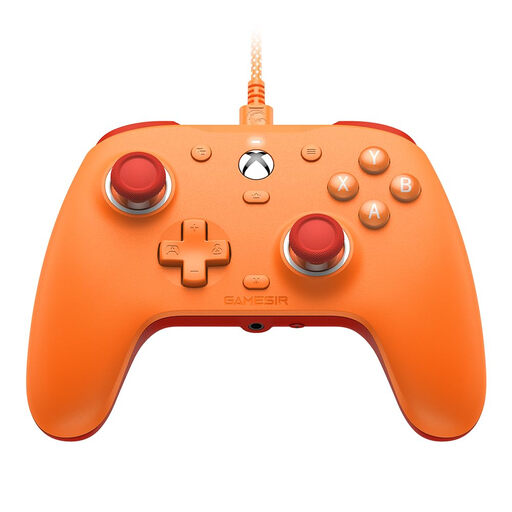 No image available
GameSir G7 SE Wired Gaming Controller
An option if you’re looking for a wired gamepad for Xbox or one of the Windows PCs listed; check game support separately.
The product name lists Xbox Series X|S, Xbox One and Windows 10/11.
Joybuy
Frequently asked questions
Is “PC compatible” enough to ensure my detective game will work?
No. Check the controller information for the specific version of the game and your model’s connection mode. Steam lists full controller support and Xbox controllers for Return of the Obra Dinn; support for other devices is marked as unknown.
How do I connect an Xbox Wireless Controller to a Windows PC?
Microsoft describes USB, Bluetooth and Xbox Wireless connections. You may need an adapter for Xbox Wireless if the feature isn’t built into your PC. To connect a Series X|S controller via USB, you’ll need a USB-C cable that supports data transfer.
Do I need Bluetooth to use the 8BitDo Ultimate 2C Wireless with a Windows PC?
No. For this model, 8BitDo specifies 2.4 GHz with a USB receiver or a wired connection on Windows; Bluetooth is intended for Android. Check that you have a free USB port on your PC for the receiver.
What can I do if clues are hard to see in daylight?
Check for reflections on the screen you actually use, then position your screen and light sources accordingly. A different controller won’t change how visible the game is on screen.


