First, check whether the specific detective game you want to play supports controller input and whether the controller is compatible with your platform. Then choose between lighting, wired or wireless connectivity. RGB lighting on the casing doesn’t automatically mean the button labels are illuminated, and advanced haptic features depend on the game and connection.
Which controller is right for you?
Players with a specific platform in mind
To avoid buying the wrong controller, check that it works with your console or PC and the specific game you want to play. Steam lists full controller support for Loco Motive, while Microsoft and Nintendo each specify the platforms their models work with.
Players in a dark room
If you want to find the controls more easily in low light or avoid distracting illumination, check which parts are actually lit and whether you can adjust the lighting. PowerA describes customisable RGB zones on its Lumectra models, but this doesn’t confirm that the button labels are illuminated.
PC players on the sofa or at a desk
If you’re deciding between mouse and controller controls, check the input options for the game you want to play. Steam lists controller, mouse and keyboard input among the options for BROK the InvestiGator. For wireless models, also make sure the connection and charging setup suit where you’ll be playing.
What should you look for when buying?
Start by checking support for your game and platform. Then consider the room’s lighting, how well the controls suit puzzle-solving, and the type of connection.
| What matters when buying |
What to check |
Who should consider it? |
| Platform and game |
Check that the platform and game version match, and look for the controller support listed on the game’s store page. |
If I want to make sure a particular game works with a controller on my console or PC, I check both first. Around 29% of consumers put compatibility first. |
| Lighting and visibility |
Check which areas are illuminated and what settings are available. Don’t assume RGB lighting on the casing means the buttons are lit. |
If I want to find the buttons more easily in a dim room without distracting lights, I check which areas are illuminated and whether the lighting can be adjusted. Around 23% of consumers prioritise lighting for dark rooms. |
| Puzzle controls |
Check the control options and button mapping in the specific game. |
If I want to navigate clues, selection boxes and menus as easily as possible, the controls in the game itself matter more to me than an extra controller feature. Around 18% of consumers prioritise puzzle controls. |
| Connection and power |
Check your seating distance, cable route or wireless adapter, power supply and what’s included with the version you’re buying. |
If I sit further from the screen or need to plan for a dedicated charging spot, I choose based on the cable route and connection. Around 18% of consumers prioritise seating position, connection and power. |
| Haptics and extra features |
Check whether the feature is supported by the specific game and the connection you plan to use. |
If I want to use special feedback features while playing, my game needs to support them. Around 12% of consumers prioritise haptic feedback. |
Common buying misconceptions
-
Confusing RGB lighting on the casing with illuminated buttons
Lighting zones on the casing don’t mean you’ll be able to read the labels on the buttons you need in the dark.
Check exactly which areas light up on the version you’re considering and what settings are available.
-
Expecting DualSense features just because it connects to a PC
According to Sony, haptic feedback on PC requires a compatible game and a USB connection. Adaptive triggers also require game support.
Only count on these features if you’ve confirmed they’ll work with your game and connection type.
-
Assuming a lit Switch 2 model will work with every setup
According to the manufacturer, the PowerA Lumectra model for Switch 2 covered here can only be used with the console docked and doesn’t support motion controls.
Check your game’s requirements and play mode against the conditions for this controller version.
-
Confusing a voluntary guarantee with your statutory rights
Verbraucherzentrale distinguishes between your statutory rights against the retailer and a voluntary guarantee.
Keep your proof of purchase and contact the retailer if there’s a fault.
Key brands to consider
Microsoft Xbox
The Xbox Wireless Controller is a standard option for supported Xbox consoles and Windows PCs.
- Microsoft lists Bluetooth and customisable button mapping for this model.
- The manufacturer’s specifications don’t confirm illuminated action buttons. Check the power supply and what’s included with the version you choose.
Sony PlayStation
The DualSense is primarily designed for PS5 players, but can also be used with supported PCs and compatible games.
- Sony lists haptic feedback and adaptive triggers, provided the game supports these features.
- For haptic feedback on PC, Sony specifies a compatible game and a USB connection. The light bar doesn’t indicate that the action buttons are illuminated.
PowerA
Lumectra models feature customisable lighting on the casing. Xbox/Windows and Switch 2 versions differ in their requirements for use.
- PowerA lists a 3 m cable for its wired Xbox model and RGB lighting zones for its Switch 2 model.
- The Switch 2 model requires the console to be docked and, according to PowerA, doesn’t support motion controls. RGB lighting doesn’t confirm that the button labels are illuminated.
8BitDo
The Ultimate 2 Wireless could be a wireless option with an integrated charging dock for compatible Windows devices.
- 8BitDo lists an integrated charging dock and a wireless adapter for connecting to a Windows PC.
- Check the operating system requirements, the connection you’ll need and whether the specific game is supported.
Nintendo
The Switch 2 Pro Controller is a wireless option for players with a Nintendo Switch 2.
- Nintendo lists additional assignable buttons and a headphone jack.
- Nintendo specifies that this model is for Switch 2 and can’t be used with the original Switch. This doesn’t confirm any special button lighting.
Controllers at Joybuy
This selection includes wired models for Xbox and PC, as well as wireless controllers with RGB lighting or support for additional platforms. Check compatibility with your specific game and device before buying.
 No image available
Razer Wolverine V3 Tournament Edition White
This wired model could be a good fit for an Xbox or PC gaming setup where a cable is practical.
The product name lists PC, Xbox Series S and Xbox Series X. The cable is specified as 3 m long, so check that it’ll reach your seat.
View at Joybuy
 No image available
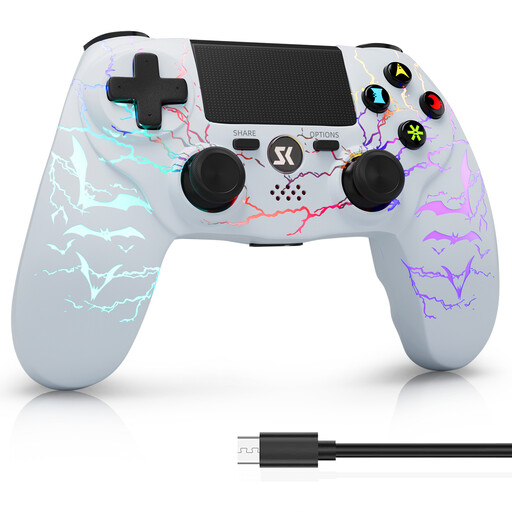
CHENGDAO Wireless Controller for PS4/Pro/PC (Windows), White Bit
If you’re looking for a wireless RGB option for the systems listed in the product name, this version is worth considering.
The product name lists RGB lighting, a 1000-mAh battery, dual vibration and 6-axis motion control. RGB lighting alone doesn’t confirm that the button labels are illuminated.
View at Joybuy
 No image available
Microsoft Xbox Wireless Controller – Deep Pink
This version could be a good option if you’re looking for a wireless controller for an Xbox or PC setup.
The product name lists Xbox One, Xbox Series X/S and PC as compatible systems.
View at Joybuy
 No image available
BIGBIG WON Rainbow 3 Wireless Controller
If you’re looking for a wireless controller with RGB lighting for the platforms listed in the product name, check this version against your game’s requirements.
The product name lists 14 customisable RGB lights, 16 mechanical buttons and a 6-axis gyroscope, as well as PC, Switch 2, iOS and Android. The RGB specification doesn’t confirm that the button labels are illuminated.
View at Joybuy
 No image available
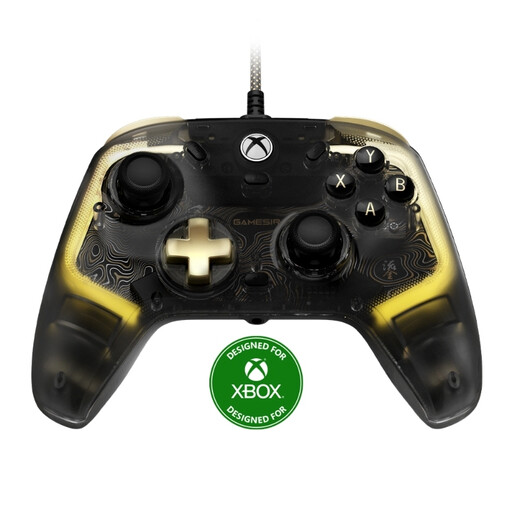
GameSir Kaleid Flux Enhanced Wired Controller
This model could be a good fit for a wired Xbox or Windows PC setup if you’re looking for RGB lighting.
The product name lists RGB lighting and a Hall effect joystick. The listed platforms are Xbox Series X|S, Xbox One and Windows 10/11. The cable is specified as 3 m long. Check the exact model to see whether the button labels are illuminated.
View at Joybuy
Frequently asked questions
Is the label ‘detective game’ enough to assume controller support?
No. Check the store page for the specific version of the game. For example, Steam lists full controller support for Loco Motive, including input with Xbox and PlayStation controllers. This doesn’t automatically apply to other detective games.
Do all DualSense features work on PC?
No. It depends on the game and connection. Sony specifies USB and a compatible game as requirements for haptic feedback on PC; adaptive triggers also need to be supported by the game.
Do I need to plan differently for a controller with a charging dock or cable?
Yes. Allow space for the charging dock or check that the cable will reach your seat. The 8BitDo Ultimate 2 Wireless needs an adapter connection for wireless use with a Windows PC. For its wired Xbox Lumectra model, PowerA lists a 3 m cable.
What should I know about a faulty controller and its guarantee?
Your statutory rights against the retailer are separate from any voluntary guarantee. Verbraucherzentrale recommends checking your rights with the retailer if there’s a fault. Keep your proof of purchase.


