Players who focus on dialogue and clues
If you mainly play story-driven detective games, check whether voices and sound details come through clearly to you. F.A.Z. Kaufkompass points out that impressions of sound are subjective.


If you want to follow dialogue and subtle clues in detective games, check the sound and fit first, then decide whether a cable will get in the way at your small desk. Wired models save you having to charge them, while wireless headsets keep cables clear of your workspace but require a receiver and charging. The connections, your microphone needs and your listening environment all affect which option is right for you.
If you mainly play story-driven detective games, check whether voices and sound details come through clearly to you. F.A.Z. Kaufkompass points out that impressions of sound are subjective.
If space is tight, check how a cable would run alongside your mouse and keyboard, or make room for a wireless receiver and somewhere to charge your headset. The right connection also depends on your gaming device.
If you play several chapters in one sitting, try the fit, pressure and padding for yourself if possible. Weight and materials can help you narrow down your options, but they’re no substitute for trying a headset on.
For detective games at a small desk, it makes sense to check sound and fit first, then consider cable management, device connections and whether you need a microphone.
| Buying priority | What to check | Who is it important to? |
|---|---|---|
| Dialogue and clues | If possible, assess voices and quieter scenes using familiar audio; don’t treat sound profiles as proof that you’ll hear clues better. | If I want to follow dialogue and audio details, I’d check the sound using familiar material. Around 28% of consumers would put dialogue and clues first. |
| Clear desk space | Plan how a cable will run around your mouse and keyboard. For wireless models, make sure there’s a suitable USB port and somewhere to charge the headset. | If I want room to use my mouse and keyboard, I’d check whether a cable might get in the way and where the receiver could go. Around 22% of consumers would prioritise keeping their desk clear. |
| Comfort during long sessions | Try the fit and pressure for yourself if possible. Check the padding, weight and availability of replacement parts for the specific model. | If I play several chapters in one sitting, I want a headset that feels comfortable to wear. Around 22% of consumers would make long-term comfort their top buying priority. |
| Connection to your gaming device | Compare your device’s connections with those of the exact headset variant, and check the manufacturer’s compatibility information. | If I want to keep using my current gaming device, I’d first check that it works with the required connection or receiver. Around 17% of consumers would put device connectivity first. |
| Voice chat | Check the microphone position and mute function. Trying it on your own device will tell you more about how it works than a general sound specification. | If I want to talk while playing with others, an easy-to-use microphone matters to me. Around 11% of consumers would make voice chat their top priority. |
A profile gives you an adjustment option, but it doesn’t prove that you’ll hear clues more clearly in every detective game. Sound is subjective.
If possible, judge voices and quieter scenes for yourself, and use profiles only if they work with your device and game.
A wireless model’s stated compatibility doesn’t automatically apply to every gaming device. You’ll also need a suitable USB port available in your setup.
Before you buy, check the exact headset variant, its receiver and the connections on your gaming device.
Open-back and closed-back earcups are built differently. Whether an open-back model suits your listening environment depends on whether you can play without interruption and whether you mind others hearing your game.
Choose an open-back design because it suits your surroundings, not simply because of a promise of more spacious sound.
The Cloud III is a wired option if you’re looking for several clearly specified connection choices.
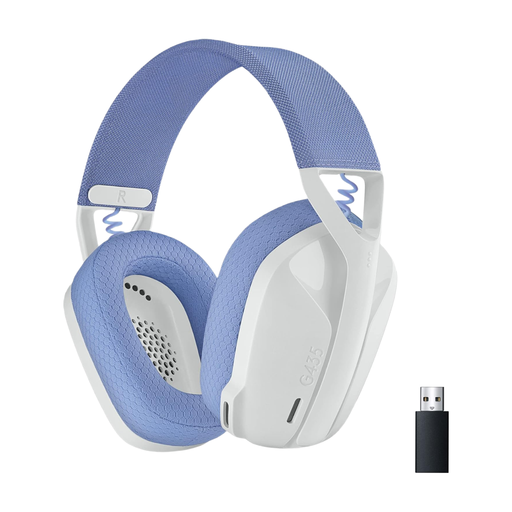
The G435 is worth considering if you want to play wirelessly and your device supports the required connection.
The H6 Air and H9 II have different designs: one is an open-back wired model, while the other is wireless and has noise cancelling.
The MMX 300 PRO is a closed-back wired model, while the MMX 150 wireless is a separate wireless option.
The Arctis Nova 5 Wireless is aimed at buyers who want to switch between 2.4 GHz wireless and Bluetooth.
This selection includes wired and wireless gaming headsets for use at a small desk. Before you buy, check that the connections, receiver and fit suit your gaming device and listening environment.
 No image available
An option if you want to choose between wireless, Bluetooth and wired connections at your desk.
Features include 2.4 GHz wireless via a USB receiver, Bluetooth 5.4 and wired use. The headset has a rechargeable battery and a microphone mute function; wireless use requires the receiver.
 No image available
A good fit for wireless gaming if your device supports the stated LIGHTSPEED connection.
PC, PS4 and PS5 compatibility, USB-C charging and a stated battery life of 33 hours are listed. It weighs 236 g and has memory foam ear cushions. Wireless use requires charging.
 No image available
A wireless option if you want to switch between a gaming device and a mobile device, and its connection options suit the way you use it.
Features include HyperSpeed Wireless, Bluetooth, USB-C charging and a built-in microphone. It also has an over-ear design, weighs 295 g and features FlowKnit memory foam ear cushions. Wireless use requires charging.
 No image available
A good option to consider if you’re weighing up a cable-free desk against the need to charge a wireless headset.
The product title lists LIGHTSPEED, Bluetooth, built-in microphones and a battery life of 18 hours. Logitech lists LIGHTSPEED compatibility with PC, Mac, PS4 and PS5; check compatibility with other devices and connection types separately.
 No image available
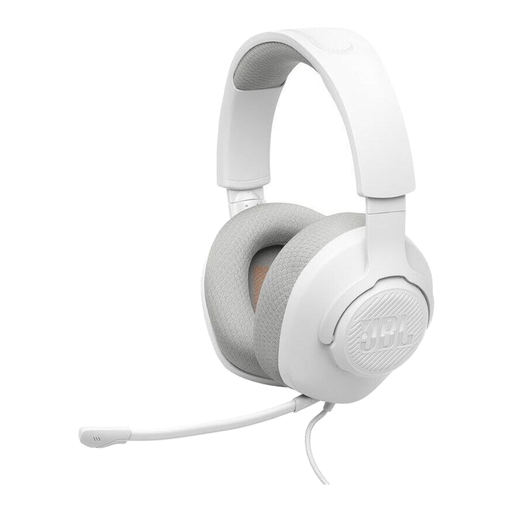
A wired option if your gaming device has a 3.5 mm connection and you have room to manage the cable at your desk.
Features include a 3.5 mm connection, a detachable microphone with a mute function and volume controls on the headset. The ear cushions are described as breathable fabric with memory foam.
Compare the connections on your gaming device with those of the exact headset variant. HyperX lists 3.5 mm, USB-C and USB-A for the Cloud III; Logitech lists LIGHTSPEED for the G435 with PC, Mac, PS4 and PS5. These details don’t automatically apply to other models or connection types.
Make sure it fits comfortably, keep the volume low and take regular listening breaks. The World Health Organization notes that louder volumes and longer listening times increase the risk of hearing damage; its general guidance isn’t a measurement of any particular headset. If the ear cushions wear out, check whether replacement pads are available for your exact model.
If goods are faulty in Germany, you may generally have statutory rights against the seller; these are separate from a manufacturer’s warranty. Verbraucherzentrale also explains that many online purchases usually come with a 14-day right to cancel. For a wireless model, also check its charging requirements and whether replacement parts are available for the specific model.
No. The German Environment Agency recommends disposing of electrical and electronic waste separately, using local collection points or take-back schemes at retailers. If an old battery can be removed easily, you should return it separately.