Choose your laptop based on the build and development workflow you actually use. Running IDEs, containers or emulators in parallel affects which CPU, RAM and SSD configuration will suit your projects. Then check the ports, power supply and screen setup at your shared desk. Upgradeability or a particular platform might help you decide, but each comes with its own considerations.
Who is a developer laptop for at a shared desk?
Developers running demanding local builds
If you compile larger projects while using IDEs, containers or emulators, choose the CPU, RAM and SSD to match the needs of your specific projects. Google recommends at least 16 GB of RAM for a good experience with the Android Emulator; this is not a general requirement for all development laptops. Sources: Android Developers and Docker Docs.
Developers using different team desks
If you regularly connect your laptop to shared monitors and input devices, check the ports, power supply and available desk equipment in advance. The Federal Institute for Occupational Safety and Health covers both display screen work and mobile work equipment.
Developers committed to a particular platform
If your project requires specific tools or operating systems, check compatibility before choosing a device. Apple Developer describes Xcode as a tool for developing on Apple platforms and lists the supported macOS versions.
What should you look for when choosing one?
First, match your build workflow and required tools to the specific configuration. Then consider the ports and shared desk setup. As a rough guide, the percentages refer to consumers choosing a laptop for local builds at a shared desk, each with one main buying consideration.
| Consideration |
What to check before buying |
Who is this important to? |
| Performance and storage for local builds |
List your build system and the tools you use at the same time; check the CPU, RAM and SSD specifications of the exact configuration. |
If I build larger projects locally and use several development tools at once, the specifications need to suit my workflow. Around 31% of consumers would prioritise local build performance. |
| Connectivity at a shared desk |
Check the monitor and peripheral connections, as well as the desk's power supply, against the laptop and any dock you might use. |
If I move between team desks, I want to know whether I can connect my monitor and input devices to the configuration I choose. Around 25% of consumers would prioritise desk connectivity. |
| Portability and desk setup |
If you often move between desks, consider the combined weight of the laptop and accessories. For regular screen-based work, check the external devices available and the desk setup. |
If I regularly carry my device and work at a desk for long periods, I need to consider its weight and screen setup together. Around 19% of consumers would prioritise portability and ergonomics. |
| Development platform compatibility |
Check your project's operating system requirements and the supported versions of the tools you need before buying. |
If my project requires a particular operating system or development tool, my laptop needs to be compatible. Around 13% of consumers would prioritise platform compatibility. |
| Upgrades and support |
Check the memory slots and replacement options for the specific model; consider your statutory consumer rights separately from any voluntary guarantee. |
If I want to use my laptop for longer and adapt it to changing requirements later, upgradeability and clear support if something goes wrong are important. Around 12% of consumers would give these points priority. |
Which buying mistakes should you avoid?
-
Choosing based only on a product range's name
RAM and other components can vary between configurations in the same business or workstation range. For local development projects, it’s the specific version of the device that matters.
Before ordering, compare the full model number and RAM and SSD specifications with your workflow.
-
Leaving the shared desk setup until after you buy
Monitors, input devices and power supplies vary from desk to desk. Any port or dock you use needs to work with the equipment already there.
Before buying, make a note of the ports you need and check how you’ll connect the monitor, peripherals and power supply.
Depending on the ports available, you may need suitable adapters or expansion cards.
-
Assuming the manufacturer's battery-life figures apply to long builds
Apple's stated battery life is based on specific activities such as web browsing or video streaming, not your individual build workload.
For longer local builds, plan for power at your desk rather than assuming battery life will match figures based on other uses.
-
Confusing a voluntary guarantee with your statutory rights
The consumer advice centre distinguishes between your statutory consumer rights and an additional, voluntary guarantee.
Make a note of who to contact if something is faulty and what conditions apply to any additional guarantee.
Which brands could meet these requirements?
Lenovo
The ThinkPad P14s Gen 6 AMD range is aimed at buyers looking for a clearly specified setup for local development work.
- Lenovo's 21RVCTO1WWDE1 configuration lists 64 GB of RAM, a 2 TB SSD and a matte 14-inch display.
- These specifications apply to the configuration listed, not every P14s variant, and do not constitute a build performance test.
Apple
A 14-inch MacBook Pro with M5 Pro is worth considering, particularly if your development workflow requires macOS or Xcode.
- Apple lists different CPU and memory options for this model.
- Choose the option that suits you. Apple's battery-life figures don't indicate how long it will last during continuous compiling.
Framework
Framework describes the Laptop 13 with AMD Ryzen AI 300 Series as a device with customisable ports and memory that can be replaced later.
- Framework lists four Expansion Card slots and upgradeable memory.
- Choose Expansion Cards to suit the equipment at your desk. With the DIY version, you'll also need to assemble the laptop and choose an operating system.
HP
According to HP, the EliteBook 8 G1a 14 range offers several memory configurations for different build workflows.
- HP lists two accessible SODIMM slots and a choice of RAM configurations.
- HP notes that components vary by configuration. These specifications alone don't indicate build speed.
Dell
The Dell Pro 14 Plus PB14250 is available in several business configurations for Windows workflows and flexible working arrangements.
- Dell lists options with different processors and DDR5 or LPDDR5X memory.
- These specifications don't necessarily apply to every listing. One of the configurations listed does not include a charger.
Joybuy products for local development work
This selection includes laptops for local development work and connecting to a shared desk.
 No image available
Lenovo ThinkPad E16 Gen 3 21ST
This configuration could suit local builds using several tools at once; check that its specifications match your project requirements.
AMD Ryzen 7 250, 32 GB RAM, 1 TB SSD and Windows 11 Pro. According to the product listing, the 16-inch model weighs 1.71 kg.
Listed ports: USB-C, USB-A, HDMI 2.1 and RJ45.
View at Joybuy
 No image available
MSI Prestige N16 Flip AI+ C1XMT-027Y
If you need plenty of memory and SSD capacity for development data, check that this specific configuration suits your projects.
16-inch 2-in-1 laptop with 128 GB DDR5, 2 TB SSD and Windows 11 Pro.
View at Joybuy
 No image available
Samsung Galaxy Book6 Enterprise Edition 14
For local builds and development tools running at the same time, check that the listed memory configuration meets your needs.
Intel Core Ultra 7 355, 32 GB LPDDR5X, 512 GB NVMe SSD and Windows 11 Pro. The 14-inch model lists RJ45 connectivity.
View at Joybuy
 No image available
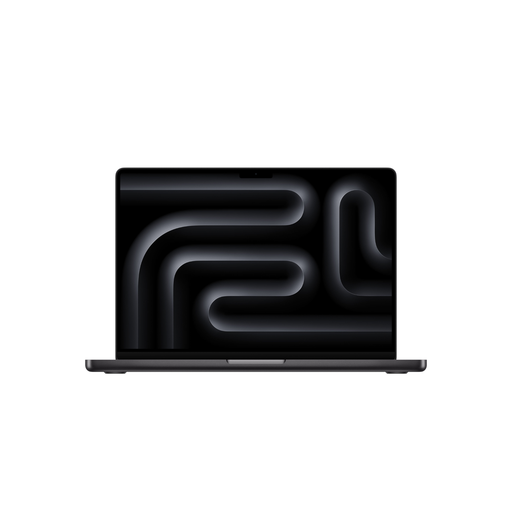
Apple 16-inch MacBook Pro with M5 Pro
If your development workflow requires macOS or Xcode, check that this specific configuration and its ports suit your desk setup.
18-core CPU, 20-core GPU, 24 GB and 1 TB SSD. According to the product description, the 16.2-inch model weighs 2.14 kg and supports external displays via Thunderbolt and HDMI.
The product description states that a power adapter is not included.
View at Joybuy
 No image available
Apple 14-inch MacBook Pro with M5 Pro
If your development workflow requires macOS or Xcode and you prefer a more compact screen, check the specifications and desk connections.
15-core CPU, 16-core GPU, 24 GB and 1 TB SSD. According to the product description, the 14.2-inch model weighs 1.60 kg; it lists Thunderbolt and HDMI ports and support for external displays.
The product description states that a power adapter is not included.
View at Joybuy
Frequently asked questions about developer laptops
Are an emulator's minimum requirements a general recommendation for laptops?
No. Google recommends at least 16 GB of RAM for a good experience with the Android Emulator; higher API levels or larger virtual devices may need more. This figure applies to the emulator mentioned and is not a general threshold for all developer laptops.
What should I check before setting up Docker Desktop on Windows?
Check the current requirements for your planned installation method and backend. Docker distinguishes, among other things, between per-user and all-users installations; the latter requires administrator rights.
What should I consider when regularly using a shared display screen workstation?
ASR A6 applies to display screen equipment at workplaces in German workplaces. For permanent display screen workstations, it describes having the screen and input device separate as the standard arrangement; the specific setup depends on the work and workstation. This does not mean that every private laptop purchase has to meet a blanket requirement.
Who should I contact if something is faulty, and is a guarantee the same as statutory consumer rights?
For your statutory consumer rights, contact the seller. A guarantee is an additional voluntary commitment with its own terms. The consumer advice centre lists repair or replacement as ways of resolving a fault.
Can I cancel an online laptop purchase in Germany?
According to the consumer advice centre, a qualifying distance-selling contract with a consumer usually comes with a 14-day right to cancel after you receive the goods. You must notify the other party to the contract that you wish to cancel; check the terms of your specific purchase.


