If you already work at a computer and have limited space, a pen tablet without a display is a good place to start. If you want to draw directly on the image in front of you, consider a pen display connected to your computer. If you want to work without a computer, you’ll need a standalone tablet. Also check whether your diagram software supports editable shapes and connectors: the largest drawing area or a high number of pressure levels alone won’t determine whether a device is right for diagrams you’ll need to edit later.
Who are the different devices suited to?
Artists with a small desk
If you already use a computer and want to put your input device away after a study session, compare the device’s overall dimensions with its active drawing area. Wacom says the Intuos Small is designed for use with a Mac or PC; ugee lists an active area of 10 × 6.25 inches for the M908.
People creating editable diagrams
If you move boxes, labels and arrows around later, your software’s diagram features are just as important as pen input. The LibreOffice Documentation Team explains that connectors in LibreOffice Draw stay attached to objects when you move them.
Artists who want direct input or to work without a PC
A pen display shows the image on its drawing surface, but needs to be connected to a computer. A standalone tablet is a different type of device: Samsung lists an S Pen as included with the German Galaxy Tab S10 FE, while Wacom describes the MovinkPad 11 as a standalone Android device.
What should you consider when choosing?
Pen tablet without a display
A good fit if: you draw on a computer you already own and want to put the input device away afterwards.
The trade-off: You draw on the tablet and check your work on a separate screen; larger drawing areas need more space.
Pen display connected to a computer
A good fit if: you want to draw directly on the diagram shown on screen and your computer has the necessary connections.
The trade-off: Cables, ports and desk space need to suit your setup; having a display doesn’t automatically make the device usable on its own.
Standalone tablet with a pen
A good fit if: you want to draw without a connected computer.
The trade-off: Check whether the available app supports the diagram features, file formats and export options you need.
| What matters to you |
What to check before buying |
Who is this important to? |
| Desk space and computer |
Compare the overall dimensions and active area separately. Wacom lists the Intuos Small as compatible with Mac or PC; ugee gives the M908 an active area of 10 × 6.25 inches. |
If I already use a computer at a small desk, I want to be able to put the input device away after drawing. Around 36% of consumers would prioritise space-saving pen input with a computer they already own. |
| Editing diagrams |
Check that your chosen software has shapes, attached connectors and the export formats you need. The LibreOffice Documentation Team describes how objects and connectors remain connected when you move them in LibreOffice Draw. |
If I need to rearrange boxes and arrows later, I don’t want to redraw them as freehand lines every time. Around 29% of consumers would prioritise editable diagrams above all else. |
| Drawing directly on the image |
Check your computer’s video and data ports against the connection method and cables for the specific model. XPPen says the Artist 12 (2nd Generation), for example, can connect using a 3-in-1 cable with an HDMI signal. |
If I want to see the line directly beneath the pen tip, a connected pen display could be right for me. Around 21% of consumers would prioritise direct input on the image in front of them. |
| Working without a computer |
Check which diagram app is available, along with its shapes and connectors, file sharing and export options. Samsung lists an S Pen as included with the German Galaxy Tab S10 FE; Wacom describes the MovinkPad 11 as a standalone Android device. |
If I want to draw independently of my desktop computer, the app on the device needs to support my workflow. Around 14% of consumers would prioritise drawing without a connected computer. |
Common mistakes when choosing
-
Confusing a pen display with a standalone tablet
The XPPen Artist 12 (2nd Generation) is designed to connect to another device. Wacom, by contrast, describes the MovinkPad 11 as a standalone device.
First decide whether you want to draw on a computer you already own or without a computer. Then check that the connections or available apps suit your workflow.
-
Assuming pressure levels mean better diagram features
Pen input alone doesn’t tell you whether boxes, labels and arrows will remain editable as diagram objects later on.
Try out shapes, attached connectors and the file export you need in the software you plan to use.
-
Confusing the active drawing area with the space the device needs
The active area isn’t the same as the device’s overall dimensions or the space its cables take up on your desk.
Before buying, compare the device’s dimensions and active area with the space you actually have available on your desk.
Key brands at a glance
Wacom
The Intuos Small is a pen tablet for use with a computer you already own; the MovinkPad 11 is a standalone Android option.
- Wacom lists the Intuos Small CTL-4100K-S as compatible with Mac or PC. The MovinkPad 11 comes with a Pro Pen 3 and can be used without a PC.
- The MovinkPad 11’s features don’t automatically apply to the Intuos range.
XPPen
The Deco 01 V2 is a pen tablet without a display; the Artist 12 (2nd Generation) is a pen display that connects to a computer.
- XPPen lists an active area of 10 × 6.25 inches and eight customisable keys for the Deco 01 V2.
- For the Artist 12, check that the ports and cables for the specific model are compatible with your computer; the Deco 01 V2’s specifications don’t apply to this model.
Huion
The Inspiroy 2 M is a display-free option with configurable controls.
- Huion lists eight press keys, three group keys and a scroller for this model.
- Driver settings are only useful if you can use the settings you want on your computer.
ugee
The M908 is a display-free pen tablet with a larger working area and a scroll wheel.
- ugee lists an active area of 10 × 6.25 inches and eight shortcut keys for the M908.
- The manual describes a USB connection and driver installation; check that the setup process is compatible with your computer.
Samsung
The Galaxy Tab S10 FE is a standalone tablet with a pen for drawing without a connected computer.
- For the German 5G model SM-X526BZAREUB, Samsung lists a 10.9-inch display and an S Pen in the box.
- Having a pen and display doesn’t guarantee that a particular diagram app supports editable connectors and the export formats you need.
Joybuy product selection
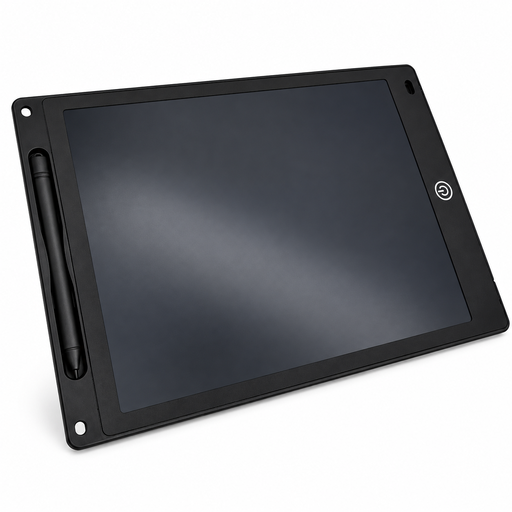
A Joybuy option for sketching and writing on an LCD drawing surface with a pen.
 No image available
12-inch LCD writing and drawing tablet with pen, erase button and lock function
May suit simple sketches with a pen; check whether your workflow requires you to edit diagram objects in software.
12 inches; 5 mm thick; the erase button described clears the entire drawing surface.
View at Joybuy
Frequently asked questions
Do I need a computer for a pen display?
The XPPen Artist 12 (2nd Generation) described here is designed to connect to another device. Check its video and data ports, along with the cables supplied with the specific model. To draw without a computer, you’ll need a device explicitly designed to work on its own.
How do I keep arrows attached to boxes when rearranging a diagram?
Use attached connectors in suitable diagram software rather than simple freehand lines. The LibreOffice Documentation Team explains that these connectors stay attached when you move objects; check that the feature works in the software you actually use.
What should I check when setting up a pen tablet?
After connecting it, check that the pen controls the cursor. The ugee M908 manual says that you’ll need a driver compatible with the model and operating system for additional settings; setup steps vary by device.


