For recording at a fixed location
You’re recording someone seated in the same place and want to control the microphone’s position and monitor the audio. Sennheiser points out that microphone distance and positioning affect the input level.


If you’re recording someone seated in a fixed, quiet location, a suitably positioned USB microphone with headphone monitoring is a natural choice when recording through a computer. If you’re recording in different locations, a standalone recorder is more practical; if the distance to the speaker often changes, consider a microphone worn close to them. No type of microphone can replace a quiet environment, a test recording and permission to record, agreed in advance.
You’re recording someone seated in the same place and want to control the microphone’s position and monitor the audio. Sennheiser points out that microphone distance and positioning affect the input level.
You visit interviewees and need a recording setup that doesn’t rely on a permanent computer setup. The Zoom H1essential and Tascam DR-05XP are examples of portable recorders with built-in microphones.
You want your questions to be as clear as the interviewee’s answers. Make a test recording to see how both seating positions sound with your planned setup.
First decide whether you’ll be recording at a fixed computer setup or in different locations. If the distance changes, consider placing a microphone close to the speaker. The Oral History Association recommends choosing a quiet location with as little background noise as possible.
| Buying priority | What to check | Who is this important for? |
|---|---|---|
| Clear recording of one voice | Position and distance; headphone monitoring and a test recording from the seat. | If I’m recording someone who’s seated, I want to position the microphone for a fixed location and monitor the sound while recording. Around 36% of consumers put having a controllable recording of one voice first. |
| Recording without a fixed computer setup | Check that the specific model can record independently, and review its power supply, storage and monitoring options. | If I’m interviewing people in different locations, I want to record without relying on a permanent computer setup. Around 29% of consumers prioritise being able to record in different locations. |
| Recording questions and answers | Test both seating positions; check that the inputs and recording tracks suit your planned setup. | If I want to record my questions as well as the answers, I want to assess both voices in a test recording. Around 21% of consumers prioritise recording both sides of the conversation. |
| Connectivity and expandability | Check USB-C compatibility; if using XLR, allow for the additional recording equipment you’ll need. | If I want to connect the microphone easily and may want to use a different recording setup later, I’ll check the connections on my device. Around 14% of consumers put connectivity and setup first. |
Zoom and Tascam list 32-bit float recording as a device feature. It won’t make a noisy room quiet or put the recorder in the right position.
Make a short test recording from the seat you plan to use, then listen back to it.
Sections that are difficult to understand may need extra editing.
Distance and positioning affect the recorded sound. Two seating positions call for different microphone placements.
Ask both people to speak from their actual seats during a test recording, then check whether the setup captures both voices clearly enough.
Depending on your setup, you may need an additional microphone or extra time to get everything set up.
Shure promotes digital signal processing features, but this doesn’t provide independent proof that every setting is suitable for documenting dialect features.
Check the available processing settings and compare a test recording with the documentary sound you’re aiming for.
The AT2020USB-X is a USB desktop microphone designed for use at a fixed computer setup.
The H1essential is a portable recorder with built-in X/Y microphones.
The DR-05XP is a portable recorder with built-in microphones and an input for an external audio source.
The MV7+ is an option for a fixed speaking position, with USB-C and the potential to use an XLR recording setup later.
The Profile USB microphone is another USB option for a fixed recording location.
This selection includes microphones for a fixed speaking position, as well as lapel mic options for one or more speakers.
 No image available
For a fixed seat where you want to control the microphone’s position and monitor the recording. The product title lists USB/XLR, a headphone socket and a desktop stand. For an XLR recording setup, you’ll also need an audio interface or mixer and a separate XLR cable, which the product description says is not included.
 No image available
This lapel microphone is an option if you want the microphone to be worn close to the seated speaker. Check whether your recording device has a compatible 3.5 mm socket or supports a suitable adapter.
 No image available
Two transmitters are useful for a setup with two people speaking. The product title lists 2.4 GHz and USB-C and Lightning connectors; check that the receiver is compatible with your recording device.
 No image available
The listed configuration of two transmitters and one receiver is an option if you want to record both sides of a conversation. Check that your recording device supports the USB-C receiver.
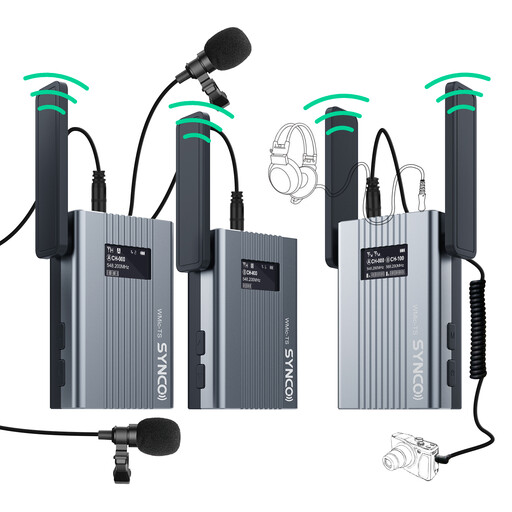 No image available
A lapel mic system is worth considering if you want the microphone to be worn directly by the speaker. The product title lists UHF transmission and an OLED real-time monitor; check that the intended recording setup is compatible with your device.
Position it for the person’s actual seat and listen back to a test recording. Sennheiser points out that positioning and distance affect the input level; the Oral History Association recommends keeping distracting background noise to a minimum.
Not necessarily. Make a test recording to check whether the planned setup captures both questions and answers clearly. If you want to keep a microphone close to someone who changes position, consider a lapel mic; the connections and recording setup must be compatible with your device.
Agree the purpose, storage arrangements and potential access with the interviewee in advance. The Oral History Association recommends documenting informed consent and planning for future storage. This is professional guidance, not a general statement about any particular provision of German law.
Check the specific listing to see whether it includes a tripod or microphone arm, headphones, compatible cables, storage media and a power supply. A USB microphone and a standalone recorder use different recording setups.
Under Section 201(1) of the German Criminal Code (StGB), recording another person’s privately spoken words without authorisation is a criminal offence. Make sure you have permission to record before you begin. You should also check that you have an applicable legal basis for processing personal data. Whether you can publish the recording later depends on the specific purpose of publication.