For an archive that will mostly stay in one place, an external HDD is a natural starting point, provided its capacity and connection are right for your computer. If you’ll be carrying it around regularly, manufacturer-stated shock protection may be important. For confidential recordings, built-in access protection could also be a key consideration. However, a single hard drive isn’t a fail-safe archiving strategy: the Federal Office for Information Security (BSI) points out that the lifespan of storage media cannot be predicted precisely and recommends testing your ability to restore files.
Who is this guide for?
Archive recordings for the long term
If you regularly need to back up irreplaceable original recordings locally, you’ll need plenty of space and a recovery process you’ve tested. The Federal Office for Information Security (BSI) notes that the lifespan of storage media cannot be predicted precisely.
Protect confidential voices
If voices could be used to identify someone, suitable access protection may be important alongside keeping a local copy. Whether recording and further processing other people’s voices is permitted must be considered separately from your choice of device.
Back up recordings on the go
If you copy files in different locations, check that the connection is compatible with your recording or copying device. Bear in mind that a drive you carry around may be exposed to knocks and bumps.
What should you look for when buying?
| Your concern |
What to check before buying |
Who is this important to? |
| Losing recordings |
Work out how much storage you need, including planned growth; try restoring sample files from the backup drive. |
If my original recordings matter to me, I don’t want to lose them because a single drive fails. Around 33% of consumers put protection against losing recordings first. |
| Confidentiality |
Check whether the specific model offers access protection and how you can regain access if there’s a problem with the device or your login details. |
If you’re carrying a portable copy that may contain identifiable voices, access protection deserves particular attention. Around 25% of consumers prioritise keeping stored voices confidential. |
| Backing up on the go |
Check the connection and power supply on the device you plan to use; don’t assume shock protection guarantees data security. |
If you’re making copies in different recording locations, check that you can connect and transport the drive safely. Around 25% of consumers prioritise being able to move between locations frequently. |
| Compatibility |
Check that the operating system and backup software are compatible; back up any existing files before reformatting. |
If I want to use the drive with my existing computer and open my files again later, the format matters. Around 17% of consumers prioritise compatibility. |
Common misconceptions
-
The only copy is on the hard drive labelled as a backup
Storage media can fail, and simply having a drive doesn’t prove that you’ll be able to restore your files later. The BSI points out that the lifespan of storage media cannot be predicted precisely.
Keep another local copy separately and try restoring some files to check that it works. The BSI also recommends keeping a backup away from home, in case devices at the storage location fail.
If the drive fails, conversations that can’t be recorded again may be lost.
-
A drive formatted for Windows is ready to use with Time Machine
For the documented Canvio Basics variant, Toshiba specifies NTFS formatting for Windows. Apple recommends APFS or APFS (Encrypted) for new Time Machine volumes.
Before formatting the drive, check your operating system and preferred backup method. Back up any existing files elsewhere first, as reformatting may delete them.
-
Encryption also determines whether a recording is legal
Access protection on a device doesn’t tell you whether you’re allowed to record or process someone else’s voice. Section 201 of the German Criminal Code (StGB) covers, among other things, the unauthorised recording of another person’s private spoken words. If personal data is involved, you’ll also need to check that you have an appropriate legal basis.
Consider device security and legal requirements separately. Guidance is available from the Federal Ministry of Justice and the Federal Office of Justice, as well as the Federal Commissioner for Data Protection and Freedom of Information.
-
One-touch backup works without any software setup
According to Transcend, the one-touch backup function on the Transcend StoreJet 25M3 requires Transcend Elite.
Set up the local backup function before you use it, then test that you can restore your files before relying on it in your day-to-day recording work.
Brands to consider
Toshiba
Canvio Basics is a range of portable HDDs for local copies. According to Toshiba, Canvio Slim also comes with downloadable backup and security software.
- For the documented EMEA Canvio Basics variant, Toshiba specifies USB 3.2 Gen 1 and NTFS for Windows.
- This variant needs reformatting for the macOS versions listed by Toshiba. Software details for Canvio Slim don’t automatically apply to Canvio Basics.
Seagate
According to Seagate, Expansion Portable is a range of USB-powered HDDs for transferring files locally.
- The Seagate datasheet lists a 2 TB variant for STKM2000400.
- The datasheet says the drive needs reformatting for Time Machine. According to Seagate, Rescue Data Recovery Services aren’t available in every country and aren’t a guaranteed service in Germany.
Verbatim
According to the manufacturer, Fingerprint Secure #53650 is aimed at buyers looking for a portable HDD with built-in access protection.
- For #53650, Verbatim specifies 1 TB of storage, fingerprint access and AES-256 hardware encryption.
- These security features don’t determine whether a recording is permitted or what other data protection obligations apply.
Transcend
The StoreJet 25M3 is a range of portable HDDs for which Transcend highlights protection during transport.
- Transcend specifies three-stage shock protection and USB 3.1 Gen 1 for the StoreJet 25M3.
- According to Transcend, the one-touch backup function requires Transcend Elite software. The manufacturer’s shock protection claims don’t guarantee that data can be recovered after a fall.
Joybuy products for local backups
This selection includes portable and desktop WD Elements external hard drives for local archives. The key factors are how much storage you need and where you plan to use the drive.
 No image available
WD Elements Portable 5 TB USB-C
If you back up recordings in different locations and 5 TB is enough for your existing files and future growth, this portable drive could be a good fit.
5 TB; USB-C.
View at Joybuy
No image available
WD Elements Portable 4 TB USB-C
This portable drive is worth considering for a local copy on the go, provided 4 TB is enough for your archive and its planned growth.
4 TB; USB-C.
View at Joybuy
 No image available
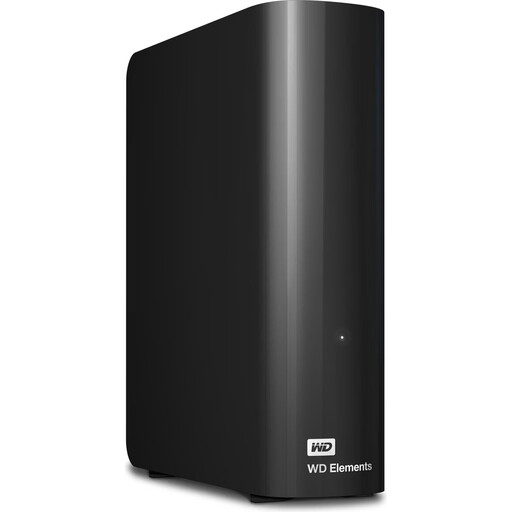
WD Elements 24 TB Desktop External Hard Drive, USB 3.2 Gen 1, 3.5", Black
A desktop option for a stationary archive if 24 TB meets your needs; you’ll need the external power adapter to use it.
24 TB; USB 3.2 Gen 1; 3.5 inches.
View at Joybuy
 No image available
WD Elements 6 TB Desktop External Hard Drive, USB 3.0, 3.5", Black
A drive for an archive kept in one place, provided 6 TB is enough; this desktop model needs an external power adapter.
6 TB; USB 3.0; 3.5 inches.
View at Joybuy
 No image available
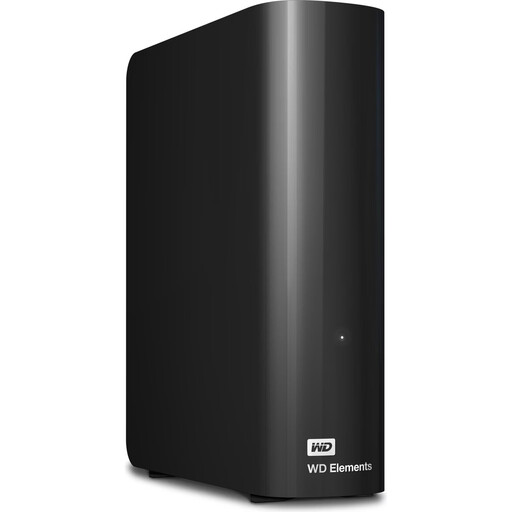
WD Elements 10 TB Desktop External Hard Drive, USB 3.2 Gen 1, 3.5", Black
If you’re building a larger stationary archive and 10 TB suits your needs, this desktop drive is an option. You’ll need access to an external power adapter.
10 TB; USB 3.2 Gen 1; 3.5 inches.
View at Joybuy
Frequently asked questions
Is an external hard drive enough as the only backup for my dialect recordings?
No, not if it holds the only remaining copy. The Federal Office for Information Security points out that the lifespan of storage media cannot be predicted precisely. Make another separate copy and test whether you can restore some files.
What should I bear in mind when using Time Machine with a drive previously used on Windows?
Apple recommends APFS or APFS (Encrypted) for new Time Machine volumes. Back up any existing files elsewhere before reformatting, as formatting may delete them.
Can I record conversations with other people and archive them on a hard drive?
Buying a hard drive doesn’t give you permission to record. Section 201 of the German Criminal Code (StGB) makes it an offence, among other things, to record another person’s private spoken words without authorisation, as well as certain uses of such a recording. If personal data is being processed, you’ll also need to check that you have an appropriate legal basis. The requirements in a particular case can’t be assessed from your choice of device alone.
Do I need a cloud subscription for a local backup?
No. A backup to a directly connected external drive doesn’t use a cloud service as part of the storage process. You’ll need additional storage media to keep more local copies.


