You don’t automatically need a gaming PC to write and test branching dialogue in Twine or Inky: the writing tools described here don’t require a dedicated graphics card. First, try your existing computer with a clear, easy-to-read screen and a suitable keyboard. If you’re also developing a game in an engine, check its specific requirements against the exact PC configuration, the space available and any accessories you’ll need.
Which PC is right for you?
Dialogue tree writers
If you mainly create and test branching text, a comfortable writing setup and regular backups are what matter. You can use Twine in a browser or as an installed application; Inky is designed for writing, testing and exporting ink stories.
Students short on desk space
If you study and develop projects in the same space, consider whether a laptop with an integrated screen will suit you, or whether a compact computer with a separate monitor would work better. ASUS describes the ROG NUC as a mini PC with a case volume of 2.5 litres; even with a small case, you’ll need to plan for the rest of your workspace.
Game engine developers
If you’re also adding dialogue to a game in Godot or Unity, check the requirements for your specific project, not just those of the text editor. Unity notes that memory requirements depend on the size and complexity of the project.
What should you look for when buying?
Choosing the right setup for writing a dialogue tree in a student room comes down to your writing routine, the space available and whether you might also work on engine projects.
| Consideration |
What to check before buying |
Who should pay particular attention? |
| Writing workflow |
Try the editor you plan to use on your current computer. Make sure the display is easy to read and the keyboard suits you. |
If I mainly write branching stories in Twine or Inky, I’d like to start with the equipment I already have. Around 34% of consumers put their writing workflow and avoiding unnecessary gaming hardware first. |
| Space and portability |
Measure the whole setup, including the mouse, screen and power connections. Consider whether you’ll need to carry or put away your computer regularly. |
If my desk is also where I study and develop projects, I want to know whether a laptop or a computer with a separate screen will fit. Around 33% of consumers prioritise space or portability between study locations. |
| Engines and games |
Choose your engine and project, then check the CPU, memory, graphics and operating system for the exact configuration. Unity 6.6 recommends at least 8 GB of RAM for the Editor; more complex projects may need more. |
If I’m adding my dialogue to a specific game project, I want to choose the right equipment for that project. Around 20% of consumers base their decision primarily on engine or game requirements. |
| Quiet working and backups |
Compare noise figures only when the measurement conditions are clear. If you use Twine in a browser, export and back up your stories regularly. |
For longer writing sessions, I want to stay focused and avoid leaving my files solely in the browser profile. Around 13% of consumers prioritise a low-distraction workflow and protecting their dialogue files. |
Common buying and usage pitfalls
-
Assuming every dialogue tree needs a gaming PC
Twine and Inky are tools for writing and testing branching stories. The requirements of any game you’re developing alongside them are a separate consideration.
First, try your planned writing workflow on the hardware you already own. Then decide which other applications you want to use.
-
Assuming every model in a range has the same specification
Among the HP Victus and MSI Cyborg variants reviewed, operating system details differ; Windows and FreeDOS are not interchangeable.
Before buying, check the full model number, operating system and key components against the specific offer.
If you need a different operating system, a FreeDOS model may require additional setup.
-
Focusing only on the case when buying a mini PC or tower
A computer without an integrated screen needs a properly planned workspace. According to Lenovo, the German Lenovo tower offer reviewed here includes neither a keyboard nor a mouse.
Measure the whole setup and check the connections and what’s included with the specific model.
-
Using Twine in a browser without making your own backups
Twine notes that saved work may be lost if the relevant browser data or profile is deleted.
Export your stories regularly and back up the files outside the browser profile you use.
Brands and product ranges to help you choose
HP
The Victus range includes gaming laptops with integrated screens, suited to a flexible workspace.
- HP lists Windows 11 Home, 16 GB RAM and a 512 GB SSD for the Victus 15-fa2770ng.
- For the separate 15-fa2750ng model, HP lists FreeDOS 3.0. Don’t assume the specifications for one variant apply to the other.
Acer
The Nitro V 16 is a laptop range designed for working on its integrated 16-inch display.
- For configuration NH.QP1EG.001, Acer lists a 16-inch WUXGA display with a 16:10 aspect ratio, Windows 11 Home, 16 GB RAM and a 1 TB SSD.
- These specifications apply to the configuration listed and not necessarily to every Nitro V 16 model.
MSI
The Cyborg 15 A13V range includes variants whose operating system you should check carefully.
- MSI lists Windows 11 Home for the A13VF-862.
- For the A13VF-1461, MSI lists Free DOS. Check the full model number and the specifications of the exact variant you want.
Lenovo
The Legion Tower 5i is a desktop PC option for a permanent desk, while LOQ is also the name of a laptop range.
- For the German tower offer 90YECTO1WWDE1, Lenovo lists 16 GB RAM and a 1 TB SSD.
- Lenovo says this offer includes neither a keyboard nor a mouse. Specifications and included accessories may vary by configuration.
ASUS
The ROG NUC is a mini PC option for which you’ll need to plan for a separate monitor.
- ASUS describes a 2.5-litre case that can be positioned horizontally or vertically.
- The size of the case alone tells you nothing about noise levels or whether it’s suitable for a particular project.
Joybuy products for a laptop workspace
This Joybuy selection features gaming laptops with integrated screens for a writing workspace that may also be used for engine or game projects.
 No image available
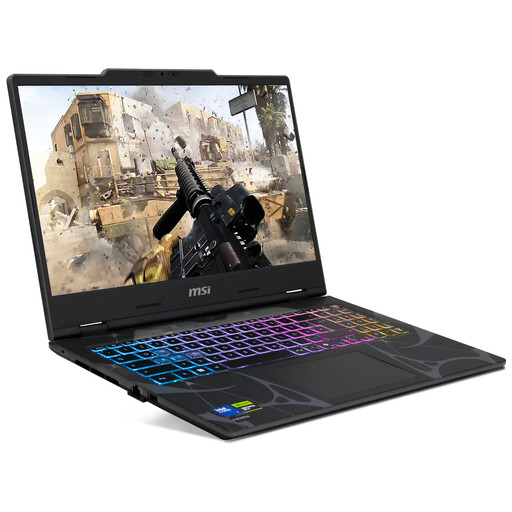
MSI Cyborg 15 B2RWEKG-067
The integrated display and German QWERTZ keyboard suit a workspace where you’ll also use the same computer for other projects.
15.6-inch, Full HD, 144 Hz; Intel Core 7 240H; 16 GB RAM; 512 GB SSD; NVIDIA RTX 5050; Windows 11 Home.
View at Joybuy
 No image available
MSI Crosshair 16 Max HX E2WGXK-023
This 16-inch laptop is an option if you’d like to work on dialogue and other projects using the integrated screen.
Intel Core Ultra 9 275HX; NVIDIA GeForce RTX 5070 12 GB; 16 GB DDR5; 1 TB SSD; QHD+ 165 Hz OLED; Windows 11 Home.
View at Joybuy
 No image available
MSI Katana A15 AI B8VG-459
This laptop combines an integrated screen with a German QWERTZ keyboard for a single, flexible workspace.
15.6-inch touchscreen; 16 GB RAM; 1,000 GB SSD; NVIDIA GeForce RTX 4070; Windows 11 Home.
View at Joybuy
 No image available
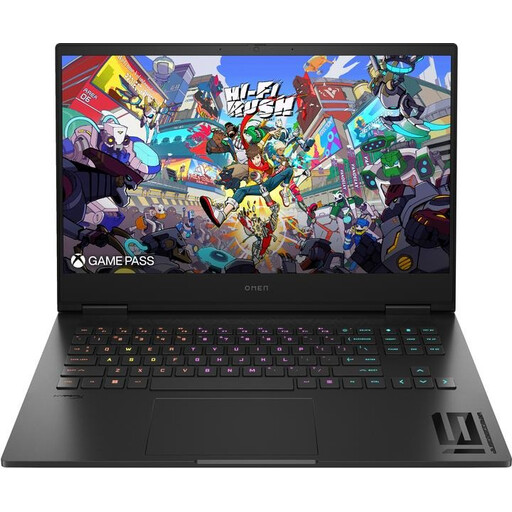
HP OMEN 16 16-wf1473ng
The integrated 16.1-inch display and German QWERTZ keyboard suit a workspace where you can write and work on other projects on the same device.
Full HD, 165 Hz; Intel Core i7-14700HX; 16 GB RAM; 512 GB SSD; NVIDIA GeForce RTX 4060.
View at Joybuy
 No image available
MSI VenturePro A16 AI+ A3HWEG-003
This laptop lets you bring dialogue work and additional projects together on an integrated 16-inch screen.
Ryzen AI 7 350; 16 GB RAM; 1 TB SSD; GeForce RTX 5050.
View at Joybuy
Frequently asked questions
Do I need a dedicated gaming graphics card for a dialogue tree?
A dedicated graphics card is not listed as a requirement for writing and testing branching stories in Twine or Inky. If you’re adding dialogue to a game, check the requirements of the engine you’re using and your specific project separately.
How can I avoid losing my Twine dialogue tree?
If you use Twine in a browser, export and back up your stories regularly. Twine notes that saved work may be lost if the relevant browser data or profile is deleted.
What should I plan for when setting up a mini PC or tower?
As well as space for the case, make sure you have suitable connections for a screen and input devices. Check what’s included with the exact configuration too: according to Lenovo, the German tower offer reviewed here doesn’t include a keyboard or mouse.
What are my rights if I bought a faulty PC as a consumer in Germany?
If goods are faulty, you may have statutory consumer rights against the seller; these are separate from a voluntary guarantee. The Verbraucherzentrale states that newly purchased faulty goods are covered for two years from delivery or receipt. Online purchases generally come with a 14-day right to cancel, subject to the relevant conditions.


