
Lieferung heute & morgen

Qualitätsgarantie

Willkommens-Angebote freischalten: KOSTENLOSE Lieferung | Bis zu 80 % RABATT | Kostenlose 30-Tage-JoyPlus-Testphase
App herunterladen
A digital camera for beginners should be easy to use while still offering more options than a smartphone. School pupils, teenagers and families in particular often look for 5K video, lots of megapixels, zoom, Wi-Fi or a front and rear camera. However, these specifications can be misleading. A high resolution alone does not guarantee detailed images, and advertised zoom is not automatically optical zoom.
A 64 MP camera or 56 MP camera may sound powerful at first. However, the megapixel count mainly describes the possible image resolution. The sensor, lens, lighting conditions, focus and image processing also affect image quality. When choosing a digital camera for beginners, you should therefore consider the practical features, not just the pixel count.
It is also important to distinguish between photo resolution and video resolution. A camera may take photos with a high pixel count, while videos use a different technical resolution.
An offer for a digital camera with 8x zoom should be checked carefully to determine whether the zoom is optical or digital. With optical zoom, the lens changes the framing. Digital zoom enlarges part of the image computationally, which can result in visible detail being lost.
For holidays, school events or shooting subjects from a distance, a 10x optical zoom is generally more versatile than purely digital magnification. However, its actual suitability also depends on the lighting, lens construction and how steadily you hold the camera.
A digital camera with night vision can deliver different results depending on its design. “Full Color Night Vision” is a product specification and should not be equated with professional night photography. In low light, choosing a suitable shooting location and holding the camera steadily remain essential.
A camera with image stabilisation cannot prevent every blurred shot either. Electronic stabilisation can partly compensate for movement, but it does not replace a tripod or a short exposure time when photographing moving subjects.
If you want to record videos, pay attention to the exact specification, such as 5K at 25 FPS or 5K 5120 × 2880 at 30 FPS. FPS stands for frames per second. A higher frame rate can produce smoother footage when recording movement, but it also requires more storage space.
It is also worth checking:
Optical zoom is particularly useful when you cannot get closer to your subject. With a digital camera with 8x optical zoom or a model with 10x optical zoom, the product description should clearly distinguish between optical and digital magnification.
Electronic image stabilisation, or EIS for short, can help when recording video. When choosing a camera, you should also check whether it has autofocus, a manual focus ring or a focus area that can be selected manually.
A children’s camera with front and rear camera or a digital camera for teenagers can be useful for selfies, group photos and creative shots. For beginners, a clear menu is more important than having the longest possible list of features.
Wi-Fi makes it easier to connect wirelessly to compatible devices. Before buying, users should check whether the relevant app, smartphone operating system and preferred transfer method are supported. A touchscreen can make the camera easier to operate, while physical buttons may offer advantages in bright sunlight or when wearing gloves.
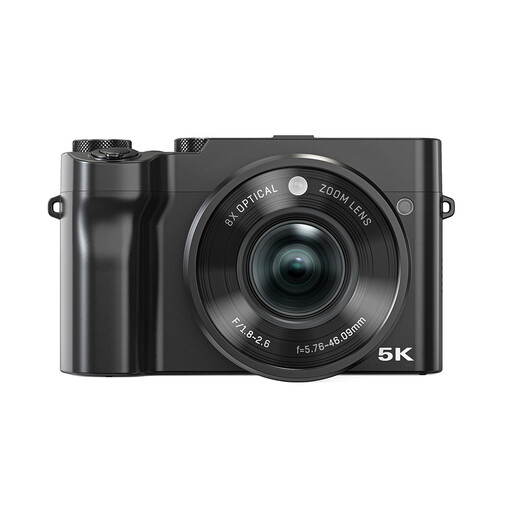
Why this product suits the profile: With 5K/25-FPS video, 64 MP, front and rear cameras and Wi-Fi, this model covers the features beginners typically want for everyday use, school and holidays.
The product specifications explicitly state that it has 8x optical zoom and EIS, so these features are not presented merely as general zoom or stabilisation claims.
8x optical zoom, autofocus, electronic image stabilisation, Wi-Fi and full-colour night vision according to the product description.
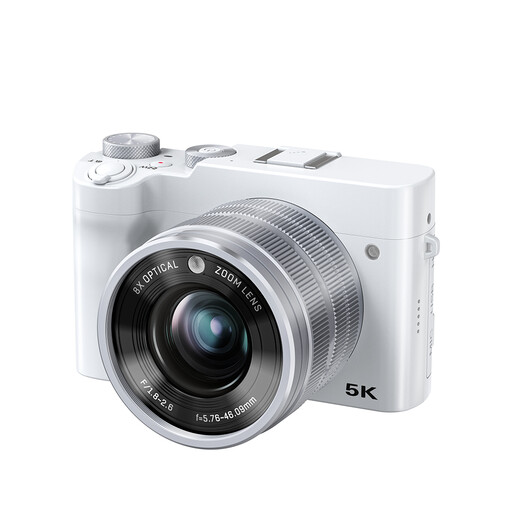
Why this product suits the profile: This model offers comparable technical features in a light-coloured housing and is aimed at users who want to combine ease of use with versatile shooting functions.
The description provides specific details about the video, display, zoom, focus and stabilisation. This makes it easier to assess the advertised features before buying.
720 × 1280 IPS touchscreen, 8x optical zoom, front and rear cameras, autofocus, EIS and Wi-Fi according to the product data.
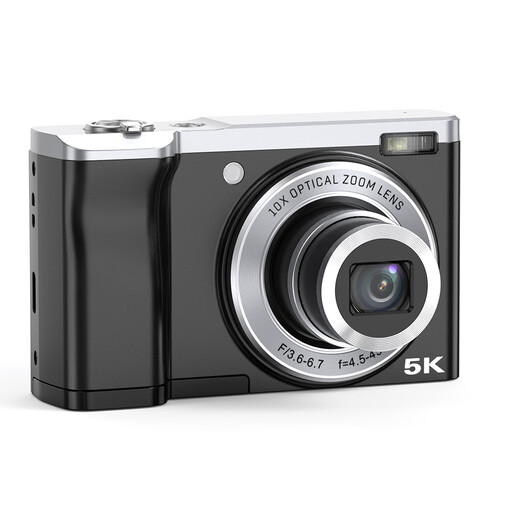
Why this product suits the profile: The 10x optical zoom is ideal for users who often photograph subjects from a distance, such as on day trips, at school events or on holiday.
The product data explicitly describes the zoom as optical. It also mentions electronic shake reduction with an integrated 6-axis gyroscope.
56 MP, 5K video at 30 FPS, 10x optical zoom, front and rear cameras, plus electronic anti-shaking according to the product description.
We have put together a complete, regularly updated list of products that fully meet these strict selection criteria and the safety regulations applicable in the EU.
Before taking your first photo, set up the battery, memory card, date and recording resolution. 5K video uses considerably more storage space. A sufficiently large, compatible memory card is therefore part of the ongoing cost.
For teenagers and school pupils: a camera is an electronic device, not a toy. Small accessories such as lens caps, neck straps and memory cards should be kept out of the hands of young children. Avoid liquid, intense heat, moisture and pointing the camera directly at intense light sources. Stop using the camera if you notice unusual heat, an unusual smell or visible damage.
A clear menu, autofocus, an easy-to-read display and straightforward product information are important criteria. Features such as Wi-Fi, a dual camera and optical zoom can be useful if they suit your intended use. A high megapixel count should not be the sole factor you consider.
Battery life depends on display brightness, video resolution, zoom, Wi-Fi and temperature. 5K video and a continuous Wi-Fi connection in particular can place greater demands on the battery. For day trips, it is advisable to take a fully charged spare battery or a suitable charging solution.
Potential additional costs include memory cards, spare batteries, charging accessories or a camera bag. Storage capacity is particularly important if you record videos frequently. Before buying, check which accessories are included and which ones need to be purchased separately.