
Lieferung heute & morgen

Qualitätsgarantie

Willkommens-Angebote freischalten: KOSTENLOSE Lieferung | Bis zu 80 % RABATT | Kostenlose 30-Tage-JoyPlus-Testphase
App herunterladen
A digital camera for teenagers should be easy to use, compact enough to take out and about, and capable of capturing photos, videos and first attempts at vlogging. Many models, however, are promoted with high megapixel counts, 4K or 5K resolution and impressive zoom figures. These numbers alone don’t tell you whether a camera is genuinely suited to everyday use.
So don’t choose based solely on the biggest number on the box. What matters is the type of zoom, ease of use, storage options, battery life and what you plan to use the camera for.
Figures such as 64 MP or 80 MP don’t automatically reflect the sensor’s ability to capture detail. In budget cameras, a high output resolution may be partly achieved through interpolation. For a camera for beginners, an easy-to-understand menu, reliable autofocus and controllable exposure are often more important than the highest possible megapixel count.
Optical zoom changes the framing through the lens design. Digital zoom, on the other hand, enlarges part of the image, which can mean losing visible detail. If you’re looking for a digital camera with zoom for trips, school events or wildlife photography, check carefully whether the advertised zoom is optical or digital.
A 4K digital camera or 5K camera may offer high video resolution. But for social media content, image stabilisation, storage requirements, battery life and video file compatibility matter too. 5K video takes up more storage space and can be more demanding to edit on older smartphones or computers.
For spontaneous shots, look for autofocus that can keep subjects sharp without lots of manual adjustments. Electronic image stabilisation, or EIS, can compensate for small movements when recording video. It won’t replace a steady hand, though, and it isn’t the same as optical stabilisation.
When checking product specifications, also make sure photo and video resolutions are listed separately. For example, the Songdian camera with 5K/25FPS is described as having 64 MP, autofocus and EIS. The Songdian 56 MP model is listed with 5K video at 5120 × 2880 pixels and 30 FPS, 10x optical zoom and a built-in 6-axis gyroscope.
A touchscreen can make it easier to choose the focus area and zoom in on photos. The Songdian 5K 64MP has a 720 × 1280-pixel IPS touchscreen and, according to the product description, supports two-finger zoom. For teenagers and students, a clearly laid-out menu and an easily accessible shutter button are useful too.
A camera for children is usually designed to be especially simple to use, while a compact camera for teenagers may offer extra features such as manual settings, Wi-Fi or webcam support. The key is to choose features that suit the user’s age and interest in learning.
Before buying, check whether you’ll need a microSD card and whether one is included. The Rollei Mini Digital Camera supports microSD cards up to 64 GB; according to the product information, the card is not included. The camera has USB-C and can transfer files to a smartphone using the adapter supplied.
Wi-Fi is handy if you want to share photos without a cable. The Songdian 5K 64MP lists a wireless Wi-Fi connection. Other models transfer files via USB. It’s also worth checking the charging time, the type of cable used and whether you can use a power bank when you’re out and about.
The models below are grouped by their features and intended use. Product details are taken from the relevant product descriptions, so check what’s included and whether the product is available before ordering.
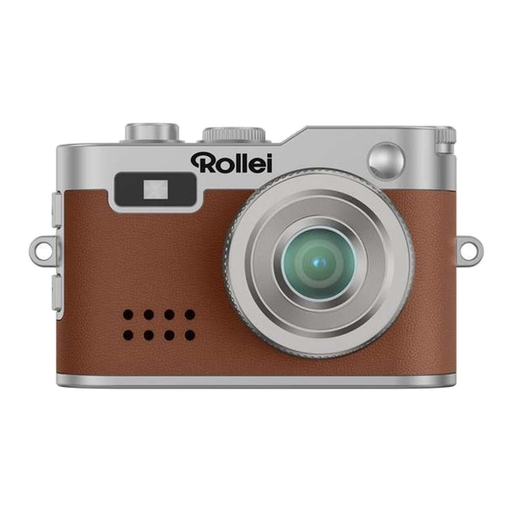
Why this product suits this user type: Weighing 18 g and measuring 31 × 20 × 54 mm, this mini digital camera is easy to carry in a bag or rucksack. It’s intended for children aged six and over when supervised, as well as teenagers who want to take simple snapshots.
Its clearly stated Full HD resolution and fixed focal length make it clear that this is a simple mini camera, not a zoom camera.
2 MP photos, Full HD video, five colour filters, LED light, voice recording and webcam functionality via USB-C.
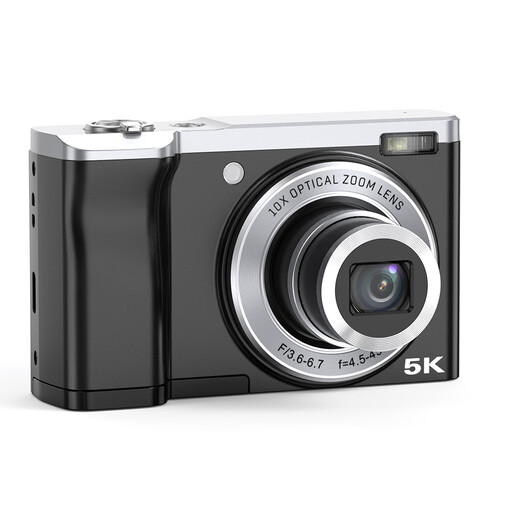
Why this product suits this user type: With 10x optical zoom, front and rear cameras and 5K video, this model is a good fit for teenagers who want to take photos as well as make videos for creative projects.
The optical zoom is clearly specified. Electronic stabilisation via a built-in 6-axis gyroscope is also listed.
5K recording at 30 FPS, 10x optical zoom, two cameras and LED flash.
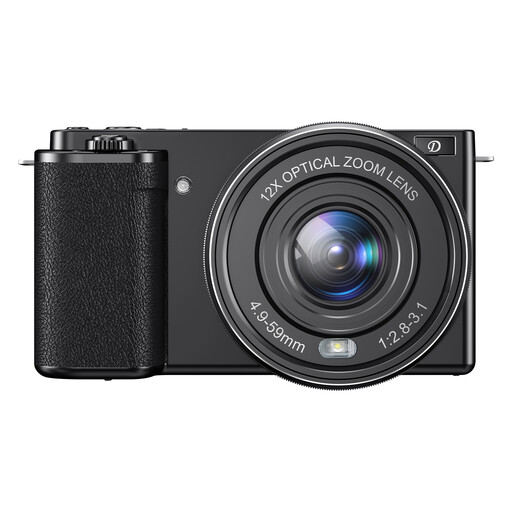
Why this product suits this user type: This model is designed for photography, 4K video and vlogging. Wi-Fi can make it easier to share footage if teenagers want to work on it further using a smartphone or computer.
The product name specifies 12x optical zoom and Wi-Fi. This makes key features clearer than in listings that promote only a high digital zoom figure.
According to the product name: 4K video, 64 MP, 12x optical zoom and Wi-Fi support.
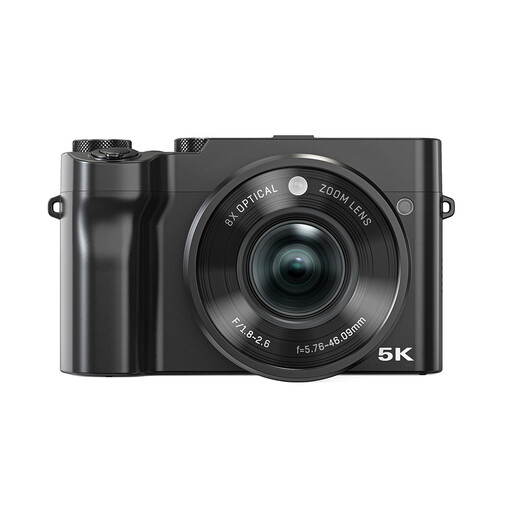
Why this product suits this user type: This camera combines 5K/25FPS, 8x optical zoom, front and rear cameras, and autofocus. It’s suited to trips, school projects and shooting a variety of subjects.
The specifications distinguish between optical zoom, EIS and autofocus. They also include guidance on moisture, overheating and direct sunlight.
64 MP, 5K/25FPS, 8x optical zoom, EIS, touchscreen, Wi-Fi and night vision, according to the product description.
We’ve put together a complete, regularly updated list of products that meet these strict selection criteria and fully comply with the safety regulations applicable in the EU.
A digital camera for teenagers is an electronic device, not a toy in the legal sense. When children are using one, adults should supervise charging, handling microSD cards and storing small accessories. Cameras with lithium-ion batteries must not be opened or exposed to high temperatures, water or strong impacts.
Before using the camera for the first time, it’s worth checking:
For students, a light weight, an easy-to-understand menu and straightforward file transfer are useful. A mini digital camera is suitable for simple photos and videos. If you also want to zoom or record films, choose a model with autofocus, optical zoom and support for a suitably sized memory card.
Battery life depends on screen brightness, video resolution, zoom, Wi-Fi and LED light use. That’s why a general estimate in hours won’t be reliable for every model. For longer days out, charge the battery and clear space on the memory card beforehand; you may also want to take a compatible power bank.
Wi-Fi isn’t essential, but it makes it easier to transfer photos and videos to a smartphone. Without Wi-Fi, files can be transferred via USB-C, a card reader or a supplied adapter, depending on the model. What matters is choosing a connection that works with the smartphone and computer you already have.