Who might be interested in a digital microscope for fountain pen nibs?

Aligning the nib tines and tipping

If you want to inspect the nib from different angles before taking any further steps, you’ll need stable positioning and enough light. The Goulet Pen Company describes checking tine alignment as one reason to use a magnifying glass.

Photographing and comparing nib details

If you’re working on a hobby project and want to save images of the nib to compare later on your computer, the specific device’s image-capture function is important. BRESSER and LEUCHTTURM describe these features for their respective models.

Working at your craft table without a PC running

If you’d like to view the image directly on the device, consider a model with a screen. Make sure the screen, space beneath the optics and the position you need for the nib all work together.

What should you look for when choosing one?

What you need What to look for Who will find this especially important?
Position the nib steadily Check the stand, focus and working distance at the magnification you actually plan to use. If you want to assess the tines and tipping from several angles, the nib needs to stay securely in position. Around 36% of consumers put nib alignment first.
Manage reflections Look for adjustable LEDs and check whether you can move the nib to view it from different angles. If you want to inspect a shiny metal nib from different angles, adjustable lighting is particularly important. Around 29% of consumers prioritise controlling reflections.
Save images For the exact model, check that the operating system, image-capture function and storage medium suit your setup. If you want to document nib details for a hobby project and compare them later on your computer, the right storage function matters. Around 21% of consumers prioritise image documentation.
View without a PC Check the screen, power supply and how much room the setup leaves for your fountain pen and nib. If you don’t want a computer running at your craft table, consider a device with its own screen. Around 14% of consumers prefer viewing without a PC running.

USB microscope connected to a PC

A good fit if: you want to view or save images of the nib on a compatible computer.

Keep in mind: your PC and operating system must be compatible with the specific model. Working distance and field of view can change with the settings.

Digital microscope with a screen

A good fit if: you want to see the image on the device and work without a PC running.

Keep in mind: screen size, storage function and room for the fountain pen vary by model.

Illuminated magnifying glass

A good fit if: you mainly want to check the nib’s alignment by eye and don’t need digital images.

Keep in mind: a magnifying glass doesn’t provide a digital live image or save image files.

Which buying mistakes should you avoid?

  • Judging a microscope by its highest magnification alone

    According to the manufacturer, the stated magnification of the BRESSER DST-1028 refers to a full-screen display on a 27-inch monitor. BRESSER also gives different working distances for different settings.

    Compare the field of view, focus and available space for your nib at the setting you actually plan to use.

  • Buying a USB device without checking your computer

    System requirements and software can vary by model. Specifications for one BRESSER model won’t necessarily apply to another.

    Check the requirements for the exact model number and make sure they match your computer. If you don’t want to use a PC, consider a device with its own screen.

  • Assuming you’ll have a clear view of every part of the nib

    A screen or a tall stand doesn’t guarantee that a mounted nib will be within reach and in focus in every position.

    Check that you can position the fountain pen and nib securely, and view the writing surface and tine gap from the angles you need.

Which brands are worth considering?

BRESSER

Relevant options include USB digital microscopes for viewing and capturing images on a PC, such as the DST-1028 5MP and model 9652210.

  • BRESSER says the DST-1028 has adjustable LEDs, a stand and Windows software with a measuring function. Its magnification figure refers to the image displayed on a 27-inch monitor.
  • The DST-1028 requires a compatible PC. For model 9652210, BRESSER specifies Windows 8.1 or later, or macOS 10.13 or later; these requirements don’t automatically apply to the DST-1028.

LEUCHTTURM

The DM 3 digital microscope is a screen-based option for viewing and capturing images without a PC running.

  • LEUCHTTURM specifies a 3.5-inch screen, adjustable LEDs and image storage on a MicroSD card.
  • According to LEUCHTTURM, the measuring software only works on Windows. Also check that the visible field of view and the height of the object being examined suit your setup.

Andonstar

The AD210 is a screen-based option with a larger setup and adjustable working distance.

  • Andonstar specifies a 10.1-inch screen for the AD210 and an adjustable working distance of 1 to 26 cm.
  • These manufacturer specifications don’t guarantee that every fountain pen nib can be brought into focus in every position. Check that the setup works for the nib position you need.

Joybuy products for close-up viewing

The products below are illuminated magnifying glasses for analogue close-up viewing. They’re an alternative for visual inspection, but they can’t replace a digital microscope with a live image or image storage.
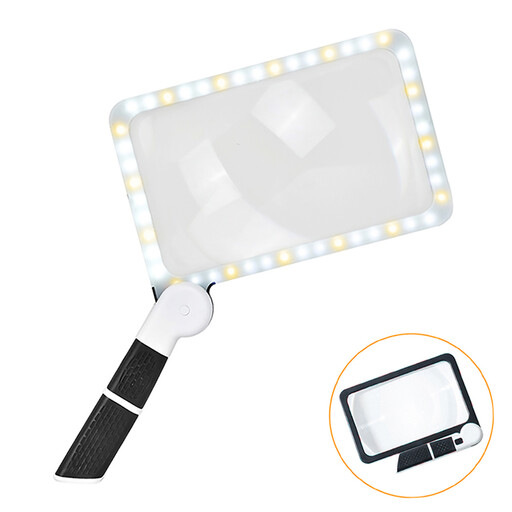
KINSI 5× LED magnifying glass with 48 LEDs and a large lens

KINSI 5× folding LED magnifying glass

An analogue option if you want to inspect the nib by eye without capturing digital images.

5× magnification; lens: 185 × 110 mm; 48 LEDs with four brightness levels.

View at Joybuy
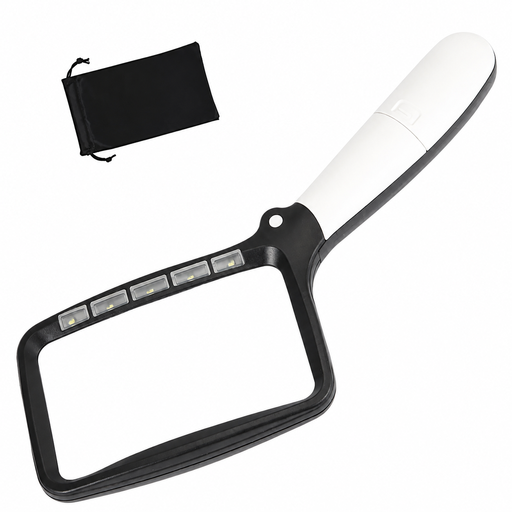
Folding LED magnifying glass with 3× magnification

Folding LED magnifying glass, 3×

A straightforward optical magnification option if you don’t need digital images of the nib.

3× magnification; five LEDs with two brightness levels.

View at Joybuy

Frequently asked questions

Do I need a digital microscope to check the nib tines?

No. The Goulet Pen Company describes an illuminated 10× magnifying glass as a useful aid for checking tine alignment. A digital microscope is another option if you want a live image or saved views.

How should I prepare a fountain pen nib for inspection?

First, clean and dry the nib, then inspect the writing surface and tine gap in good light and from suitable angles. The Goulet Pen Company recommends this preparation when using a magnifying glass. Don’t rush into a decision to grind or bend the nib based on a single image.

What should I check about software and ongoing costs?

Before buying, check the supported operating system, software and what’s included with the exact model. BRESSER specifies Windows 10 or 11 for the DST-1028; according to the manufacturer, the measuring software for the LEUCHTTURM DM 3 is limited to Windows. Your statutory rights against the seller and a voluntary guarantee are two different things.

How should I dispose of a digital microscope that’s reached the end of its life?

In Germany, an electrical appliance that’s no longer in use must not be put in household rubbish. It should be disposed of separately, for example at a recycling centre or an appropriate collection point. The German Environment Agency provides guidance on separate disposal of electrical appliances.

Can I return a microscope bought online if it doesn’t suit my setup?

For online consumer purchases in Germany, you generally have 14 days from receiving the goods to withdraw from the contract. Check the applicable terms and notify the retailer that you’re withdrawing; your rights if the item is faulty are separate. The Verbraucherzentrale explains these rights.