Those examining crystal surfaces
If you’re looking at irregular, opaque specimens, check that the lighting is suitable and there’s enough room for the sample.


When examining irregular, opaque mineral crystals, start by looking for suitable reflected-light illumination and enough clearance above the specimen. A stereo microscope with a camera is particularly useful if you need to capture the crystals’ three-dimensional form and share images with the group. If you want everyone to see the live image without a computer, the right display or HDMI output and the actual contents of the box matter more than a high digital zoom figure. The Joybuy set featured below is an experimental microscope for children; the product information alone does not confirm that it is suitable for large, opaque crystal specimens.
If you’re looking at irregular, opaque specimens, check that the lighting is suitable and there’s enough room for the sample.
For group viewing in a workshop, display and projector connections are important things to consider.
If you want to compare images later, check the camera, storage options and compatible software together.
First decide whether you’ll be viewing the specimen as an opaque surface illuminated from above. Then choose a display and documentation setup to suit the equipment available in your workshop.
| What you need | What to look for | Who is it important to? |
|---|---|---|
| Surface and specimen height | BRESSER says the Analyth STR has separately dimmable reflected and transmitted light. Also check the stand height and the clearance available for your specimen. | If I’m looking at irregular specimens, I need light from above and enough room over the sample. Around 36% of consumers are likely to prioritise viewing the surface. |
| Live image for the group | Celestron says the MicroDirect 1080p HDMI provides a live HDMI image without a computer; the BRESSER Analyth LCD is specified with a 22.5 cm screen. Check that the connection matches the inputs on your monitor or projector. | For a demonstration, I want to share the image with the workshop group on a monitor or projector we already have. Around 29% of consumers are likely to put group live viewing first. |
| Recording images | BRESSER lists a USB camera for the Analyth STR; Levenhuk specifies microSD storage for the DTX 500 LCD. Check the operating system, memory card and contents of the specific version. | If we want to compare crystal images later, I need a suitable way to save or transfer them. Around 21% of consumers are likely to prioritise image recording. |
| Moving between workstations | Levenhuk specifies a battery life of up to two hours for the DTX 500 LCD. Check that the battery life and power supply suit your workshop schedule. | When moving between workstations, I don’t want to keep relying on a nearby socket. Around 14% of consumers are likely to prioritise using the microscope at different stations. |
Levenhuk lists optical and digital magnification separately for the Rainbow DM500 LCD; these figures are not interchangeable.
First compare the lighting and the space available for your specimen, and check which type of magnification is specified for the model in question.
Celestron lists a microSD slot for the MicroDirect 1080p HDMI; the product description says the memory card is not included.
Check the connections and contents of the exact version on offer against your monitor, projector and storage needs.
KERN describes the OZM 542 as a binocular model, with a trinocular version for connecting a camera. So the term ‘stereo microscope’ alone does not confirm that a camera and software are included.
Check whether the camera, connection and software are actually included in the specific offer.
For observing crystals, the Analyth STR Trino set with camera and the Analyth LCD with its own display are particularly relevant.
The MicroDirect 1080p HDMI is designed for groups who want to connect a handheld microscope to a monitor or projector.
Levenhuk positions its DTX models for digital observation of opaque specimens; the DTX 500 LCD combines its own display with image storage.
KERN offers digital microscope sets with a microscope, camera and software, as well as OZM stereo microscopes whose specifications depend on the version.
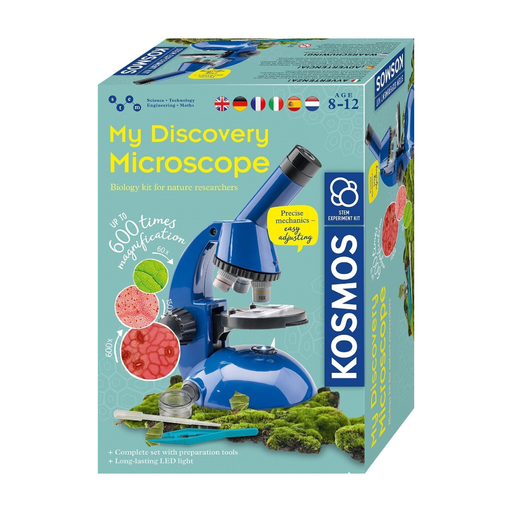
A Joybuy option for microscopy with experimental accessories; its suitability for irregular mineral crystals depends on whether the lighting and specimen clearance are right.
 No image available
The product name indicates that the set is intended for children aged 8 and over. If you’re examining irregular crystal specimens, check that the reflected light and working distance are suitable.
The product information lists magnification of up to 600x, LED lighting, slides and specimen accessories. The magnification figure does not replace the need to check the lighting and specimen clearance.
To examine the surface of an opaque crystal, check that there’s reflected light and enough room for the specimen. Transmitted light is a different way of viewing a sample, so the lighting on the specific model needs to suit it.
Check that the microscope’s output matches the input on your monitor or projector. Celestron specifies a live HDMI image without a computer for the MicroDirect 1080p HDMI; the BRESSER Analyth STR is listed with a USB camera and software for Windows 10 and Windows 11.
The BRESSER Analyth LCD instructions recommend disconnecting the power supply before cleaning or maintenance, and checking the device, cables and connections for damage before use. Follow the manufacturer’s instructions for other models.
When you buy as a consumer from a business seller in the EU, you are generally entitled to a minimum two-year legal guarantee from the date you receive the goods; the seller is responsible. An additional manufacturer’s guarantee does not replace these rights. If the school buys the microscope as an organisation, check the specific contract.
According to Your Europe, CE marking is only required for products covered by relevant harmonised EU rules; where it is required, the applicable requirements must be met. For equipment covered by the ElektroG, § 9 sets out manufacturer and marking obligations, including the specified exceptions. Check the information for the specific device and its accessories.