Teacher comparing surfaces
If you want to show the texture of a prepared, opaque paint chip, look for adjustable reflected-light illumination and a stable setup. BRESSER and Celestron describe suitable lighting or stand features on selected models.


For examining the surface of an opaque paint chip, a digital microscope that can be positioned securely and has adjustable reflected-light illumination is a sensible starting point. If you have a suitable school computer, a USB model is an option; for viewing directly at a workbench, a model with its own screen is more practical. Check the working distance, actual field of view and storage options rather than focusing solely on the highest stated magnification.
If you want to show the texture of a prepared, opaque paint chip, look for adjustable reflected-light illumination and a stable setup. BRESSER and Celestron describe suitable lighting or stand features on selected models.
For viewing a live image directly at the workbench and capturing images for later discussion, the screen and storage features of the specific device are key. BRESSER and Euromex list these features for certain models.
If you can use a suitable computer, you can compare a USB microscope with a standalone model that has its own screen. Celestron lists software for Windows and Mac for its Handheld Digital Microscope Pro; check in advance whether your school’s IT policy allows you to use it.
First decide whether you want to use an existing school computer to display the live image or have the group view it directly on the microscope.
A good fit if: a compatible computer is available at the workbench and you can position the paint chip securely beneath the stand.
The trade-off: The computer displays the image. For the Celestron Handheld Digital Microscope Pro, the manufacturer says the stated total magnification also depends on the monitor size.
A good fit if: several people need to view the live image directly on the device, without connecting a computer.
The trade-off: Screen, footprint, connections and storage options vary by model, so check the specific device.
| What you need | What to check before buying | Who is it important to? |
|---|---|---|
| See the surface clearly | Adjustable reflected-light illumination and a stable stand; you should be able to adapt the lighting to the sample. | If I want to assess the texture of an opaque paint chip, I need lighting that’s easy to position and steady focusing. Around 36% of consumers put surface viewing first. |
| View and document images together | Check whether the specific model has its own screen, image output and storage. | For a discussion at the workbench, I want to view the live image together and be able to bring up the images again later. Around 29% of consumers prioritise viewing and documenting images together. |
| Make sure it works with school equipment | For USB devices, check the connection, operating system and software approval; for LCD models, check the power supply and outputs you need. | If a suitable school computer is available, I want to know whether the connection and software are compatible before deciding how to display the image. Around 21% of consumers prioritise computer compatibility. |
| Distance from the sample | Check the working distance and whether there is enough space for the sample holder you plan to use with the specific model. | With an uneven paint chip, I need enough room between the device and the sample to position it securely. Around 14% of consumers prioritise a suitable working distance. |
Increasing the magnification on screen won’t automatically reveal more detail in the sample once you’re beyond the usable range. Leica Microsystems explains this limitation in microscopy generally.
Check optical magnification and digital zoom separately, and make sure the field of view and working distance suit your sample.
The Celestron Handheld Digital Microscope Pro uses a computer as its screen. This makes its workflow different from that of a standalone LCD model.
Decide where you want the live image to appear before choosing a model, and check the connections and whether your school allows the required software.
Examining an existing sample is not the same as preparing one in a way that produces dust. A microscope image alone cannot confirm that an unknown paint chip is safe.
Before pupils handle coating material, check its origin and how it is to be handled as part of the school’s risk assessment. Guidance on risk assessment from Sichere Schule, Unfallkasse NRW and DGUV highlights this.
The brand’s standalone LCD microscopes with reflected-light illumination are an option for examining small surfaces at the workbench.
The Handheld Digital Microscope Pro 44308 is a USB option for use at a computer workstation.
The EduBlue LCD EED-3000 is described as a standalone digital classroom microscope for samples placed beneath a fixed stand.
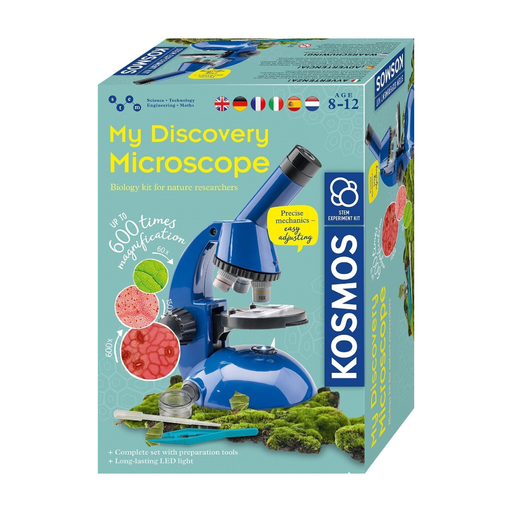
This microscope experiment kit is a general option for viewing samples; before using it with a paint chip, check whether it can provide the lighting and view you need.
 No image available
Described as a microscope experiment kit for children aged 8 and over; check in advance whether it can provide the view of the paint chip you need.
The kit contains small parts, as well as parts with sharp points, corners or edges. According to the product information, batteries should only be handled or replaced with an adult present.
No. Leica Microsystems explains that no extra detail in the sample becomes visible beyond the usable range, which is limited by resolution. So compare reflected-light illumination, focusing, working distance and the field of view you need, too.
Treat examining an existing sample separately from preparing a sample in a way that produces dust. Before pupils handle unknown coating material, check its origin and how it is to be handled as part of the school’s risk assessment; a microscope image alone cannot confirm that it is safe.
The Celestron Handheld Digital Microscope Pro 44308 uses a computer as its screen. Before buying, check the connections and whether your school’s IT policy allows the required software; Celestron also notes that the monitor size affects the stated total magnification.
According to the German federal portal, CE marking is only required if the product in question falls under the relevant EU regulations. When checking electrical products, the Federal Network Agency lists factors including labelling, product identification and instructions for use and safety warnings in German. Whether a specific product meets the relevant requirements depends on the regulations and documentation that apply to it.