Which setup is right for you?

Explore a seed’s surface

If you want to examine the shape and surface texture of a whole dry seed, incident light and a focus range that can accommodate a three-dimensional object matter more than maximum magnification. Nikon Instruments describes incident light for opaque specimens, while Leica Microsystems explains that depth of field and resolution need to be balanced in microscope images.

Document seed images

If you want to repeat or compare views, look for a stable mount and check whether the specific device offers photo or measurement features. For calibrated image measurements, Dino-Lite specifies compatible software and a calibration target for the AM4113T.

Observe without a computer

If you want to look at a screen right at your observation station, a device with an integrated display may suit you. Andonstar describes the AD409 as having an integrated screen and a metal stand; make sure you have room for it and a power supply.

What should you look for when buying?

USB digital microscope with incident light

A good fit if: you want to view and save images on a compatible computer. BRESSER lists adjustable LED incident lighting and a stand for the DST-1028.

Bear in mind: your setup will need a computer and compatible software. BRESSER’s stated 10x to 280x magnification is based on a full-screen image on a 27-inch monitor.

Digital microscope with its own screen

A good fit if: you want to view the seed at your observation station without a computer. Andonstar lists a 10.1-inch screen and a metal stand for the AD409.

Bear in mind: the device needs space and a power supply. According to Andonstar, the “up to 300x” figure applies to output on an external 27-inch HDMI monitor; it is not confirmed for the built-in display.

USB handheld microscope for measurements

A good fit if: you want to compare images repeatedly or record measurements after calibration. Dino-Lite lists measurement software for Windows and macOS, as well as a calibration target, for the AM4113T.

Bear in mind: the manufacturer specifies a 1.3-MP sensor for this model, but that alone does not indicate overall image quality. Also check which mount is suitable, as a stand is not listed among the included items.

What you want to do What to check when buying Who is this important to?
See surface details Check for incident light, adjustable illumination and a focus range that can be set for a three-dimensional object. Nikon Instruments describes incident light for opaque specimens; Leica Microsystems highlights the need to balance depth of field and resolution. If I want to assess the surface of a whole seed, a clear, suitable field of view matters more to me than the biggest possible number. Around 36% of consumers put surface details first.
Keep the seed steady Compare the stand, adjustability and working distance at your intended settings; check whether you can hold the seed in place without damaging it. If I want to focus repeatedly or look at the same area again, the specimen and device need to stay steady. Around 29% of consumers prioritise stability and suitable positioning.
Observe without a computer Check whether the device has a built-in screen, how it is powered and whether the display and stand will fit in the space you have in mind. If I want to look at the image directly at my observation station without setting up a PC, a built-in display is essential for me. Around 21% of consumers prioritise observing without a computer.
Capture images or compare measurements Check photo and storage features, software compatibility and, for measurements, whether the specific model has a suitable calibration function. If I want to save views or compare sizes, I need suitable image-capture or measurement features. Around 14% of consumers prioritise image documentation or calibrated measurements.

Avoid common buying mistakes

  • Assuming the highest magnification figure gives you the best view of a seed

    Displayed magnification can depend on monitor size and viewing conditions. With a curved surface, depth of field and resolution also need to be set appropriately.

    Compare incident lighting, the usable field of view and the focus range. Check the conditions attached to the magnification figure for the exact model.

  • Choosing a USB handheld device without considering your setup

    A USB microscope displays its image on a computer. Without compatible software or a stable position, viewing or capturing repeatable images can be awkward.

    Check the operating system, what’s included, the stand and the working distance for the specific model. Make sure your computer can run the software it requires.

  • Assuming you automatically need a separate screen for your workspace

    An integrated screen lets you observe without a PC. If you already work at a computer, a USB model can use its display instead; devices with screens need space and a power supply.

    First decide where you’ll actually view the seed, then choose between a computer connection and a built-in display.

Relevant brands and model examples

BRESSER

BRESSER describes the DST-1028 5MP USB digital microscope as a model for hobby use and viewing plant and material specimens on a PC.

  • For the DST-1028, the manufacturer lists adjustable LED incident lighting, a stand and Windows 10/11.
  • The magnification figure is based on a 27-inch monitor; the model has no built-in screen.

Celestron

According to Celestron, the Handheld Digital Microscope Pro is a USB model for three-dimensional objects, including plants.

  • The manufacturer lists an adjustable stand, adjustable LED incident lighting and a 5-MP sensor for this model.
  • You need a computer to display the image; according to Celestron, the final magnification depends on monitor size.

Dino-Lite

According to Dino-Lite, the AM4113T USB handheld microscope is suitable for repeated image documentation with measurements that can be calibrated.

  • The manufacturer lists measurement software for Windows and macOS, a calibration target and a 1.3-MP sensor.
  • No stand is listed among the included items; check which mount is suitable for your setup.

Andonstar

Andonstar describes the AD409 as a digital microscope with an integrated screen and metal stand for observing without a PC.

  • The manufacturer lists a 10.1-inch screen and image-capture features.
  • The “up to 300x” figure specifically applies to output on an external 27-inch HDMI monitor; it is not confirmed for the built-in display.

Joybuy product selection

The Joybuy selection below includes a microscope experiment kit for children aged 8 and over. To view a whole dry seed, check incident lighting, working distance and a stable way to hold it in place.
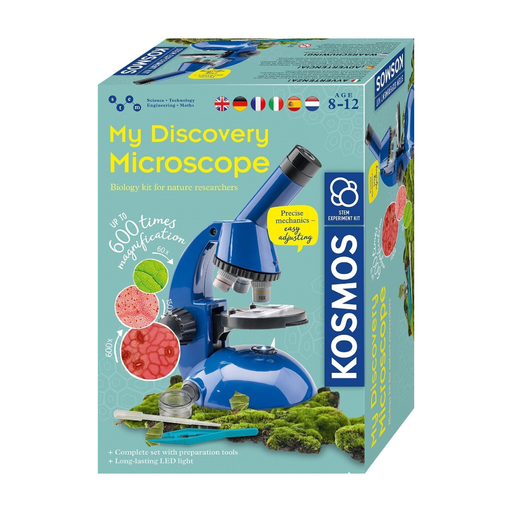
Kosmos 636050 Explorer microscope experiment kit for children aged 8 and over

Kosmos 636050 Explorer microscope experiment kit for children aged 8 and over

Described as an experiment kit for children aged 8 and over. Before using it to view a whole dry seed, check that the working distance, incident light and holding method suit your needs.

According to the product description, it is not suitable for children under 3 years of age. Small parts and functional tips, corners or edges pose a risk of injury.

Batteries are not included; according to the description, they should be inserted and replaced by adults.

Joybuy

Frequently asked questions

Should I view a whole dry seed using incident light or transmitted light?

Incident light is the right place to start when viewing the outer surface of an opaque seed. Transmitted light is intended for specimens that let light pass through; Nikon Instruments describes incident light for opaque specimens.

How important is the stated magnification?

Consider the figure alongside the conditions under which it is stated. Celestron notes that final magnification depends on monitor size; for a curved seed surface, you should also consider the focus range and depth of field.

Do I need a computer for a USB digital microscope?

You’ll need a compatible computer to display images from a USB model. Before buying, check that the software works with your operating system and whether a suitable stand is included.

What is the statutory cancellation period for an online purchase in Germany?

Consumers generally have a statutory right to cancel distance contracts. Section 355 of the German Civil Code (BGB) sets a 14-day period; when it begins and whether any exceptions apply depend on the specific contract and statutory conditions.

What should I check before buying to see what’s included?

For the specific model, check whether it includes a stand, the required software, a screen or computer and, for measurements, a calibration target. The items supplied vary by model.