For people checking nib tips
You want to view the nib tines and tipping steadily from the angle that matters when writing, before assessing what you see. Richard Binder recommends checking the alignment of the nib tines before smoothing them.


When checking fountain pen nibs, stable positioning, adjustable reflected light and a suitable viewing angle matter more than the highest quoted magnification. A microscope with its own screen can make it easier to view the image together without a studio PC; USB models are an option if you have a compatible computer for viewing or capturing images. For reflective nibs, a polariser may be another option, depending on the model. Dino-Lite describes this effect for the AM4113ZT as a manufacturer’s claim, while Richard Binder emphasises checking the nib tines before smoothing them.
You want to view the nib tines and tipping steadily from the angle that matters when writing, before assessing what you see. Richard Binder recommends checking the alignment of the nib tines before smoothing them.
If there’s no computer at the workstation, everyone in the studio should be able to see the image directly at the table. The LEUCHTTURM DM 3 has an integrated screen for this.
You want to save views for comparison and have a compatible studio computer to do so. BRESSER, Celestron and reflecta list PC-based viewing or image-capture features for selected models.
| Buying priority | What to check | Who it matters to |
|---|---|---|
| Get a steady view of the nib tip | Compare the holder, focusing and working distance at the magnification you plan to use. | If I want to assess the nib tines from a suitable viewing angle, I need a nib tip that can be positioned steadily; around 33% of consumers put stable inspection of the nib tip first. |
| View together without a PC | Check the screen size, visible area and space for the fountain pen you’re holding; also check the power supply and what’s included. | If several people need to view the image at the studio table, a built-in screen is useful; around 27% of consumers prioritise viewing without a dedicated PC. |
| Manage reflections | Check for adjustable reflected light and, if needed, a polariser for the exact model variant on offer. | If reflections from the metal nib make it harder to see, I want to manage the lighting and reflections deliberately; around 20% of consumers prioritise reflection control. |
| Document views on a PC | Check the operating system, USB connection, image-capture function and, where applicable, calibration accessories for the specific model. | If I want to save and compare nib views on the studio computer, the device and software need to work with my setup; around 20% of consumers put PC-based documentation first. |
Figures from different models aren’t necessarily directly comparable. For the BRESSER DST-1028, the manufacturer’s quoted 10x to 280x magnification refers to viewing on a 27-inch monitor. According to BRESSER, the working distance ranges from 110 mm at 10x to 10 mm at 280x.
Compare the field of view, focus and space for the fountain pen at the setting you’ll actually use, rather than comparing maximum figures directly.
USB models display the image on a computer, whereas the LEUCHTTURM DM 3 has its own screen. Display, operating system and any measurement software vary by model.
Before buying, decide where you want the image to appear, then check your computer and operating system against the specifications for the exact device.
Richard Binder points out that the alignment of the nib tines must be assessed before smoothing. High magnification alone doesn’t provide a reliable guide to working on a nib.
Use the microscope to observe the nib, and have a specialist assess any concerns rather than relying on the image alone as a guide for grinding.
The manufacturer information below relates to the models or product ranges listed and doesn’t establish how they compare when used on fountain pen nibs.
The DST-1028 is a USB reflected-light microscope for use with a compatible computer; the Analyth LCD is a separate workshop option with its own screen.
The DM 3 LCD digital microscope is an option for viewing together at a table without a PC permanently connected.
The AM4113ZT is a USB option to consider if reflections and image documentation matter when viewing.
The DigiMicroscope USB 200 is a compact, PC-connected handheld and tabletop option supplied with a stand.
The Handheld Digital Microscope Pro 44308 is a USB option with an adjustable-height stand and calibration ruler.
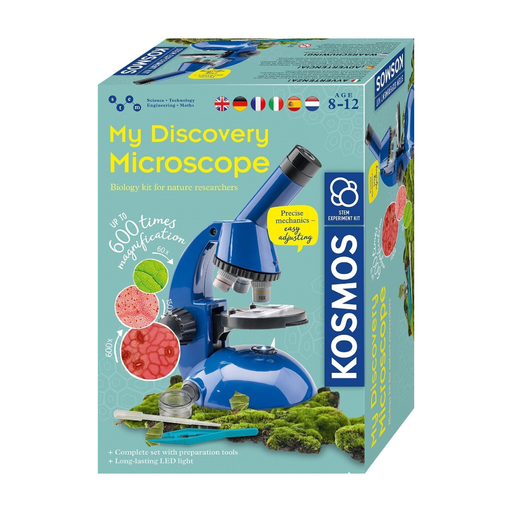
The Joybuy option below is described as a microscope experiment kit; the product name alone doesn’t establish that it’s suitable for precise inspection of fountain pen nibs.
 No image available
The product is described as an experiment kit for children aged 8 and over. This doesn’t establish that it’s suitable for precise inspection of nib tines or tipping; before buying, check that the holder, working distance and positioning are suitable for your fountain pen.
Not necessarily. What matters is whether you can focus steadily on the nib tip from a relevant viewing angle. According to the manufacturer, the working distance of the BRESSER DST-1028 decreases at higher settings.
Place the device on a stable surface and adjust the focus and lighting before comparing images. The instructions for the LEUCHTTURM DM 3 warn against unstable positioning, knocks and moisture; follow the relevant instructions for other models.
The applicable requirements depend on the specific device; CE marking is only required where the relevant harmonised EU rules say it is. EU / Your Europe explains this requirement. The Bundesnetzagentur lists CE marking, an identifiable product and correct manufacturer details among the points to check in its guidance.
For an online consumer purchase in Germany, you generally have a 14-day right to cancel after receiving the goods; exceptions and the specific contract must be taken into account. The Verbraucherzentrale notes that you must notify the retailer of your cancellation, and that this is not the same as making a complaint about a faulty product.