If you want to position or work on a secured watch movement, start by checking the working distance and how stable the setup is. For occasional inspections on a computer, a more compact USB microscope may be enough. For shiny gears, look for adjustable incident lighting and, if needed, a suitable polariser or diffuser. A built-in screen lets you view the image directly at your workbench, while a digital stereo setup may take up more space.
Who is a digital microscope suitable for?
Watch enthusiasts who need to work beneath the optics
If you want to position or work on gears in a secured watch movement, working distance and a stable setup are important. Andonstar describes the AD246S-M and AD249S-M as having an adjustable holder. Also check that the specific setup will work with your workbench.
Inspecting shiny metal parts
When examining polished gears, you want to see surface details without reflections getting in the way. Leica Microsystems describes diffusers and polarisation sets as ways to reduce glare during inspection.
Documenting work at your home workbench
If you want to view and record observations directly on the device or on a computer, choosing the right display and storage options matters. KERN & SOHN lists HDMI and USB connections, as well as a microSD card slot, for the OIV 345.
What should you look for when buying?
First, decide how much room you need to position the watch movement and how you want to control reflections. Then compare the display and documentation options.
| What you need |
What to check before buying |
Who it matters most to |
| Working distance and a stable setup |
Check the working distance at the intended magnification, as well as how adjustable the specific model is and whether a stand is included. |
If you want to work on a secured watch movement, you need space between the optics and the component, as well as a stable position. Around 29% of consumers prioritise working distance. |
| Reflections on watch gears |
Check for adjustable incident lighting and, if the surface is highly reflective, a polariser or diffuser option suitable for the model. |
When examining polished gear teeth, you want to see the details without glare washing them out. Around 23% of consumers prioritise reflection control. |
| Inspecting without a computer |
Check the screen size, footprint and display options when using HDMI output for the exact model variant. |
If you want to view the image at your workbench without a computer running, a built-in screen is worth considering. Around 18% of consumers prefer a standalone display. |
| Compact use with a computer |
Before buying, check the connection, operating system, camera software and stability of the holder. |
If you occasionally inspect removed parts using a computer you already own, a PC-connected setup may suit you. Around 18% of consumers prioritise this compact way of using a microscope with a computer. |
| Capturing images and documenting work |
Check whether photo, video or measurement functions are included with the exact model, and how files are saved. |
If you want to save observations and view them again later, the available capture and storage options matter. Around 12% of consumers prioritise documentation. |
Common buying mistakes
-
Choosing based on the highest magnification figure alone
According to the manufacturer, magnification on the Plugable USB2-MICRO-250X depends on focus and working distance. A high figure alone doesn’t tell you whether there will be enough room beneath the optics for tools.
Check the working distance and the visible field of view for the task you have in mind.
-
Simply adding more light to shiny gear teeth
More light alone won’t solve the problem of reflections from metal surfaces. Leica Microsystems describes diffusers and polarisation sets as options for reducing glare.
First check for adjustable incident lighting and, if needed, a diffuser or polariser option that suits the model.
-
Assuming a USB microscope comes as a complete kit
According to the manufacturer, the Plugable USB2-MICRO-250X is designed for use with a computer. Make sure the connection, software compatibility and holder suit your existing workspace.
Before buying, check compatibility and the actual contents of the specific model.
-
Assuming similarly named screen variants are interchangeable
Andonstar describes different display options for the AD246S-M and AD249S-M when using HDMI output, so the variants aren’t necessarily interchangeable.
Check the full model name against the display option you need.
Brands to consider
BRESSER
The Analyth LCD is a screen microscope for inspecting small objects and surfaces at your workbench.
- BRESSER lists a ring light, zoom and coarse and fine focusing for the Analyth LCD.
- Check that its footprint and setup suit your workbench. Its features alone don’t prove it has an advantage when inspecting watch gears.
Dino-Lite
USB microscopes such as the AM4113ZTL are an option for computer-based visual inspections.
- The model is described as a USB microscope for viewing on a computer.
- For the specific version, check the working distance and lighting, and whether a suitable stand is included.
Andonstar
The AD246S-M and AD249S-M are screen microscopes with an adjustable holder and additional output options.
- Andonstar describes both models as having an adjustable holder.
- Andonstar distinguishes between the variants when displaying images simultaneously via HDMI and the built-in screen. Check the full model name before buying.
KERN & SOHN
The OIV 345 is a video microscope for screen-based inspection and documentation.
- KERN & SOHN lists click-stop zoom and HDMI, USB and microSD connections for the OIV 345.
- It’s a more fully equipped workshop solution, but that doesn’t automatically mean it will give you a better view of every watch gear.
Plugable
The USB2-MICRO-250X is a compact, computer-connected microscope for occasional visual inspections.
- Plugable lists adjustable LED lighting and a flexible holder.
- According to Plugable, magnification depends on focus and distance. Check that the working distance is sufficient for your task.
Leica Microsystems
Stereo microscopes with digital cameras are a configurable way to combine inspection with a three-dimensional view for fine assembly work.
- Leica Microsystems describes lighting, camera and ergonomics options for watchmaking.
- The camera, lighting and stand need to work together as a specific configuration. The manufacturer’s description isn’t an independent comparison with USB or LCD devices.
Microscope selection at Joybuy
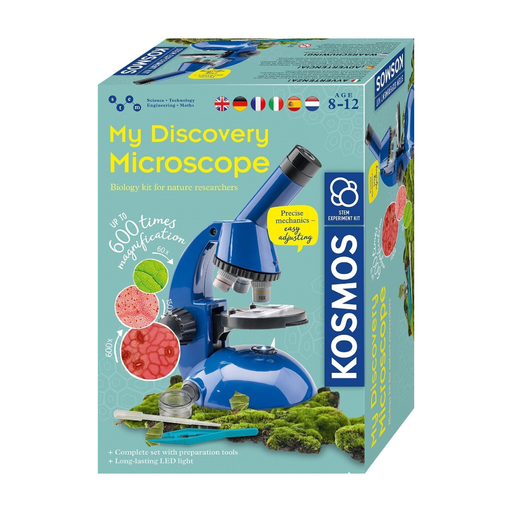
The selection includes a microscope experiment kit for children aged 8 and over. The product name doesn’t confirm that its working distance, lighting or holder are suitable for inspecting watch gears.
 No image available
KOSMOS 636050 Explorer Microscope, experiment kit for children aged 8 and over
The product name identifies this as an experiment microscope for children aged 8 and over; it doesn’t establish that it’s suitable for precision work on watch gears.
View at Joybuy
Frequently asked questions
Can I inspect watch gears using the highest stated magnification?
First, choose a field of view and working distance that keep the gear visible and the watch movement accessible. According to the manufacturer, magnification on the Plugable USB2-MICRO-250X depends on focus and distance; a maximum figure doesn’t guarantee there’ll be enough room for tools.
How do I set up a USB microscope with a computer?
First, check the connection and software supported by the specific model. For the Plugable USB2-MICRO-250X, the manufacturer explains that on macOS you can select it as a camera in Photo Booth. You can then adjust focus, distance and LED brightness. These instructions won’t necessarily apply to other models.
How should I care for my microscope and workspace?
Keep the optics and work surface clean, and follow the cleaning instructions in the manual for your device. General advice doesn’t replace care instructions specific to your model.
What does the CE marking on a microscope mean?
According to information from the European Union, CE marking is required only for products covered by harmonised EU rules that require it. Check the requirements that apply to the specific device; the marking says nothing about its imaging performance.
What are my rights if I buy a faulty product in Germany?
For consumer purchases, the seller is generally responsible for the statutory guarantee for two years from the date you receive the goods; an additional manufacturer’s guarantee doesn’t replace it. For goods ordered online, you generally have 14 days from receipt to withdraw from the purchase, subject to legal exceptions. The EU’s Your Europe information page explains the statutory guarantee, and the Verbraucherzentrale explains the right of withdrawal.


