If you already use a suitable laptop, a USB-connected pen tablet lets you write without needing an extra socket; your handwriting appears on the laptop screen. If you don’t have a laptop, a standalone note-taking device could be the answer. Compare its note-taking features, file sharing options and model-specific battery life. A connected pen display is a good choice if you want to write directly on the document on screen, provided its connections and power requirements suit your setup.
Who are these devices for?
Note-takers with a laptop
If you want to add handwritten notes or formulae to a computer you already own, a USB pen tablet could be a good fit. The One by Wacom Small connects to a Mac or PC via USB, with your writing appearing on the computer screen. Wacom says you’ll need to install a driver.
Note-takers without a laptop
If you want to work directly on notes or PDFs on a device of your own, a standalone note-taking tablet could be the answer. reMarkable’s Paper Pure is designed for handwritten notes and documents, and the manufacturer states that its battery lasts for up to three weeks.
Note-takers who use multiple apps
If you want to use other apps or colour documents alongside handwriting, check the specific device and its battery life. BOOX lists Android 15 and a colour E Ink display for the Note Air5 C; XPPen describes the Magic Note Pad as running Android 15 and featuring a Notes app.
What should you look for when buying?
First, decide whether you can use a laptop for note-taking or need a standalone device. Then consider whether you want to write directly on the display, and what connections and power supply your setup requires.
| Priority |
What to check |
Who it matters to most |
| Writing on a laptop without using an extra socket |
USB connection, operating system, driver requirements and compatibility with your note-taking software |
If I take notes on my existing laptop, I don’t want to use another socket and I’m happy to write on a separate surface. Around 36% of consumers prioritise writing on their own laptop. |
| Taking notes without a laptop and charging infrequently |
Battery life of the specific model, reading light, PDF import and export, and subscription terms |
If I want to take notes without relying on a laptop, battery life and the features I need are particularly important. Around 29% of consumers prioritise standalone note-taking with infrequent charging. |
| Writing independently and using multiple apps |
Apps you need, stylus and included accessories, document formats, export options and model-specific battery life |
If I want to combine handwritten notes with other apps or colour documents, I check the whole workflow on the specific model. Around 21% of consumers prioritise using apps in this way. |
| Writing directly on a connected display |
Video output and power supply from the connected device, as well as the cables you need |
If I want to write directly on the document on screen, having the stylus exactly where I’m writing matters more to me than having the simplest possible power setup. Around 14% of consumers prioritise writing directly on screen. |
Common misconceptions
-
“USB-C” doesn’t automatically mean you can use just one cable
The connection requirements for the Huion Kamvas 13 vary depending on the device it’s connected to. Huion requires an additional power supply when connecting it to an Android device; according to the manual, a suitable USB-C-to-USB-C cable isn’t included.
Before buying, check the video output, power supply and cable type required for your specific device and setup.
Depending on your setup, you may need a suitable cable or an additional power supply.
-
A pen tablet without a display isn’t a standalone note-taking device
The One by Wacom Small needs to be connected to a computer. Without a laptop, you can’t use the tablet and its screen as a standalone solution while taking notes.
Before buying, decide whether you’ll have access to a laptop with a screen every time you take notes.
-
Paper-like displays don’t all use the same technology
BOOX describes the Note Air5 C as colour E Ink; XPPen describes the Magic Note Pad as having an X-Paper colour display. These terms don’t tell you how long either device’s battery will last.
Compare the display technology and battery life of each specific model rather than assuming figures for one device apply to another.
-
Note-taking features and accessories may come with extra conditions
According to the manufacturer, searching handwritten notes on the reMarkable Paper Pure requires Connect. The F.A.Z. Kaufkompass lists a better stylus as an accessory for the BOOX Note Air5 C.
Check whether the search feature you need is included and which stylus comes with the model you want.
Depending on what you need, a subscription or an additional stylus may be worth considering.
Key brands at a glance
Wacom
The One by Wacom Small is a pen tablet for adding handwritten input to a computer you already own.
- Wacom says it connects to a Mac or PC via USB; you’ll need to install a driver.
- The device doesn’t work on its own; the CTL-472-N model described was listed as unavailable in the German Wacom shop.
XPPen
The Deco mini7 V2 lets you write on a connected device, while the Magic Note Pad is a standalone device with Android apps.
- XPPen lists a battery-free stylus and a USB-C connection for the Deco mini7 V2. For the Magic Note Pad, the manufacturer lists Android 15 and a Notes app.
- The Magic Note Pad’s X-Paper display is marketed as paper-like, but it isn’t the same as E Ink.
Huion
The Kamvas 13 is a connected pen display for writing directly on the document on screen.
- Huion says it can be powered by a laptop, if the connection and setup are suitable.
- Huion says an Android connection requires an additional power supply; a USB-C-to-USB-C cable isn’t included.
reMarkable
The Paper Pure is a standalone monochrome paper tablet for notes and documents.
- The manufacturer states that the battery lasts for up to three weeks.
- The display has no reading light; according to the manufacturer, searching handwritten notes requires Connect.
BOOX
The Note Air5 C combines a colour E Ink display with handwriting and Android apps.
- BOOX lists a 10.3-inch display and Android 15 for this model.
- Check that the specific model and your workflow support the apps you need, and check which stylus is included and how long the battery lasts.
Suitable products at Joybuy
This selection includes an LCD writing tablet for notes and sketches, as well as a standalone E Ink note-taking tablet for saving your notes.
 No image available
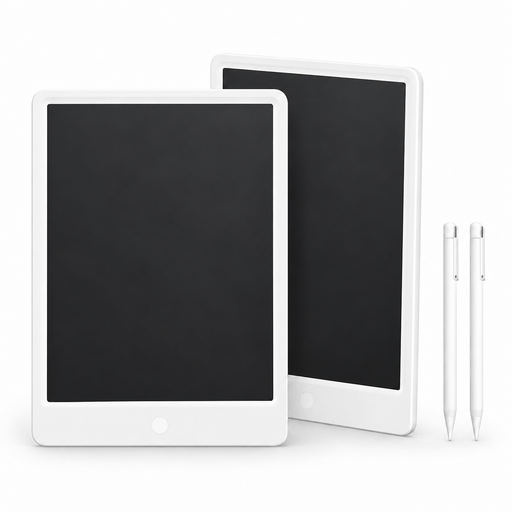
Xiaomi LCD Writing Tablet 13.5″, pack of 2
For handwritten notes and sketches directly on the LCD screen.
Comes with a stylus and coin-cell battery; line thickness responds to writing pressure. Pressing a button clears the entire screen, removing any notes currently displayed.
View at Joybuy
 No image available
iFLYTEK AINOTE 2, 10.65″ E Ink note-taking tablet with protective case
For independent handwritten note-taking, with notes saved locally.
The product description states that typical use lasts for up to 14 days, based on around 30 minutes of use per day. Speech-to-text is available in 16 languages; an internet connection is required for real-time transcription.
View at Joybuy
Frequently asked questions
Does every graphics tablet need a free socket when you’re taking notes?
No, it depends on the device and what you connect it to. Wacom describes the One by Wacom Small as connecting to a computer via USB; Huion says the Kamvas 13 can be powered by a suitable laptop. According to Huion, the Kamvas 13 needs an additional power supply when connected to an Android device.
What should I check before setting up a pen display?
Check the video output, data connection and power supply of the device you’ll be connecting. For a USB-C connection between the Kamvas 13 and an Android device, Huion specifies at least USB 3.1 Gen 1 and DisplayPort 1.2; according to the manual, the suitable USB-C-to-USB-C cable is sold separately.
What ongoing or extra costs might come with digital note-taking?
According to the manufacturer, searching handwritten notes on the reMarkable Paper Pure is a Connect feature. You may also need to buy a suitable USB-C-to-USB-C cable for the Huion Kamvas 13. Before buying, check which features and accessories you actually need.
What legal rights and disposal rules apply in Germany?
When you buy consumer goods from a business seller in the EU, you’re generally entitled to a statutory guarantee of at least two years from the date you receive them; this is different from a voluntary manufacturer’s warranty. The German Environment Agency advises that used batteries and rechargeable batteries must not go in household waste and should instead be taken to an appropriate collection point.


