
Lieferung heute & morgen

Qualitätsgarantie

Willkommens-Angebote freischalten: KOSTENLOSE Lieferung | Bis zu 80 % RABATT | Kostenlose 30-Tage-JoyPlus-Testphase
App herunterladen
Switching to a paperless office or study routine promises greater efficiency and organisation. A digital notebook is at the heart of this promise: handwritten notes that are instantly searchable, organisable, and shareable. However, the market is flooded with devices whose advertised features often fail to deliver in practice. Before you make an investment, it's crucial to understand the common pitfalls that can lead to disappointment and unnecessary expense.
Many devices advertise revolutionary features that, upon closer inspection, prove to be inadequate. Pay close attention to these three points to avoid a bad purchase:
To ensure a smart notebook meets your needs, you should examine three core technical areas. These largely determine the user experience and practical utility in daily life.
The choice of display is fundamental. For note-taking and extended reading, an E-Ink tablet with a stylus is the preferred option.
The ability to convert handwriting to text is one of the most critical features. The quality of the software is decisive here. Check the following aspects:
A tablet for notes should get you through long work or study days without needing constant recharging. E-Ink devices have a clear advantage here, with battery life often measured in weeks, not hours. Also, look for modern connectivity options like USB-C for fast charging and data transfer, as well as stable Wi-Fi and Bluetooth connections for synchronisation and using accessories.
Choosing the right tool depends on your individual workflows. Here are some configurations tailored to specific user profiles.

Why This Fits Their Persona: Ideal for professionals and students seeking an all-in-one solution for notes, meeting minutes, and task management. The advanced AI features are designed for maximum productivity.
The device integrates powerful, field-tested AI tools, including real-time transcription in 16 languages, directly into the system. The E-Ink display without a front light offers an authentic writing experience and avoids the eye strain of LCD tablets.
Combines handwriting, reading, transcription, and planning functions in a 4.2 mm thin body. Syncs with Google Calendar and allows access to notes via PC and mobile apps.
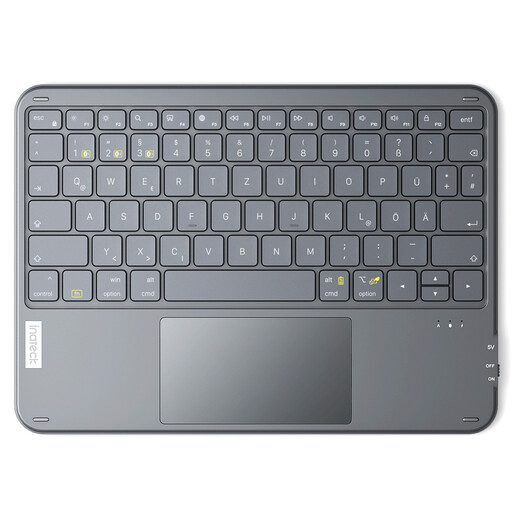
Why This Fits Their Persona: For users who appreciate the tactile feel of paper for brainstorming but need an efficient way to digitise and organise notes on their existing tablet or laptop.
This approach avoids the high initial cost of a dedicated digital notebook. You use a classic notebook and digitise the content with a portable keyboard, bypassing unreliable handwriting recognition.
A cost-effective bridge between analogue and digital. The keyboard is extremely thin at 5 mm, weighs only 228g, and can connect to up to three devices simultaneously, making it highly flexible.
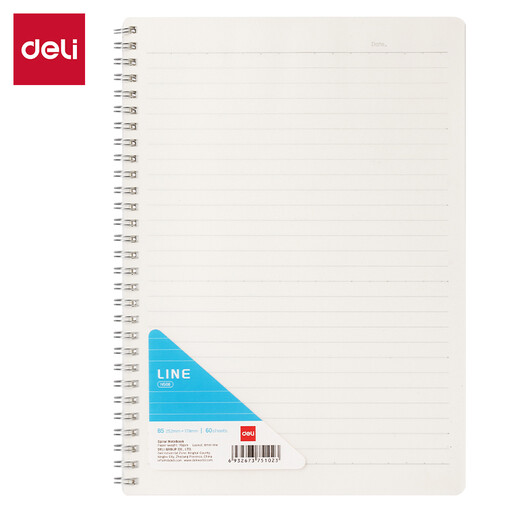
Why This Fits Their Persona: For anyone who prefers the simplicity and reliability of pen and paper for school, work, or personal organisation and needs a solid foundation for their notes.
This product completely bypasses the complexity, cost, and potential technical issues of digital devices. There are no batteries, no software updates, and no hidden fees—just reliable paper.
The B5 format offers ample space for detailed notes. The spiral binding allows it to lie flat, and the durable PP cover protects the pages. The 70gsm paper is suitable for most pens.
We have compiled a complete, real-time updated list of products that fully meet these strict selection criteria and German safety regulations.
1. How long does the battery of an E-Ink note-taking tablet last? Battery life is one of the biggest advantages of E-Ink devices. With typical use (approx. 30–60 minutes per day), most models last several weeks on a single charge. In standby mode, the battery can even last for several months. This varies depending on the model, use of the backlight (if any), and Wi-Fi activity.
2. Does handwriting-to-text conversion work even with illegible writing? The accuracy of handwriting recognition has improved significantly in recent years, but it is not flawless. With very illegible or highly stylised handwriting, the software can reach its limits. High-quality devices use advanced algorithms and AI to interpret less neat writing styles as well. However, it is recommended to write in relatively clear print or cursive for optimal recognition.
3. Are there monthly costs to use a smart notebook? That depends on the manufacturer and model. Some devices offer all core functions at no extra cost, with notes being saved locally or in a free basic cloud storage plan. Other manufacturers charge a monthly fee for premium features like unlimited transcription, expanded cloud storage, or integration with specific business tools. It is important to check this carefully in the product information before purchasing.