
Lieferung heute & morgen

Qualitätsgarantie
App herunterladen
Kategorien
Switching from analogue to digital notes is a significant step towards boosting efficiency and organisation. A digital notebook offers features that go far beyond the capabilities of paper, from searchable archiving to handwriting-to-text conversion. However, selecting the right device depends heavily on individual needs. The fundamental choice often lies between two display technologies: E-Ink and LCD.
The decision to purchase an electronic notebook should be based on an analysis of its technical specifications. The following parameters are crucial for your evaluation.
The quality of the writing experience is largely determined by the stylus's pressure sensitivity and latency.
These components determine the overall performance of the device.
The operating system and available software define the range of functions. Android-based devices offer access to a wide selection of apps, while specialised systems often provide productivity-optimised features like AI-powered transcription or calendar integration. Wi-Fi is standard, while 4G/LTE or 5G provide on-the-go independence.
Based on the criteria above, we present two devices that cater to different use cases.
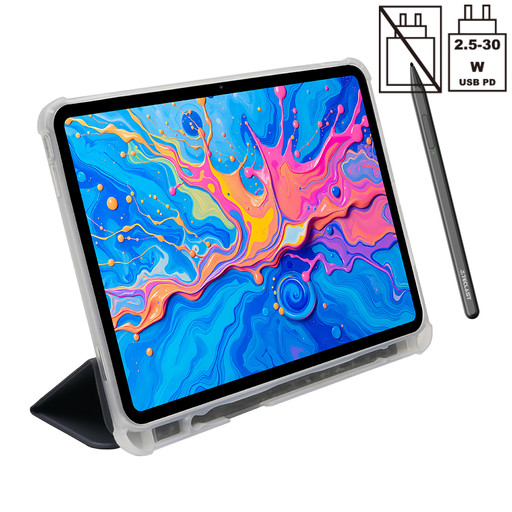
Why we recommend this product: The Teclast ArtPad Pro is a multifunctional tablet with a stylus based on a powerful Android system. Its strength lies in its versatility. The large 12.7-inch 2K display not only offers plenty of space for notes but is also excellent for multimedia applications and as a drawing tablet, thanks to its high resolution and colour accuracy. The Helio G99 Octa-Core processor, combined with a generous amount of RAM, ensures consistently smooth performance, even with demanding tasks.
Advantages:
Who it's for: This device is ideal for students and professionals looking for an all-in-one device. It serves as a tablet for university lectures, a work tool for meetings and presentations, and an entertainment hub. Creatives will benefit from the large colour screen and precise stylus input.
Manufacturer's Safety Instructions: Only charge the tablet with compatible USB-C cables and power adapters. Avoid charging in wet environments or in conditions of extreme heat. Do not open the device or attempt to replace the internal battery. Avoid use in environments with high temperatures, low air pressure, humidity, or strong magnetic fields. It is recommended to use headphones at a moderate volume. This product is not suitable for use by young children without adult supervision.
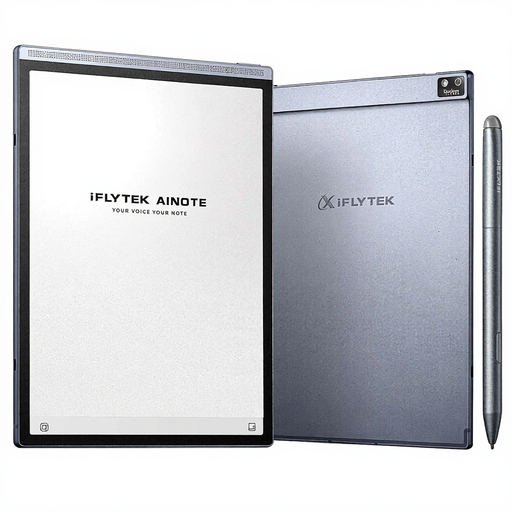
Why we recommend this product: The iFLYTEK AINOTE Air 2 is a highly specialised E-Ink tablet that is laser-focused on productivity and note-taking. Its key feature is the integration of iFLYTEK's AI technology. According to the manufacturer, the device enables real-time speech-to-text transcription in 15 languages and converts handwritten notes to text in 85 languages. The 8.2-inch E-Ink display provides a paper-like, eye-friendly writing and reading experience, ideal for long work sessions.
Advantages:
Who it's for: This note-taking tablet is aimed at professionals who frequently attend meetings and take minutes, as well as students who take notes during lectures. It is the optimal choice for users who want a dedicated, distraction-free tool for digitising handwritten and spoken information and who value an eye-friendly display.
The products featured represent two different philosophies in the digital notebook space. The Teclast ArtPad Pro stands for maximum versatility with an LCD display, while the iFLYTEK AINOTE Air 2, as a specialised writing tablet with E-Ink technology, aims for peak productivity.
A wide selection exists for users whose needs fall between these two poles or who wish to consider other form factors and price points. You can find an overview of more models in our Tablet with Stylus category.
1. What is the difference between a digital notebook and a regular tablet with a stylus? A regular tablet with a stylus is typically a general-purpose device with an LCD screen (like the Teclast ArtPad Pro), optimised for a wide range of apps and multimedia. A specialised digital notebook (often called a smart notebook or E-Ink tablet, like the iFLYTEK AINOTE Air 2) focuses on the writing and reading experience, often uses an eye-friendly E-Ink display, and offers specialised software for note management and transcription.
2. Can you also browse the internet or watch videos on an E-Ink tablet? Browsing text-based websites is possible on most E-Ink tablets. However, due to the low refresh rate of E-Ink technology, displaying videos, animations, or fast-moving images is severely limited and not recommended. These devices are designed for static content like text and drawings.
3. How does handwriting-to-text conversion work? This function, also known as OCR (Optical Character Recognition) for handwriting, uses software algorithms to interpret the lines drawn with the stylus as letters and words. The accuracy depends on the quality of the software and the legibility of the handwriting. Devices like the iFLYTEK AINOTE Air 2 integrate advanced AI to improve the recognition rate and often support multiple languages.