
Lieferung heute & morgen

Qualitätsgarantie

Willkommens-Angebote freischalten: KOSTENLOSE Lieferung | Bis zu 80 % RABATT | Kostenlose 30-Tage-JoyPlus-Testphase
App herunterladen
Display smart glasses combine a glasses frame, microdisplay and smartphone functions. Depending on the model, notifications, translations, navigation or video content appear directly in your field of vision. This can be useful for professionals, business travellers, presenters and gamers. However, the product categories differ considerably. If you focus only on impressive display figures or AI promises, you can quickly end up buying glasses that do not suit the way you intend to use them day to day.
AR glasses, XR glasses and video glasses are often advertised with virtual screen diagonals. This figure does not describe the physical size of the display, but the perceived virtual viewing area. Other important factors include resolution, refresh rate, field of view, brightness and connection type.
An XR headset for films and gaming is not automatically a suitable pair of smart glasses for navigation or live subtitles. Many models require a compatible device with USB-C video output or an additional accessory.
AI smart glasses can support voice commands, transcriptions, summaries and translations. Before buying, however, you should check the following:
Smart glasses with a private display may be useful for meetings and public spaces, but they do not replace checking the relevant privacy and app settings.
Claims such as ‘up to two days’ generally refer to a specific usage pattern. Frequent translations, permanently active voice functions or high display brightness can reduce battery life. You should therefore check what is included in the box: A charging case, charging cable or optional add-on module can all affect how practical the glasses are when you are out and about.
For prompts, calendar details, navigation or smart glasses with translation, a small, near-eye microdisplay is usually sufficient. A model such as the Even G2 is designed to provide discreet information in everyday situations. For films, console gaming or a virtual work monitor, models with a larger virtual display, higher refresh rate and USB-C connection are more suitable.
Also check whether the display remains transparent so that you can see your surroundings. Stronger shielding may be desirable with video glasses or XR glasses, but these are unsuitable for road traffic or walking.
If you want discreet support during conversations in the office, at seminars or while travelling, you can specifically look for display smart glasses without a camera. According to the product information, the Even G2 and RayNeo iO AI Glasses are offered without a camera. This can make social situations easier, but it does not automatically mean that no audio data is processed. The microphone, voice assistant and app permissions remain important points to check.
Weight and frame shape should be considered together. The Even G2 is listed as weighing 36 g, while the RayNeo iO weighs 34 g. A slim frame can look discreet, but it still needs to suit your face shape and interpupillary distance. If you need vision correction, check whether individually made prescription lenses are available and whether they need to be purchased separately.
With XR models, nose pads, temple adjustment and dioptre correction are also important. Integrated adjustment from 0 to -5.0 dpt, as specified for the VITURE Pro 2, can be practical for certain short-sighted users. Before buying, check compatibility with your own smartphone, laptop or handheld console.
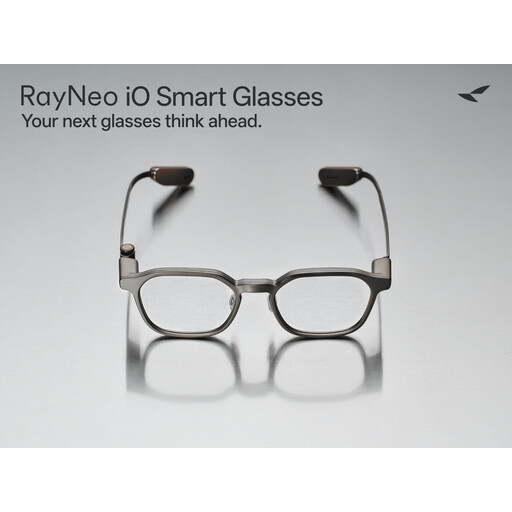
Why this product suits this profile: These camera-free everyday glasses are aimed at users looking for AI assistance, live subtitles and a discreet form factor without immediately needing immersive XR glasses.
The product information specifies a camera-free design, an integrated display and up to two days of battery life. Nevertheless, check app permissions and device compatibility in advance.
Weight of 34 g according to the product description, Blue-Lake waveguide display and features including live subtitles, voice memos with AI summaries and a teleprompter.
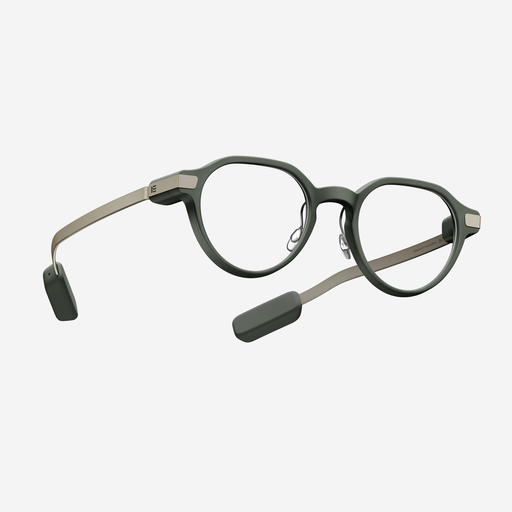
Why this product suits this profile: Suitable for work and everyday life if a classic glasses design, private prompts and camera-free use are your priorities.
According to the supplier, the glasses do not have a camera. The IP65 rating makes them dustproof and resistant to water splashes, but they are not suitable for showering or submersion.
Weight of 36 g, Micro-LED display, private viewing, translation in more than 35 languages according to the product information, plus teleprompter and navigation functions.
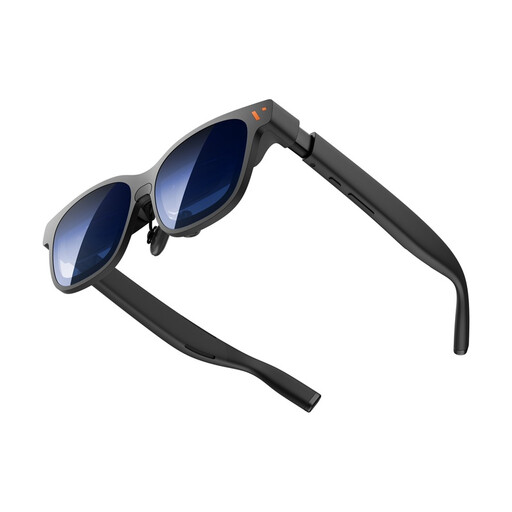
Why this product suits this profile: For travellers, gamers, students and mobile professionals looking for a private large screen for compatible smartphones, laptops or consoles.
The product description explicitly states that USB-C video output is required. This allows you to check before buying whether your device is suitable.
Sony Micro-OLED, 120 Hz, a virtual 146-inch display and integrated dioptre adjustment from 0 to -5.0 dpt according to the product information.
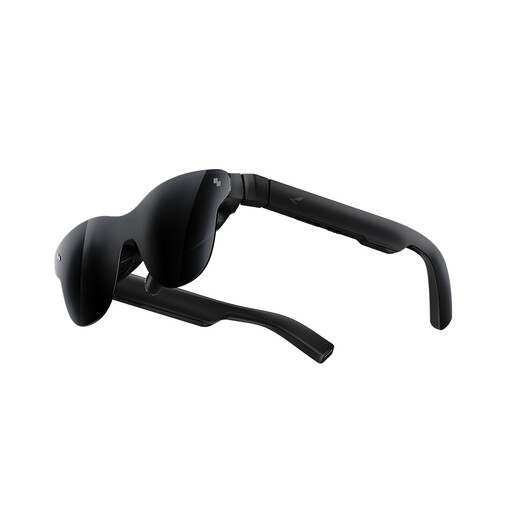
Why this product suits this profile: An option for users who want to enjoy films, 3D content and gaming via a smartphone, Switch, Steam Deck or PlayStation on a private virtual screen.
The product description lists the connections and supported devices. Before buying, check USB-C output, whether an adapter is needed and which 3D formats you want to use.
HDR10, 120 Hz, a 201-inch virtual display and support for 3D content according to the supplier. The listed weight is 76 g.
We have put together a complete, regularly updated list of products that fully meet these strict selection criteria and the safety regulations applicable in the EU.
For translations, you need a model with a display, microphone, voice processing and a compatible app. The Even G2 specifies live translation in more than 35 languages. Actual availability may depend on the app version, language and internet connection.
That depends on the model. According to the product information, prescription lenses for the Even G2 are made separately and individually. XR models may instead use dioptre adjustment or separate inserts. Before buying, have compatibility checked based on your prescription and the specific frame design.
Battery life varies depending on display brightness, voice functions, translations and connection type. The Even G2 and RayNeo iO are both specified as offering up to two days under certain usage conditions. For longer journeys, a charging case or an additional charging option is useful. Display content should also not be used while driving or operating machinery if it could cause distraction.