For long writing sessions at a shared desk, a clear display, a comfortable keyboard and enough room for your preferred setup all matter. If you move between locations frequently, weight and charging become more important. Before choosing, also check that your writing, reference-management and specialist software works with the operating system. The University of Kassel lists portability, ports and required software as factors to consider; the German Federal Institute for Occupational Safety and Health explains how separate input devices and a screen can be positioned.
Which laptop is right for you?
Writing lengthy documents
If you spend long hours writing and revising chapters, your display, keyboard and the space available at your shared desk should suit the way you work. The University of Kassel lists portability, technical specifications and required software among the factors to consider.
Moving between workspaces
If you regularly need to free up your workspace or write in the library and seminar room, weight, ports and charging are important considerations. The University of Kassel lists portability, including size, weight and battery life, as a factor when choosing a laptop.
Juggling references and software
If you use sources, word-processing software and specialist applications side by side, check that the programmes and ports you need are available on the specific device. Zotero lists plugins for Microsoft Word, LibreOffice and Google Docs.
What should you look for?
Start by deciding what matters most in your day-to-day work. Specifications alone won’t tell you whether a laptop will suit your shared workspace and the programmes you need.
| Priority |
What to check before buying |
Who will value this most? |
| Setting up your writing space |
Check the keyboard layout, screen readability and reflections at your actual workspace, as well as the ports you need for any accessories. |
When I’m working on chapters for long stretches, I want to position the keyboard and screen comfortably, even with limited desk space; around 33% of consumers prioritise setting up their writing space. |
| Portability and charging |
Compare the weight of the specific model, the ports you need, whether a power adapter is included and the stated battery life, including the test conditions. |
When I take my laptop between a shared desk, the library and a seminar room, carrying weight and charging at each location matter; around 27% of consumers prioritise portability and moving between workspaces. |
| Working with references alongside your writing |
Check the screen size and aspect ratio, ports for a possible external monitor, and the memory in the exact model you’re considering. |
When switching between PDFs, notes and my manuscript, I want to know whether the built-in screen will work for my routine; around 20% of consumers prioritise working with references alongside their writing. |
| Software compatibility |
Check your faculty’s requirements and the system requirements for the writing and specialist programmes you use. |
Before choosing an operating system, I check that it works with the programmes I definitely need; around 20% of consumers put software compatibility first. |
Avoid common buying mistakes
-
Assuming the manufacturer’s battery-life estimate is guaranteed writing time
Apple gives separate battery-life figures for video streaming and wireless web browsing. These test conditions don’t necessarily reflect a session involving PDFs, a browser and word-processing software.
Only compare battery-life figures when the test conditions are stated, and plan your charging around the workspace you actually use.
-
Considering only the laptop’s dimensions at a shared desk
An external keyboard or a raised screen can take up extra desk space that may not always be available.
Measure the usable desk area and think about which devices you want to set up and pack away at each session.
Additional input devices, a stand or a docking solution may also need more storage space and require daily setup.
-
Assuming similar model names mean identical configurations
ASUS lists a Core Ultra 9 285H for the Zenbook 14 OLED UX3405CA-QL205W; the similarly named Joybuy model UX3405CA is listed with a Core Ultra 7 255H.
Before buying, check the full model name, processor and included items. A manufacturer’s warranty is also separate from your statutory rights regarding faulty goods.
Brands and models at a glance
Lenovo
A Windows option for writing spaces where a matte screen and German keyboard are important.
- For the ThinkPad E14 Gen 7, part number 21SX000RGE, Lenovo lists a matte 14-inch WUXGA screen, 16 GB RAM, 512 GB SSD and Windows 11 Pro.
- These specifications apply to the model listed; they don’t tell you how the keyboard will feel to you or how long the battery will last while writing.
Apple
The 13-inch MacBook Air with M5 may suit buyers who prefer a compact macOS device and have checked their software requirements.
- Apple lists a weight of 1.23 kg, a fanless design and two Thunderbolt 4/USB-C ports for this device.
- Apple’s battery-life estimate is based on its own test conditions. For your writing routine, you should also check which adapters you need and what’s included.
ASUS
The Zenbook 14 OLED UX3405CA-QL205W is a compact Windows option with an OLED touchscreen.
- ASUS lists 32 GB RAM, a 1 TB SSD and a 14-inch OLED touchscreen for this model.
- ASUS states that no power adapter is included. Models with similar names may have different processors and configurations, so check the full model number.
Joybuy products for everyday writing
The models listed range from compact devices for frequent moves between workspaces to options with a larger built-in screen. Check that the operating system, screen size and ports you need suit your workflow.
 No image available
Lenovo ThinkPad E16 Gen 3 21ST, Ryzen 7 250, 32 GB RAM, 1 TB SSD
The 16-inch model may suit longer writing sessions if you have room for it on your shared desk.
Listed in the product name: AMD Ryzen 7 250, Windows 11 Pro, 32 GB RAM, 1 TB SSD and 16-inch screen.
View at Joybuy
 No image available
Apple 13-inch MacBook Air (M5, 2026), 16 GB RAM, 512 GB SSD, Silver
This compact model may be a good choice if you often move between workspaces and macOS is compatible with your programmes.
Listed in the product name: 10-core CPU, 8-core GPU, 16 GB RAM, 512 GB SSD and German QWERTZ keyboard.
The product description says that a power adapter is not included; check what charging accessories you’ll need.
View at Joybuy
 No image available
Apple 15-inch MacBook Air (M5, 2026), 16 GB RAM, 512 GB SSD, Midnight
The larger built-in screen may suit your workflow if you want to work on your manuscript and references on one display, and the weight is manageable for moving between workspaces.
Listed in the product name: 10-core CPU, 10-core GPU, 16 GB RAM, 512 GB SSD and German QWERTZ keyboard.
The product description says that a power adapter is not included; check what charging accessories you’ll need.
View at Joybuy
 No image available
ASUS Zenbook 14 UX3405CA-QD1303W, Core U7 255H, 16 GB RAM, 1 TB SSD
This model may suit a Windows workflow if you want to use the touchscreen.
Listed in the product name: 14-inch WUXGA OLED touchscreen, Core U7 255H, 16 GB RAM, 1 TB SSD and Windows 11.
The screen is listed as glossy; check for possible reflections at your actual workspace.
View at Joybuy
 No image available
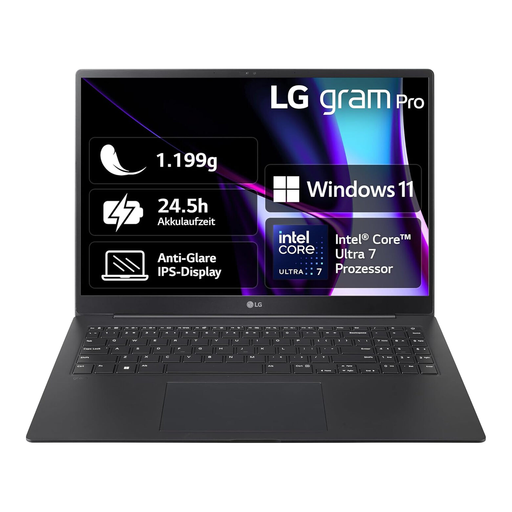
LG Gram 16 Pro, Core Ultra 7 155H, 16 GB RAM, 1 TB SSD, 6Z90SP-G.AA78G
The 16-inch model may suit you if you prefer a larger built-in screen for working on your manuscript and references.
Listed in the product name: Core Ultra 7 155H, 16 GB RAM, 1 TB SSD and Windows 11.
View at Joybuy
Frequently asked questions
Do I need to buy a new laptop for my dissertation?
No, not just because you’re planning to study for a degree. The University of Kassel points out that you don’t necessarily need to replace an existing laptop straight away. First, check whether it supports the programmes you need and suits your workflow.
How can I set up my laptop for long writing sessions at a shared desk?
If there’s enough room, you can position an external keyboard separately from a raised laptop screen. The German Federal Institute for Occupational Safety and Health describes this setup. Whether it’s practical at a shared desk depends on the space available and how easy it is to set up and pack away each day.
Is Zotero syncing enough to back up my PDFs?
Not necessarily. Zotero distinguishes between syncing library entries and notes, and separately setting up file syncing for attachments. Check your settings and keep your own backup of your work.
Can similarly named Zenbook models be used interchangeably?
No. Check the full model name and specifications. ASUS lists a Core Ultra 9 285H for the Zenbook 14 OLED UX3405CA-QL205W; the similarly named Joybuy model UX3405CA is listed with a Core Ultra 7 255H.
How do statutory rights regarding faulty goods differ from a manufacturer’s warranty?
Your statutory rights regarding faulty goods are against the seller; a manufacturer’s warranty is an optional additional promise. Under § 438 BGB, ordinary claims for defects are generally subject to a two-year limitation period from delivery. The applicable legal requirements still apply.


