First, measure the playing area, including cards, and check that the camera arm and viewing angle can cover it from the space you have available. For live explanations, frame rate at your chosen resolution, focus and lighting all matter. In a shared room, check the framing and audio before every broadcast. USB works well for streaming through a computer, while models with HDMI/USB may also offer direct video output; check the power requirements for the model you choose.
Who is this guide for?
Board game explainers with limited space
If there’s barely any room beside the board, consider how far the arm can be adjusted and how much of the playing area the camera can capture from that position. INS-WAN describes the INS-1 as having a small base, while the INS-2 has a working area of 420 × 315 mm.
Live players in a shared room
When explaining a game on your computer, it’s not just picture and sound that matter: you also need to consider what the camera captures and which audio source is active. OBS Project explains how to select a video source, while the Federal Commissioner for Data Protection and Freedom of Information highlights people’s rights when it comes to video recordings.
Presenters using a screen
If you want to show the game directly on a monitor, check the connection options. IPEVO describes HDMI and USB modes for the VZ-R, while ELMO lists HDMI, RGB and USB outputs for the MX-P3.
What should you look for when buying?
| Buying criterion |
What to check |
Who is it important for? |
| Capture the whole playing area |
Measure the board and any cards you need to show together, then compare the dimensions with the capture area and camera height specified for the model. INS-WAN gives the INS-2 a working area of 420 × 315 mm; IPEVO lists a maximum of 342 × 255 mm for the V4K. |
If I want to show the board, cards and playing pieces together, I need a field of view that suits my setup. Around 33% of consumers put the playing area captured first. |
| Being considerate in a shared room |
Before streaming, check the framing and active audio source; mute the microphone if needed and agree the broadcast with your housemates. OBS Project explains how to select a video source, while the Federal Commissioner for Data Protection and Freedom of Information covers the protection of people’s rights. |
If other people are in the room, I want to limit the picture and sound to the game demonstration. Around 27% of consumers put consideration for others in a shared room first. |
| Seeing moves and details clearly |
Compare the frame rate and resolution for the mode you’ll be using, and check focus and lighting in the preview. JOURIST lists Full HD video at 30 fps for the DC530; HUE specifies up to 1080p at 30 fps for the HUE HD. |
If I want to move playing pieces and show small print, I need to make sure the preview is suitable for both. Around 20% of consumers prioritise seeing moves and details clearly. |
| The right connection |
Decide whether you need to stream through a computer or output video directly, then check that the connections and power supply suit your setup. IPEVO lists HDMI and USB for the VZ-R and notes that a power source is required in HDMI mode; ELMO lists HDMI, RGB and USB for the MX-P3. |
If I want to switch between presenting on a computer and directly on a screen, I need a connection that works with the equipment I have. Around 20% of consumers put connecting to their display device first. |
Common misconceptions
-
Comparing megapixel counts alone
A high resolution doesn’t tell you the frame rate the camera can manage at that resolution. For moving game pieces, this difference can be crucial to the live preview.
Compare frame rate and resolution together, and check small text in the preview. INS-WAN and JOURIST’s specifications apply to specific models and modes.
-
Assuming “A3” means “my whole game will fit”
As well as the board, your playing area may include cards or trays. The format alone doesn’t tell you whether everything will stay in frame from your actual camera position.
Measure the entire playing area and compare it with the capture area of the specific model. Then check the framing with your own setup.
-
Assuming HDMI means completely wireless operation
According to the manufacturer, the IPEVO VZ-R needs a power source in HDMI mode, even when outputting video without a computer.
Before buying, check the output you want to use, the power supply available and the connections on your screen.
-
Confusing noise reduction with privacy protection
A microphone advertised as having noise reduction won’t determine whether your housemates or personal belongings are visible or audible on the stream.
Check the picture and active audio source before every broadcast, and agree with anyone affected what can be captured.
Key brands at a glance
INSWAN
According to the manufacturer, the INS-1 and INS-2 offer different solutions for limited desk space and larger playing areas in a USB setup.
- INS-WAN lists a small base, joints, an LED and autofocus for the INS-1, and a working area of 420 × 315 mm for the INS-2.
- The INS-2 has different maximum frame rates depending on the resolution. A USB-C computer may need an adapter to connect to its USB-A port.
IPEVO
The range includes USB cameras and, with the VZ-R, a camera with HDMI output.
- IPEVO lists a maximum capture area of 342 × 255 mm for the V4K and advertises A3 capture for the V4K PRO 120.
- According to the German manufacturer’s website, the VZ-R needs a power source in HDMI mode. Specifications for individual models don’t prove that they’ll suit every playing area.
JOURIST
JOURIST describes the DC530 as a document camera for live demonstrations, with an adjustable arm and USB webcam functionality.
- The manufacturer lists Full HD video at 30 fps and dimmable LEDs.
- Maximum image resolution and Full HD video operation are different specifications; they don’t independently confirm that game cards will be legible.
HUE
According to the manufacturer, the HUE HD is a USB camera with manual focus.
- HUE lists up to 1080p at 30 fps and a manual focus ring.
- If the distance or camera position changes, you’ll need to adjust the focus by hand. Check that the field of view is wide enough for your game.
ELMO
ELMO positions the MX-P3 for presentations with or without a computer, and lists USB, HDMI and RGB outputs.
- The manufacturer describes it as a slim, lightweight device with one-push autofocus.
- Having several connections doesn’t confirm that the capture area or picture quality will suit a particular stream.
Joybuy products
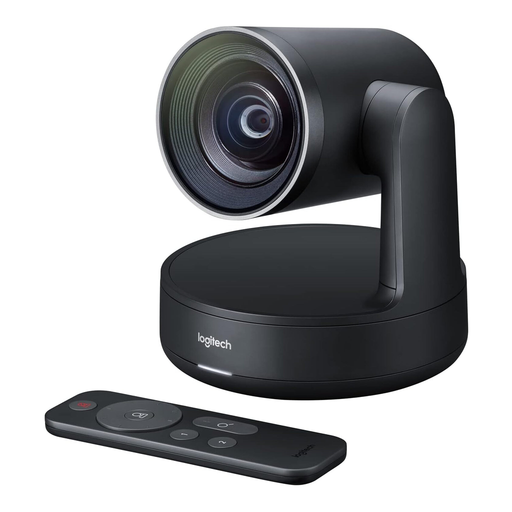
The following Joybuy products include webcams and a conference camera for computer-based streaming; they aren’t described as document cameras. So it’s especially important to check that you can position the camera securely in your setup and capture the entire playing area.
 No image available
Logitech Conference Camera Rally 960-001227
This could be an option for computer-based streaming if you can achieve the required field of view reliably with your setup.
View at Joybuy
 No image available
Logitech C922 Pro Stream Webcam, USB
This USB webcam is an option for streaming through a computer. Check that you can position it securely in your room so the whole playing area stays in frame.
View at Joybuy
 No image available
DELL Pro WB5023 2K Webcam, USB 2.0
This USB 2.0 webcam could suit a computer-based demonstration. Check first that its position and viewing angle will work for your board.
The product name specifies 2K and USB 2.0.
View at Joybuy
 No image available
Full HD 1080P USB webcam with microphone
This could work as a USB camera for computer-based streaming, provided it can capture the whole playing area in your chosen setup.
The product name specifies 1080P, USB plug and play, and a microphone.
View at Joybuy
Frequently asked questions
How do I set up the camera for a live game explanation?
First, lay out the board and any cards you need, then point the camera at the playing area. In OBS, add a video capture source, select the camera you’re using, then check the resolution, frame rate, orientation and active audio source in the preview.
Are lots of megapixels enough to capture moving game pieces?
No. Resolution alone isn’t enough to judge this: also compare the frame rate at the video resolution you’ll actually use. INS-WAN lists different maximum frame rates for the INS-2 depending on the resolution; JOURIST specifies Full HD video at 30 fps for the DC530.
How can I reduce shadows or glare on game cards?
Check the playing area in the camera preview under the lighting you’ll actually use, and adjust the position or lighting if needed. JOURIST lists dimmable LEDs for the DC530; INS-WAN specifies an anti-glare sheet for the INS-1. Neither guarantees glare-free footage of every card surface.
What extra costs or rights should I consider when buying?
Depending on your setup, you may need an adapter or a suitable power source for HDMI operation. The consumer advice centre distinguishes between your statutory rights and a voluntary guarantee. For many online purchases, you generally have a 14-day cancellation period, provided the relevant legal requirements are met. The consumer advice centre also explains when the period starts and which exceptions apply.
Can I film or record the sound of my housemates while presenting?
This doesn’t mean you have blanket permission to make every live broadcast. The Federal Commissioner for Data Protection and Freedom of Information highlights people’s rights in relation to video recordings and the requirements for freely given consent. Limit the picture and sound to the demonstration, and check with anyone affected what will be visible or audible before you stream.


