What should you look for when buying?
First, check whether the app you want is already available and whether you can see the picture clearly in daylight. Then consider app compatibility, connectivity and how much effort setup will take to help you choose between a stick and a box.
| Consideration |
What to check before buying |
Who is this particularly important to? |
| App access |
Check whether the documentary app you want is available on your specific TV or device. |
I want to use the documentary apps I need without relying on general information about a device. Around 29% of consumers prioritise access to the right apps. |
| Picture in daylight |
Assess the brightness and reflections on your existing TV in typical daylight. |
I want to make out details in daylight and assess distracting reflections before buying another device. Around 29% of consumers prioritise picture quality in daylight. |
| Connection to the TV |
Check the Wi-Fi signal where the TV is positioned. If needed, check whether the exact model has an Ethernet port. |
I want to watch longer programmes on my TV without repeated connection problems. Around 21% of consumers prioritise a stable connection. |
| Setup and accessories |
Check what’s included, along with the HDMI connection and power supply for the exact model. |
I only want to set up extra devices and cables if they’re needed for the documentaries I want to watch. Around 21% of consumers prioritise straightforward setup and suitable accessories. |
Related products at Joybuy
The Joybuy products below are projectors with built-in streaming features, not separate streaming sticks or TV boxes. Check whether the projector and screen suit your room and its lighting conditions. The stated lumen figures alone don’t allow you to compare them with a TV’s screen brightness.
 No image available
XGIMI Vibe One Match Night Collection
With Google TV built in, this portable projector can provide an additional streaming interface.
FHD 1080P; 250 ISO lumens.
With a built-in battery, screen and stand.
View at Joybuy
 No image available
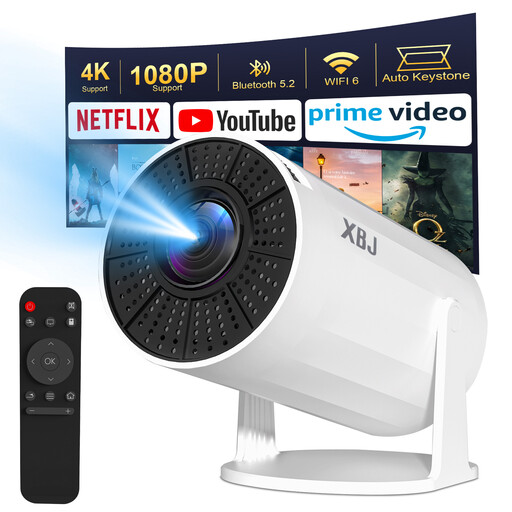
XBJ Portable Projector, Upgraded Version
Its built-in Android 11 system and listed streaming apps offer a projector option without a separate streaming device.
1080P HD with 4K decoding; 200 ANSI lumens.
Wi-Fi 6, Bluetooth 5.2 and automatic vertical keystone correction; stated image size: 40 to 200 inches.
View at Joybuy
 No image available
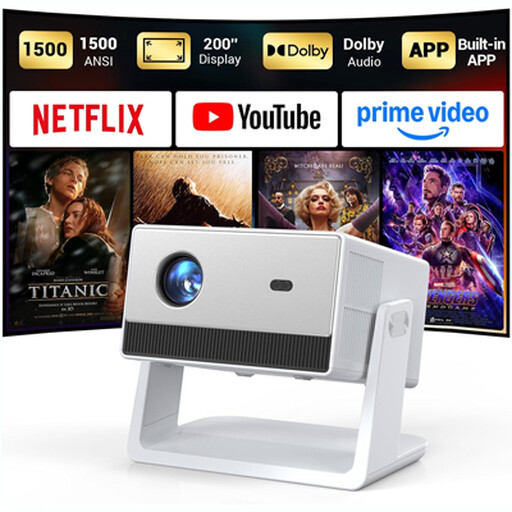
Funflix Smart Projector
Streaming apps are listed as built in, so you can access documentaries directly through the projector.
Native 1080P; 1500 ANSI lumens.
Automatic focus; stated image size up to 200 inches.
View at Joybuy
Frequently asked questions
Will a 4K streaming device automatically make science documentaries easier to see in daylight?
No. In a bright room, your TV’s brightness and how well it handles reflections are what matter. RTINGS.com explains that a dark or highly reflective picture can be difficult to see in bright ambient light. A player will only output 4K or HDR if your TV supports the relevant format.
Can I watch documentaries without buying a new stick or box?
Yes, if the app you want works on your TV. The ARTE Help Centre says its service is supported on many smart TVs and connected devices, but its general device information refers to newer generations. Check your specific TV model and the app you want to use.
What should I check if a stick won’t start or streams keep buffering?
Check the HDMI input, power supply and Wi-Fi signal where the TV is positioned. For the Streaming Stick 4K, model 3820, Roku Support Germany warns that some TV USB ports don’t supply enough power and that the included USB cable contains the Wi-Fi receiver.
Are all the HDMI cables you need included with a box?
It depends on the model. Google says the certified HDMI 2.1 cable for the Google TV Streamer (4K) is sold separately; Xiaomi lists an HDMI cable as included with the TV Box S (3rd Gen). Check the details for the specific model.
Is every free documentary streaming site legal to use?
No. The consumer advice centre Verbraucherzentrale distinguishes broadcasters’ catch-up services from illegal streaming sites that don’t have a licence. This is general consumer information, not an assessment of any individual service. For specific documentaries, use services with confirmed rights to show them.


