Choose a microphone to suit your room and workflow. In a room where background noise is audible, a dynamic microphone that you can position close to your mouth and speak into consistently is a sensible starting point. In a quiet, controlled space, a condenser microphone may be worth considering for capturing vocal nuances. USB makes it easy to connect directly to your computer, while XLR requires a suitable interface and, for an XLR condenser microphone, the necessary power supply.
Which setup is right for you?
Voice recording in a noisy room
If you record at home and can hear a fan, traffic or room echo, a convenient microphone position and a consistent distance are important factors when choosing a mic. RØDE notes that placing the microphone further away can make your voice sound more distant and reverberant.
Voice recording in a quiet space
In a quiet, controlled space, you could consider a condenser microphone if you want to capture the finer nuances of your narration. Also think about how much of the room’s sound the recording will pick up.
Solo recording with a simple workflow
If you record alone at your computer, a direct USB connection and controls on the microphone can simplify your workflow. Check whether you can monitor your voice and playback through a headphone output during longer takes.
What should you look for when buying?
Consider the microphone type alongside your room. Then decide whether you want to record directly via USB or use an XLR setup with a suitable interface.
| Buying priority |
What to check |
Who is it important to? |
| Room noise and echo |
Polar pattern and how close you can position the mic; record a test in your intended spot with your usual background noise. |
If I record in a room where background noise is audible, I want to assess my voice and the room sound together in a test recording. Around 36% of shoppers say room noise is their main concern. |
| Vocal nuances |
Record both quiet and emphatic passages; listen for clarity, sibilance and changes when you move your head normally. |
In a quiet room, I want to hear the nuances in my narration without ignoring the sound of the room. Around 29% of shoppers put how their voice sounds first. |
| Connection and setup |
Check the connections on the specific model variant; for XLR, check the components and the power supply required by the microphone. |
If I record alone at my computer, I want to connect as few extra devices as possible. Around 21% of shoppers prioritise a straightforward connection. |
| Monitoring and controls |
Check for a headphone output and suitable controls; make sure the supplied mount works at your own reading position. |
During longer takes, I want to hear my voice and control the level while recording. Around 14% of shoppers consider monitoring the most important factor. |
Common selection mistakes
-
Assuming noise processing can replace a quiet recording space
A microphone won’t automatically make a noisy or echoey room unsuitable, but it won’t make it quiet by itself either. RØDE explains that placing the microphone too far away can make your voice sound more distant and reverberant. Shure’s statements about noise processing on the MV7+ are manufacturer claims, not proof of how it will perform in every home studio.
Record a test take in your planned spot with your usual background noise, then listen back to the unprocessed voice.
-
Planning to use a dedicated XLR microphone like a USB model
USB and XLR use different signal paths. The power supply required depends on the specific microphone.
Check the full signal path and what’s included in the box. An XLR setup may need a suitable interface and cable; depending on your setup, you may also need a mount and headphones.
-
Prioritising maximum detail regardless of the room
A recording that brings out vocal nuances may also pick up unwanted room sound clearly.
Compare dynamic and condenser options using the same voice in the same spot, and assess clarity and room sound together.
-
Assuming similar model names and bundles have identical features
Connections and what’s included can vary between versions. The shock mount for the Audio-Technica AT2020USB-X is listed as an optional accessory; Shure offers the MV7+ with different stand options.
Check the full model name, connections and what’s included with the specific version.
Depending on the configuration you choose, you may also need a stand, pop filter or headphones.
Key brands at a glance
RØDE
RØDE’s NT1 5th Generation is a condenser microphone with USB and XLR connections; the dynamic PodMic USB also offers both.
- The different connection options can suit different setups.
- USB and XLR features aren’t necessarily identical. The manufacturer’s stated self-noise figure for the NT1 doesn’t describe the noise level in your own room.
Shure
According to Shure, the MV7+ offers USB-C and XLR; the dynamic SM7B is an XLR model that needs a suitable external signal path.
- Shure lists a headphone output and digital processing features for the MV7+.
- Claims about removing background noise come from the manufacturer and don’t guarantee a particular result in every room. The SM7B’s external signal path must suit your setup.
Sennheiser
The Profile USB Microphone is a USB-C condenser microphone for recording voice on a computer.
- This model is listed with Gain, Mix and headphone controls, as well as a desk stand.
- It isn’t an XLR alternative; a cardioid polar pattern doesn’t replace control of your room acoustics.
Audio-Technica
The AT2020USB-X is a USB-C condenser microphone supplied with a desk stand for recording voice on a computer.
- The AT2020USB-X is listed with a headphone output, Mix control and mute button.
- The AT8455 shock mount is an optional accessory; models in the AT2020 range have different connections.
CHERRY
The UM 6.0 ADVANCED has a USB setup and switchable polar patterns.
- This model is listed with a headphone output, Gain control and shock mount.
- The omnidirectional mode picks up sound from every direction, so it isn’t automatically the right choice for one voice in a room where background noise is audible.
Joybuy products for voice recording
This selection includes dynamic USB and XLR desk microphones, as well as other microphone kits for different recording positions and connection types.
 No image available
FIFINE K688CTW, dynamic microphone with boom arm, white
For recording a single voice at close range on a computer or in an XLR setup; the boom arm lets you adjust the microphone’s position.
Unidirectional recording; USB-C and XLR connections, headphone socket, volume control and mute button. XLR cable not included.
View at Joybuy
 No image available
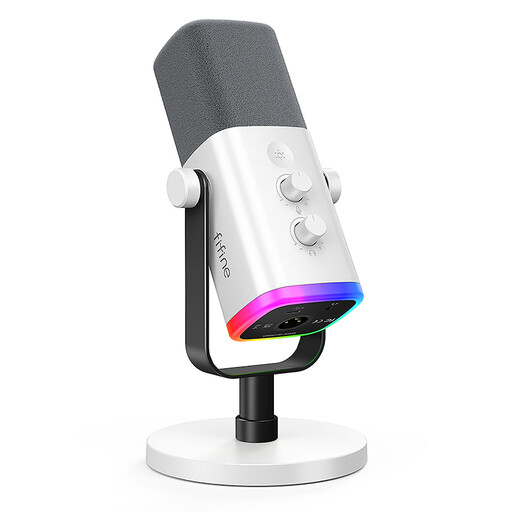
FIFINE AM8 White, dynamic USB-C and XLR microphone
For recording one voice at a computer if you’d prefer a desk stand to a boom arm.
Unidirectional polar pattern, USB-C and XLR connections, headphone socket, Gain control and mute button. According to the product description, the controls and RGB features are available in USB mode; an XLR cable and boom arm are not included.
View at Joybuy
 No image available
DJI Mic Mini 2S, 2 TX + 1 RX + Charging Case
An option if you want to record voice using clip-on or magnetic transmitters rather than a fixed desk microphone.
The set includes two transmitters, one receiver and a charging case; the description mentions an internal recording function. Before buying, check that the connection method will work with your recording device.
View at Joybuy
 No image available
Yinkaer G10-P15-XB microphone kit with audio mixer
For a recording setup where you want to use a microphone with an audio mixer and boom arm.
The kit includes a 3.5 mm condenser microphone; computers and mobile devices are listed as compatible uses. Check that the mixer’s connections are compatible with your recording device.
View at Joybuy
 No image available
SYNCO S8 lavalier microphone
For recording voice on a PC or laptop if a clip-on microphone worn by the speaker better suits your planned recording position.
3.5 mm connection, clip and windscreen; the product description lists compatibility with PCs and laptops. Its omnidirectional polar pattern picks up sound from every direction rather than focusing specifically on your voice.
View at Joybuy
Frequently asked questions
How should I position the microphone for longer narration?
Point the active side of the microphone towards your mouth, choose a comfortable distance you can maintain, and listen back to a test take from your actual recording position. RØDE recommends placing the mic close for voiceover; with directional microphones, the bass response can also change as the distance varies.
Does an XLR condenser microphone need phantom power?
Check the instructions for your specific microphone and interface. Focusrite explains that condenser microphones need power, which is usually supplied as 48 V phantom power in compatible XLR setups; USB uses a different signal path.
How should I care for my microphone after recording?
Keep moisture away from the microphone element and follow the care instructions for your particular model. Shure’s cleaning advice for wired Shure microphones recommends against cleaning the microphone element itself; this isn’t general guidance for other brands.
What are my rights in Germany if a product is faulty or I cancel an online purchase?
The Verbraucherzentrale distinguishes between your statutory rights against the seller and a voluntary guarantee. Distance purchases generally come with a right to cancel within 14 days; exceptions and when the period starts depend on the circumstances.
What should I check for microphone product safety?
The Bundesnetzagentur lists correct CE marking, product identification and manufacturer details among the points checked in its market surveillance. The requirements for a particular device depend on its characteristics; CE marking is not a sound or quality test.


