
Lieferung heute & morgen

Qualitätsgarantie

Willkommens-Angebote freischalten: KOSTENLOSE Lieferung | Bis zu 80 % RABATT | Kostenlose 30-Tage-JoyPlus-Testphase
App herunterladen
A television usually has a slim design, but only limited space for speakers. A Dolby Atmos soundbar can significantly enhance the sound for films, series, sport, music and gaming. However, it is worth taking a close look at the technical specifications before buying. Many product descriptions use similar terms, even though the design, connections and spatial performance can differ considerably.
Specifications such as 5.1.2 soundbar, 5.1 soundbar with subwoofer or 7.1 soundbar describe the intended audio structure. However, they do not automatically show how many physical speakers are included.
The channel count is therefore only a starting point. What matters is whether the system actually includes separate speakers, a subwoofer and upward-firing drivers.
The Dolby Atmos logo does not mean that every source automatically delivers object-based surround sound. Several components need to work together:
Before buying, check the HDMI connections on your TV. You may also need to change the digital audio output setting from “PCM” to a compatible bitstream or passthrough option.
Power ratings such as 220 W, 420 W or 500 W are only of limited use for comparison without standardised measuring conditions. A high figure does not guarantee clearer dialogue or a stronger Atmos effect. The speaker arrangement, room, positioning and available sound modes are more relevant.
A wireless subwoofer reduces the number of speaker cables between the soundbar and bass module, but it still requires a power socket. Systems with rear speakers may also need additional cables or power supplies.
An HDMI-eARC soundbar is practical for many modern home cinema setups, as it allows TV audio and control through a single cable. Also check for:
A soundbar with Bluetooth is suitable for mobile source devices, but it does not necessarily replace HDMI-eARC for high-quality TV audio and multichannel formats.
Measure the space in front of your television. A wide soundbar may dominate visually with a small TV or block the infrared sensor. Models with upward-firing drivers need sufficient clear space directly above the soundbar. Shelves or a very low TV wall mount can interfere with the reflections.
The subwoofer should be placed securely and not inside an enclosed cabinet. With surround systems, the rear speakers should ideally be positioned to the sides of or behind the seating position.
A clear centre channel is important for news, series and sport. Features such as a dialogue mode can make voices stand out against sound effects. Depending on the model, automatic room calibration measures the acoustic properties of the room and adjusts certain settings. This is helpful, but it cannot replace suitable positioning.
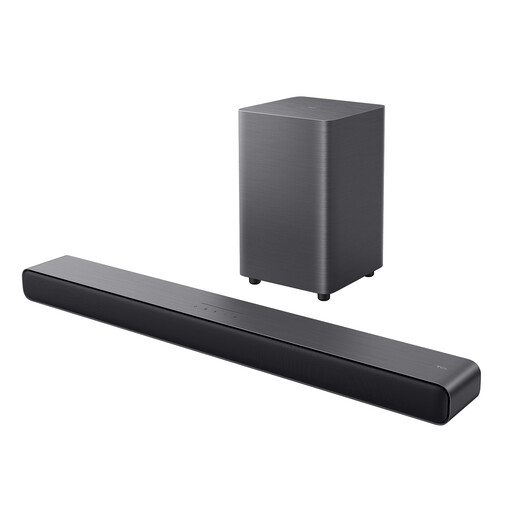
Why this product suits this profile: The 2.1 system combines a compact soundbar with a wireless subwoofer and several inputs. It is suitable for TV, music and occasional gaming without the need to position separate rear speakers.
The product data specifies the actual 2.1 configuration, the 4-inch subwoofer and the available connections. This makes it easier to assess the virtual surround processing realistically.
Dolby Atmos, DTS Virtual:X, HDMI-eARC, Bluetooth 5.3, USB and optical input; wall-mountable housing.

Why this product suits this profile: This soundbar is aimed at users who want to combine streaming, voice control and room calibration in a single main unit.
The specifications list Dolby Atmos and TrueSpace separately. AI Dialogue Mode and ADAPTiQ room calibration are also named specifically, rather than relying on general claims about “cinema sound”.
5.1.2-channel configuration, HDMI-eARC, Wi-Fi, Bluetooth 5.0, AirPlay 2, Chromecast and Spotify Connect.
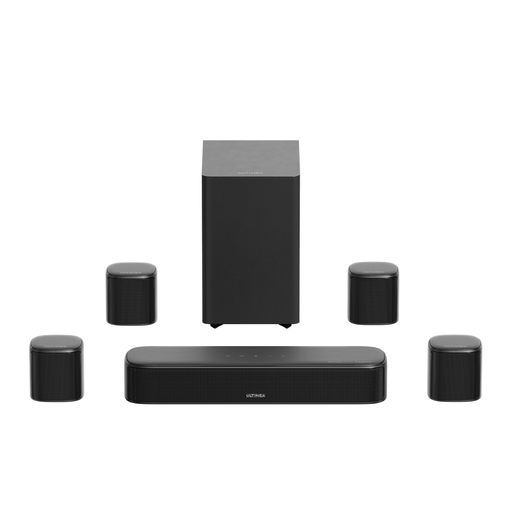
Why this product suits this profile: Four surround speakers, a 5.25-inch subwoofer and extensive app settings appeal to users who want a pronounced surround layout for films and gaming.
The four surround speakers are listed explicitly. The hybrid or wired connection of the rear units and the need to route the cables safely are also described.
7.1-channel configuration, HDMI-eARC, VoiceMX dialogue adjustment, BassMX subwoofer, plus a 10-band EQ and app control.
We have put together a complete, regularly updated list of products that fully meet these strict selection criteria and the safety regulations applicable in the EU.
Not necessarily. Depending on the TV, soundbar and source, HDMI-ARC or an optical input may also be used. However, HDMI-eARC offers greater bandwidth for certain high-resolution or lower-loss Atmos signals. It is therefore important to check the connections and supported formats of all the devices involved.
Its lifespan depends on usage time, volume, ventilation and software support. Avoid moisture, blocked ventilation openings and consistently high volume levels. With a system featuring a wireless subwoofer, the wireless connection, socket position and placement surface should also remain suitable over time.
Consumption varies depending on the model and volume. The subwoofer requires its own power supply while in use; consumption is usually considerably lower in standby mode. Automatic switch-off and a night mode can make everyday use more convenient, but they do not replace checking the specific manufacturer’s specifications.