Readers in an echoey room
If you’re recording alone in an untreated living space, try positioning the microphone close and adjusting its direction in the room to bring your voice forward over reflections and everyday noise.


For a dramatic reading in an untreated room, a good starting point is a microphone that you can position close to your mouth and keep steady. Shure says that a distance of 2 to 12 inches for podcast recordings can help bring your voice forward over reflections and background noise. A dynamic cardioid USB microphone is a suitable choice if you want to record directly on your computer; USB/XLR is worth considering if you’d also like to use a compatible XLR recording setup. Getting close won’t replace testing in the room itself or checking your levels and plosives.
If you’re recording alone in an untreated living space, try positioning the microphone close and adjusting its direction in the room to bring your voice forward over reflections and everyday noise.
If you switch between whispers and powerful passages, choose a setup that lets you check the distance, levels and plosives before recording longer takes.
If you want to record directly on your computer, USB is one way to get started. A USB/XLR model also gives you the option of using a compatible XLR recording setup later on.
A good fit if: you read close to the microphone and want to get started on your computer without a separate audio interface.
Keep in mind: getting close can make breath and plosive sounds more noticeable; it won’t eliminate room echo.
A good fit if: you already have a suitable XLR microphone input, or want to choose your microphone and recording equipment separately.
Keep in mind: you’ll need compatible connections and enough preamp gain; XLR alone doesn’t guarantee better sound or less room echo.
A good fit if: you want more detail in your voice and higher frequencies, and you’re happy with how a test recording sounds in your actual room.
Keep in mind: depending on the microphone and its position, mouth and room noise may also be more noticeable.
| Consideration | What to check before buying | Who is it most relevant to? |
|---|---|---|
| Room echo and background noise | Record a short test in the room you plan to use, and try different microphone distances and speaking directions. | If you’re reading alone in an untreated room, you’ll want to hear how position and direction bring your voice forward in the recording. Around 36% of consumers rank room echo as their top concern. |
| Quiet and loud passages | Record both volume extremes and listen back using your intended recording setup; check the levels and plosives. | If your reading moves between whispers and powerful passages, you’ll want to be able to check the recording before a long take. Around 29% of consumers prioritise managing these changes in level. |
| Connection and recording setup | Check compatibility with your computer or recorder, the right cables, your software and your preferred headphone setup. | If you want to get started without a separate interface or use XLR later, the connection should suit the recording equipment you actually have. Around 21% of consumers rank connectivity as their main buying consideration. |
| Voice character and accessories | Check whether a pop filter, stand or boom arm, cables and space for your script are included. | If you have a particular voice sound and comfortable reading position in mind, accessories and setup matter. Around 14% of consumers put these considerations first. |
Distance, direction and the room itself also affect how much echo you hear in the recording.
Compare short test recordings in the room you’ll be using rather than relying solely on noise-reduction claims.
XLR describes the connection in the signal path. Depending on the connection you use, a USB/XLR model may offer different features.
Choose a connection that suits your existing recording equipment, and check the full signal path.
Without a suitable microphone input, you may also need an audio interface and compatible cables.
Speaking close to the microphone can make plosives more noticeable. A suitable mount also affects whether the microphone stays comfortably in position while you read.
Check exactly what’s included and plan a position that lets you read your script comfortably.
Depending on the package, you may need to buy a mount or pop filter separately.
Audio-Technica also describes the ATR2100x-USB as suitable for voiceover users who want to use both USB and XLR.
According to RØDE, the PodMic USB combines USB-C and XLR for voice recording.
According to Shure, the MV7+ offers USB-C and XLR, as well as digital features for voice recording.
The Q2U is a dynamic USB/XLR model. The product description referenced here doesn’t specifically relate to a German retail version.
According to PreSonus, the Revelator Dynamic is a dynamic USB microphone with presets and a built-in mixer.
This selection includes microphones and sets with different designs and connection options. For a single reading voice, pay particular attention to the polar pattern, positioning and the features available in the connection mode you choose.
 No image available
The boom arm lets you adjust the microphone’s position; according to the product description, gain controls and headphone monitoring are available in USB mode.
The description lists a cardioid pattern and a recommended speaking distance of 2 to 6 inches. An XLR cable isn’t included.
 No image available
The desktop stand is one option for recording directly on a computer; according to the description, the microphone’s features are available in USB mode.
The product description lists a dynamic design, a directional or cardioid pattern, gain controls, a mute function and a windscreen. A microphone arm and XLR cable aren’t included.
 No image available
The set is described as including a 3.5 mm condenser microphone and a sound card. Before buying, check that the stated connections are compatible with your computer or mobile device.
 No image available
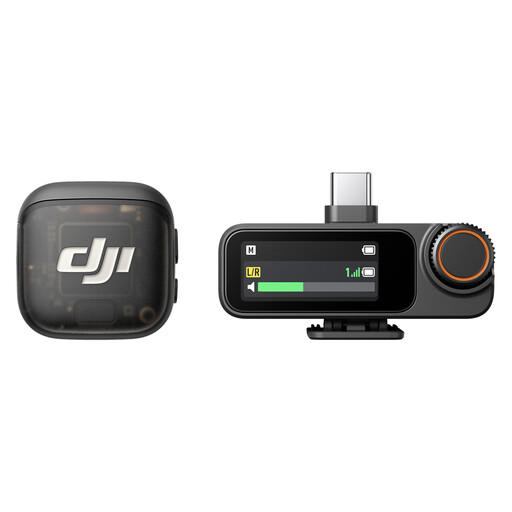
This product is described as a microphone system with two transmitters, one receiver and a charging case. Check that this setup suits your planned reading recording and the device you intend to record on.
Connection options listed include USB-C, Lightning and 3.5 mm TRS; internal storage for each transmitter is also listed.
 No image available
The product description lists USB plug-and-play operation, a pop filter and two setup options, including a tripod stand.
The stated polar pattern is omnidirectional, picking up sound from all directions. Consider whether this pattern suits your room and setup.
No. The close positioning described by Shure can improve the balance between your voice and reflections, but you should still test the recording in the room itself. A directional pattern reduces sound picked up from certain directions, but it won’t soundproof the room.
Record a quiet passage and a particularly powerful one, then listen back using your intended recording setup. Check the distance, levels and plosives. A direct headphone output is documented for some of the USB models mentioned, but it isn’t a standard feature of every microphone.
Check the contents of the specific package against what you need: a mount, pop filter, compatible cables and headphones may be included or need to be bought separately. For an XLR recording setup, you’ll also need a suitable microphone input.
Not simply because you recorded the reading yourself. According to the German Patent and Trade Mark Office, literary texts may be protected by copyright; the rights of use include making a work available to the public online. For the specific text and intended use, check whether you’re entitled to use it, have the appropriate permission or the text is in the public domain.