If you already have a suitable computer and monitor, and need to clear the desk quickly after drawing, a compact pen tablet is a natural place to start. If you want to draw directly on the display, a pen display may be a good choice, provided you have enough space and the right connections and power supply. If you don’t want a computer permanently connected, a standalone tablet is an option. Check that it supports your chosen app and stylus, and confirm what’s included in the box.
Who are the different devices best suited to?
Artists sharing a computer workstation
If you already have a computer and monitor, and want to put your drawing tool away after each session, a pen tablet could be a good fit. Wacom lists the Intuos Pro Small as measuring 215 × 163 mm, with an active area of 187 × 105 mm.
Detail-focused artists who want a drawing display
If you want to trace outlines directly onto the image on screen, and have enough desk space and connections, a pen display could be right for you. Huion’s information on cables and connections applies to the Kamvas 13 model documented.
Artists without a permanently connected computer
If you often move between workspaces, a standalone tablet can combine your drawing surface and device in one. Check that it supports your chosen drawing app and stylus, and confirm what’s included with the specific version.
What should you look for when buying?
At a shared desk, your choice depends on what matters most to you: keeping the workspace clear, controlling your lines, drawing directly on the display, or getting the right app and stylus package.
| Priority |
What to check before buying |
Who is it most important to? |
| Clear desk space and easy storage |
Check the overall dimensions and active drawing area separately. Also consider cable routing and space for your drawing hand. |
If I need to clear the shared desk quickly after drawing, both the device’s footprint and its active area matter. Around 33% of consumers put saving space and easy storage first. |
| Fine lines and shading |
Check the pressure and tilt sensitivity of the specific stylus, and make sure it’s supported by your chosen drawing app. |
If I want to control leaf veins and shading with my stylus, I check the features of the exact model. Around 27% of consumers prioritise control over their strokes. |
| Drawing directly on the image |
For a pen display, check the connections, cables and power requirements of the specific model. For a standalone tablet, consider its integrated drawing surface. |
If I want to draw with the stylus tip directly on the image on screen, the direct connection between the two is key. Around 20% of consumers prioritise drawing on the display. |
| The right software and a complete drawing package |
Check your chosen app, operating system, stylus compatibility and what’s included in the box together. |
If I want to use a particular drawing app without having to buy missing accessories, I check what’s included with the specific version. Around 20% of consumers prioritise software and a complete drawing package. |
Common buying misconceptions
-
Comparing only the number of pressure levels
A high pressure-level figure quoted by a manufacturer doesn’t, by itself, tell you whether the stylus and app will support the strokes you want to make. With the compatible iPad Air with M4, the Apple Pencil Pro and Apple Pencil USB-C differ in pressure sensitivity.
First decide what kind of stroke control and drawing app you need. Then check that the specific stylus model is compatible with your device.
-
Assuming a pen display is a complete wireless solution
With the Huion Kamvas 13 model documented, the connection and power supply depend on how you choose to connect it. For USB-C to USB-C, Huion specifies requirements for the device’s port; an Android connection requires an additional power supply.
Check your computer’s connections, the cables included with the specific version, and how it needs to be powered.
The USB-C-to-USB-C cable is optional with the Kamvas 13 model documented. Depending on the connection, an additional power supply may be needed.
-
Assuming a tablet comes with everything you need to draw
The stylus and accessories vary by device and version. Apple says the iPad Air with M4 supports Apple Pencil Pro and Apple Pencil USB-C, but the Pencil isn’t listed as included. Samsung lists an S Pen with the Galaxy Tab S10 FE, but not a power adapter.
Check the stylus, charging accessories and your chosen app for the specific version you’re buying.
You may need to buy an Apple Pencil separately for a compatible iPad Air. Samsung says the Galaxy Tab S10 FE doesn’t include a power adapter.
Key brands at a glance
Wacom
Wacom’s Intuos Pro Small is a pen tablet for artists who already have a computer and monitor.
- Wacom lists USB and Bluetooth connectivity for this model, along with an active area of 187 × 105 mm.
- The Intuos Pro Small doesn’t have a built-in drawing display.
XPPen
The range includes both the Deco mini7W V2 pen tablet and the Artist Pro 16 Gen 2 pen display.
- XPPen lists Bluetooth 5.0, eight buttons and 16K pressure levels for the Deco mini7W V2.
- Manufacturers’ quoted pressure-level figures aren’t independent evidence of performance. A pen display takes up a different amount of desk space from a compact pen tablet.
Huion
The Kamvas 13 is a pen display for use with a computer you already own, making it an option for drawing directly at your desk.
- Huion’s manual describes a 3-in-1 cable connection and an optional USB-C-to-USB-C connection.
- For USB-C to USB-C, the device’s port must support the protocols specified. An Android connection requires an additional power supply. This information applies to the Kamvas 13 version documented.
Apple
The 11-inch iPad Air with M4 is a standalone tablet with an integrated drawing surface.
- Apple lists support for Apple Pencil Pro and Apple Pencil USB-C. Procreate is an iPad app.
- According to Apple, the Pencil Pro has pressure sensitivity, while the Pencil USB-C doesn’t. The iPad Air specifications don’t list a Pencil as included.
Samsung
The Galaxy Tab S10 FE is a standalone tablet option with a stylus, suited to changing workspaces.
- Samsung Germany lists the S Pen as included with the S10 FE range.
- According to Samsung, a power adapter isn’t included. Also check that your chosen drawing app works with the specific version.
Joybuy products for drawing on the go
These are standalone Android tablets with an integrated drawing surface and specified stylus accessories. Check the app and what’s included with each version.
 No image available
TECLAST ArtPad Pro 2025, 12.7-inch, 2K, T-Pen
This standalone tablet could be a good option if you want to draw without a computer permanently connected.
12.7-inch 2K display; T-Pen drawing with 4096 pressure levels; Android 15; 256 GB storage.
View at Joybuy
 No image available
TECLAST ArtPad Pro 2025, 12.7-inch, 2K, stylus included
This standalone tablet version is an option if you want to use the drawing surface without a computer permanently connected.
12.7-inch 2K display; T-Pen with 4096 pressure levels; Android 15; 256 GB storage; stylus included according to the product name.
View at Joybuy
 No image available
TECLAST ArtPad Pro 2025, keyboard bundle
This version is ideal if you want to use a keyboard as well as draw when moving between workspaces.
12.7-inch 2K display; T-Pen drawing with 4096 pressure levels; Android 15; 256 GB storage; protective case and English Bluetooth keyboard included according to the product name.
View at Joybuy
 No image available
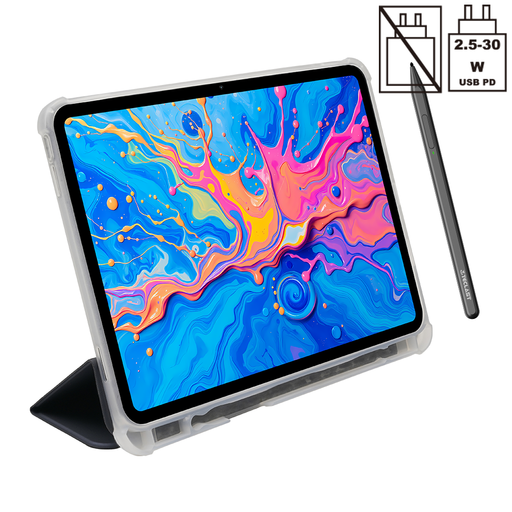
TECLAST ArtPad Pro 2025, protective case included
This standalone tablet version suits a drawing space without a computer permanently connected.
12.7-inch 2K display; T-Pen with 4096 pressure levels; Android 15; 256 GB storage; stylus and protective case included according to the product name.
View at Joybuy
Frequently asked questions
Does a pen display need to connect to a compatible computer port?
For the Huion Kamvas 13 model documented, yes. Check the recommended connection method before buying. For USB-C to USB-C, Huion specifies USB 3.1 Gen 1 for data and DP 1.2 on the connected device; the corresponding cable is optional. According to the manual, an Android connection requires an additional power supply.
Which Apple Pencil should I choose if I want line thickness to respond to pressure?
For the compatible iPad Air with M4, Apple lists pressure sensitivity for the Pencil Pro, but not for the Pencil USB-C. Check the exact iPad model, and bear in mind that a Pencil isn’t listed as included in the iPad Air specifications.
How can I back up illustrations made in Procreate on an iPad?
Procreate explains that your work is stored locally on your iPad and recommends exporting regularly or backing up the iPad. Make sure you plan for this even if you often move between workspaces.
What rights do I have when buying online from a business seller?
EU consumer information says that, in general, eligible distance purchases can be cancelled within 14 days of delivery, although exceptions apply. Faulty goods are covered by a legal minimum guarantee of two years against the seller. If you’re buying through a marketplace, check whether the seller is a business.
Can I put an old drawing tablet in my household rubbish?
No. Germany’s Federal Environment Agency explains that discarded electrical and electronic equipment must be disposed of separately from household rubbish.


