Which input option is right for you?

Artists who use a pen and lots of shortcuts

If one hand stays on your pen, an extra control pad can put frequently used drawing commands within reach of your free hand. Xencelabs says the Quick Keys lets you switch between sets of assigned commands, while Wacom describes its ExpressKey Remote as having customisable buttons and a Touch Ring.

Artists working by a bright window

As daylight changes, check how easy the keyboard legends are to read and assess screen reflections at your workstation. Logitech says the MX Keys S adjusts its backlighting to suit the surroundings. The Federal Institute for Occupational Safety and Health advises avoiding distracting reflections and glare.

Artists who spend a long time typing

If you regularly write longer pieces as well as draw, hand position and access to familiar function keys may matter more than having a small shortcut device. F.A.Z.’s buying guide describes the Logitech Ergo K860 as a split ergonomic keyboard and notes that it has no backlighting.

What should you look for?

Full-size keyboard

A good fit if: you regularly write as well as draw, or use a wide range of keyboard commands.

The trade-off: It needs space beside your graphics tablet, and backlighting won’t get rid of reflections on your screen.

One-handed shortcut pad

A good fit if: you want to keep one hand on your pen and use the other to trigger frequently used drawing commands.

The trade-off: It won’t replace a full keyboard. Check compatibility with your operating system, drivers and drawing software.

Ergonomic or split keyboard

A good fit if: you do a lot of typing as well as drawing, and hand position is an important factor for you.

The trade-off: A split layout changes the familiar position of the keys, so check that you can still reach the ones you need.

What you need What to check before buying Who is it important to?
Access to drawing commands Choose your most-used commands in the drawing software you actually use, then check the key assignments, dial functions and drivers. If I want to keep my pen hand on the tablet while drawing, direct access to drawing commands matters to me. Around 36% of consumers put easily accessible shortcuts first.
Reading keys in daylight Check the key legends in the light you usually get from your window, and assess screen reflections separately. Logitech says the MX Keys S automatically adjusts its backlighting to suit the surroundings. When I work by a bright window, I want to read the key legends and avoid distracting reflections. Around 29% of consumers prioritise readability in daylight.
Hand position while typing Think about how much extra typing you do, and whether a split layout and access to the function keys you need would work for you. When I write longer pieces as well as draw, a comfortable hand position matters to me. Around 21% of consumers prioritise typing ergonomics.
Space around your graphics tablet Measure the available desk space and decide whether you want to fit a full-size keyboard or a small extra control pad. If space around my graphics tablet is limited, I don’t want an unsuitable input device to restrict the area I can draw on. Around 14% of consumers prioritise desk space and accessibility.

Buying mistakes to avoid

  • Confusing backlit keys with anti-glare protection

    Backlit keys won’t get rid of reflections on your screen. The Federal Institute for Occupational Safety and Health advises avoiding distracting reflections and glare.

    Assess your screen position and how easy the keys are to read separately, in your usual daylight.

  • Buying a shortcut device as a full keyboard replacement

    A shortcut pad is designed for selected commands; it won’t replace a full-size keyboard for longer stretches of typing.

    Decide in advance which hand will stay on your pen and how often you write as well as draw.

    If you also write regularly, you may need a separate keyboard for your desk.

  • Assuming programmable keys will work without checking compatibility

    According to Huion, customising the keys and dial on the Huion KD100 requires the appropriate driver. Xencelabs says Quick Keys is not supported on iOS or Android.

    Check the operating system, device, driver and commands you want to use with the exact model.

  • Assuming similarly named product variants are identical

    Product variants can differ in layout and what’s included. A similar name alone doesn’t mean it’s the same version.

    Compare the full model name, layout and contents of the specific offer.

    A different bundle or variant may include different items.

Brands worth considering

Logitech

Full-size keyboards with programmable features, as well as split keyboard layouts.

  • Logitech says the MX Keys S adjusts its backlighting brightness to suit the surroundings.
  • F.A.Z.’s buying guide notes that the Ergo K860 has no backlighting; these features don’t apply to every model.

Xencelabs

Quick Keys is an extra one-handed shortcut device for creative applications.

  • Xencelabs says its OLED labels, sets of assigned commands and dial help you organise commands.
  • The dial’s functions depend on the application; the manufacturer says iOS and Android are not supported.

Wacom

The ExpressKey Remote ACK-411050 is a separate control pad which, according to Wacom, can also be used without a specific Wacom pen display.

  • Wacom specifies 17 customisable buttons and a Touch Ring.
  • According to Wacom, pairing requires the wireless receiver to be connected via USB. Check your specific computer and software setup.

Huion

The Mini Keydial KD100 is an alternative control pad for digital drawing commands.

  • Huion says the default assignments can work without a driver, even with graphics tablets from other brands.
  • According to Huion, you’ll need the appropriate driver to customise the keys and dial; compatibility details are provided by the manufacturer.

CHERRY

Keyboards with software for assigning keys; features depend on the specific supported model.

  • CHERRY describes macros and lighting control for devices explicitly listed as compatible.
  • According to the manufacturer, CHERRY UTILITY doesn’t work with every CHERRY keyboard; check support for the exact model.

Keyboards at Joybuy

The products below are full-size keyboards for artists who need to do general typing as well as draw.
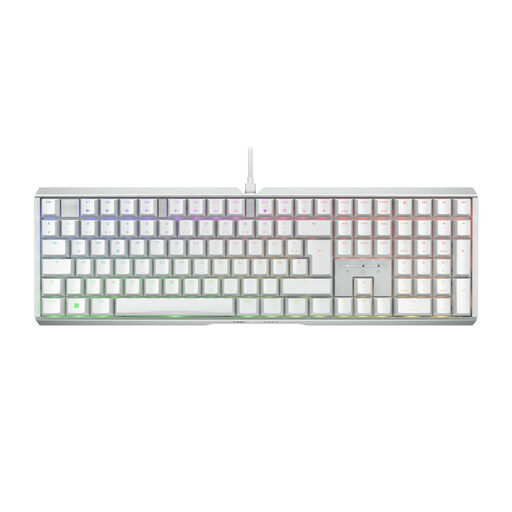
CHERRY XTRFY MX 3.1, mechanical keyboard with German layout

CHERRY XTRFY MX 3.1, MX2A Brown, RGB, German layout

A full-size keyboard for you if you want a complete typing setup for writing and general computer use as well as drawing.

Mechanical keyboard with an aluminium frame, MX2A Brown switches, RGB lighting, USB cable and German layout.

View at Joybuy
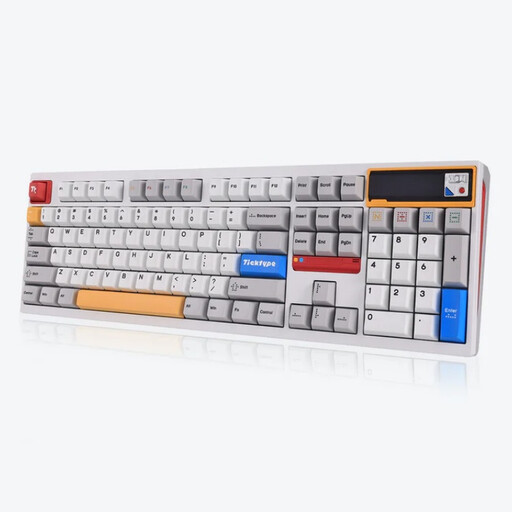
Ticktype DP104, mechanical keyboard with 108 keys and US layout

Ticktype DP104, 108 keys, US layout, Tri-Mode

This full-size keyboard is worth considering if you want a complete keyboard to use alongside your graphics tablet.

108 keys, US layout, Tri-Mode connectivity and customisable RGB lighting. The product details also list hot-swappable keys and an 8000mAh capacity.

The listed layout is US; a German QWERTZ layout is not specified for this product.

View at Joybuy
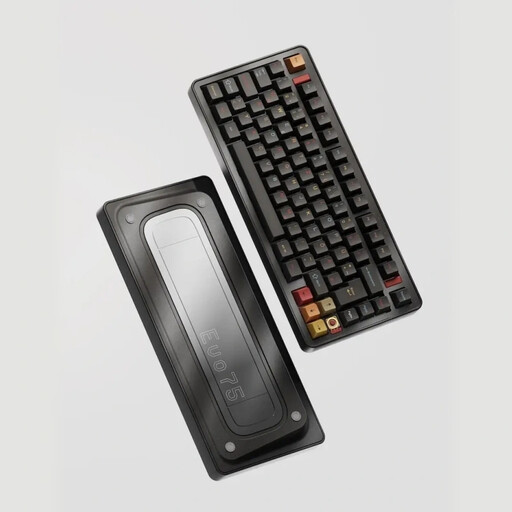
Ticktype EVO75, 75% layout with ISO-DE

Ticktype EVO75, 75% layout, ISO-DE, Tri-Mode

The specified 75% layout with ISO-DE may suit you if you’re looking for a more compact keyboard with a German layout.

The product details list macros and key assignments through compatible software such as VIA. Before buying, check that the software supports the commands you want to use.

The details also list RGB lighting, hot-swappable keys and an 8000mAh capacity.

View at Joybuy
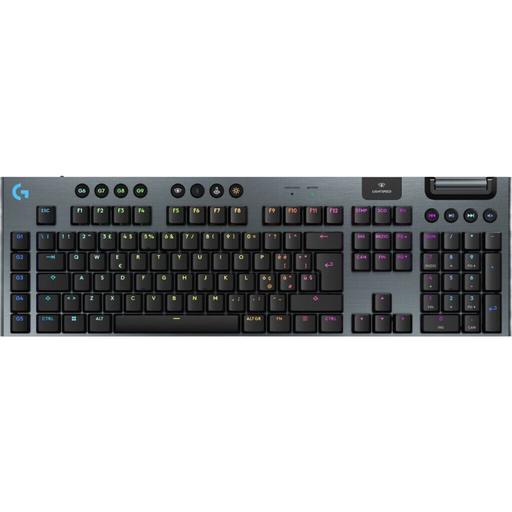
Logitech G G915 X Lightspeed, low-profile keyboard with Italian QWERTY layout

Logitech G G915 X Lightspeed, low-profile, Italian QWERTY

Worth considering if you’re looking for a full-size keyboard with extra programmable keys for your work.

The product details list nine G-keys for macros or system commands, as well as customisable RGB lighting.

The specified layout is Italian QWERTY; check that it suits the way you’re used to typing.

View at Joybuy

Frequently asked questions

Will a shortcut pad replace my regular keyboard?

No, not for general typing. Use it as an extra device if your free hand mainly triggers drawing commands, and check how to assign them in your software.

How do I set up programmable keys for my drawing software?

First, check the keyboard commands for the specific application you use. According to Huion, the Huion KD100’s default functions work without a driver; you’ll need the appropriate driver to customise the keys and dial.

Does keyboard backlighting help with glare by a window?

No, backlit keys won’t eliminate reflections on your screen. Check the position of your window and display, and see how easy the keyboard is to read in your usual daylight.

What are my rights when shopping online in Germany?

When you buy online from a business, you generally have 14 days from delivery to cancel, although exceptions may apply. If goods are faulty, you’re generally entitled to a minimum two-year legal guarantee from the seller. A voluntary manufacturer’s warranty doesn’t replace these rights. This information is based on guidance from Your Europe, the European Union’s portal.

How should I dispose of an old keyboard in Germany?

An old keyboard should be disposed of through separate collection for waste electrical equipment. Germany’s Federal Ministry for the Environment lists local collection points and retailers that are required to take back electrical equipment under the relevant legal conditions.