If you already have a computer with a good-sized screen and little desk space to spare, a small pen tablet without a display is a natural place to start. Wacom lists the overall dimensions and active area separately for one compact model. If you want to draw directly beneath the pen tip, consider a connected pen display, provided you have enough room and the right video, data and power connections. If you don’t want a computer on your desk, a standalone tablet may be an option, as long as the pen and app suit the way you work. For colour decisions, it’s the screen and software workflow you use that matter, not a colour specification from a different model year.
Who are the different types suited to?
Sketching with a computer you already own
If you want to sketch fashion designs on a desk with little spare space, then put the input device away afterwards, bear in mind that the overall dimensions and active drawing area are two different things. Wacom lists the One by Wacom Small CTL-472 as measuring 210 × 146 mm overall, with an active area of 152 × 95 mm.
Drawing directly on the screen
If you want to work on outlines directly beneath the pen, consider a connected pen display. You’ll need room for the display and the right connections on your computer. If you plan to connect via USB-C, check that it supports both video and data.
Sketching without a computer at your desk
If you want to work without setting up a computer alongside your tablet, check the tablet, compatible pen, drawing app and file transfer as one complete workflow. Apple lists the Apple Pencil (USB-C) and Apple Pencil (1st generation) as compatible with the iPad (A16).
Comparing your priorities
Small pen tablet without a display
A good fit if: You already have a computer screen and want to put the input device away after sketching.
The trade-off: You draw on the tablet while looking at the computer screen; a small active area can make precise movements more difficult.
Compact pen display
A good fit if: You want to draw directly on the design as it appears on screen and have room for the display, computer and cables.
The trade-off: The display doesn’t replace a computer. A USB-C port alone doesn’t guarantee a suitable video and data connection.
Standalone tablet
A good fit if: You want to sketch at a small desk without an additional computer, or take your designs with you.
The trade-off: The pen version, drawing app and file sharing options you need must all be compatible with the specific tablet.
The figures below refer to the single most important buying priority when sketching fashion designs at a small desk.
| Buying priority |
What to look for |
Who it matters most to |
| Desk space and drawing area |
Check the overall dimensions and active area separately. Wacom lists the One by Wacom Small CTL-472 as measuring 210 × 146 mm overall, with an active area of 152 × 95 mm. |
When space is tight, I measure the whole device and leave room for my hand to move. Around 36% of consumers say desk space and usable drawing area are their top buying priority. |
| Drawing directly on the design |
Check the display size, overall device dimensions and power supply. For the Huion Kamvas 13’s USB-C connection, Huion specifies at least USB 3.1 Gen 1 and DisplayPort 1.2 Alt Mode. |
If I want to see outlines directly beneath the pen tip, I need room for the display and cables connected to my computer. Around 29% of consumers prioritise drawing directly on the design. |
| Sketching without a computer |
Check the tablet generation and pen compatibility. Apple lists the Apple Pencil (USB-C) and Apple Pencil (1st generation) as compatible with the iPad (A16); the latter requires an adapter for pairing and charging. |
If I don’t want a computer on my small desk, I want to make sure the tablet, compatible pen and drawing app work together as one workflow. Around 21% of consumers say sketching without a computer at their desk is their main priority. |
| Colour checking and further editing |
Take the screen and software you use into account. XPPen lists 99% sRGB for the Artist 12 3rd; this manufacturer specification applies to this specific model version. |
If I want to assess or share designs in colour, I check the screen and file workflow rather than relying on a single colour specification. Around 14% of consumers prioritise colour reproduction. |
Common buying mistakes
-
Confusing the active drawing area with the space the device takes up
According to Wacom, the One by Wacom Small CTL-472 has an active area of 152 × 95 mm, while the device measures 210 × 146 mm overall.
Measure the available desk space and allow extra room for your hand and cables.
-
Assuming “USB-C” means a straightforward single-cable setup
For USB-C video transmission on the Kamvas 13, Huion specifies particular data transfer and DisplayPort requirements.
Check the capabilities of both USB-C ports and the cable for the exact model.
Depending on the ports you already have, you may also need a suitable cable, adapter or power supply.
-
Assuming a standalone tablet is a complete drawing setup
Apple lists the tablet and a USB-C charging cable as included with the iPad (A16); pen compatibility and any required adapter need to be checked separately.
Before deciding, check the exact pen version, whether you’ll need an adapter, the drawing app and the export formats you need.
-
Applying specifications from one model generation to another
XPPen’s 99% sRGB specification applies to the Artist 12 3rd, not automatically to the Artist 12 (2nd Generation).
Check the full model name and make sure each specification applies to that exact version.
Brands to consider
Wacom
The One by Wacom Small CTL-472 is a compact pen tablet without its own display, designed for use with a computer.
- Wacom lists overall dimensions of 210 × 146 mm, an active area of 152 × 95 mm and a pressure-sensitive, battery-free pen.
- You’ll also need a screen to display your design while you draw.
Huion
The Inspiroy 2 S is a pen tablet without a display, while the Kamvas 13 is a connected pen display.
- Huion lists the Inspiroy 2 S as measuring 246 × 152 mm, with a scroller and pen buttons.
- For USB-C use with the Kamvas 13, both the device and cable must support the required video and data functions. The features of these two models are not interchangeable.
XPPen
The Deco mini7 V2 is a small pen tablet without a display; the Artist 12 (2nd Generation) and Artist 12 3rd are pen displays.
- XPPen lists the Deco mini7 V2 as measuring 260,2 × 162,2 mm overall, with an active area of 177,8 × 111,1 mm.
- According to XPPen, the 99% sRGB specification applies to the Artist 12 3rd, not the Artist 12 (2nd Generation).
Apple
The iPad (A16) lets you work independently, without setting up an additional computer.
- Apple lists the iPad (A16) as measuring 248,6 × 179,5 mm and names the Apple Pencil (USB-C) and Apple Pencil (1st generation) as compatible.
- The pen is not included in the iPad package listed by Apple. The Apple Pencil (1st generation) requires an adapter for pairing and charging.
Joybuy products for compact sketching
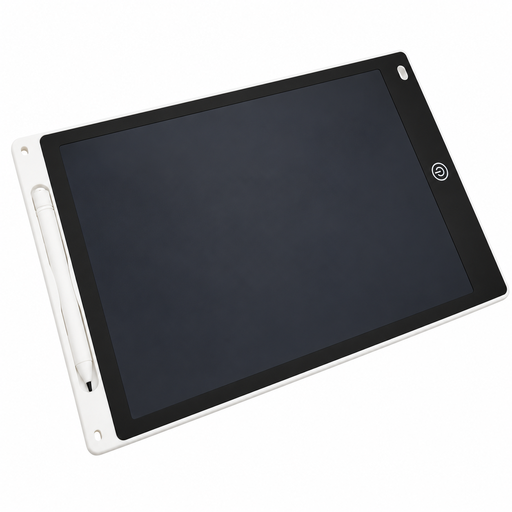
This Joybuy product option is an LCD drawing tablet with a pen, designed for simple sketches. Check whether its drawing area and straightforward drawing experience suit your fashion designs.
 No image available
12-inch LCD drawing tablet with pen and erase function
The LCD drawing surface and pen are designed for quick sketches.
12 inches; includes a pen and erase function. The erase button clears the entire image at once.
View at Joybuy
Frequently asked questions
Do I need a specific USB-C port for a pen display?
For the USB-C to USB-C setup described by Huion for the Kamvas 13, the port and cable must support USB 3.1 Gen 1 for data and DisplayPort 1.2 Alt Mode for the video signal. Check the power requirements for the specific model too.
What can I do if the pen controls the wrong screen?
Select the right working area and screen in the driver settings. Huion explains how to map the pen for both pen tablets without a display and pen displays; menu names may vary depending on the driver version.
Can I use any Apple Pencil with the iPad (A16)?
No. Apple lists the Apple Pencil (USB-C) and Apple Pencil (1st generation) as compatible with the iPad (A16). The 1st generation Pencil requires a USB-C to Apple Pencil Adapter for pairing and charging. Also check that the drawing feature you want is available with your chosen pen version.
What’s the difference between the active area and overall dimensions of a pen tablet?
The active area is where you draw with the pen; the overall dimensions show how much space the whole device takes up. Wacom lists the One by Wacom Small CTL-472 as having an active area of 152 × 95 mm and overall dimensions of 210 × 146 mm.
Does the 99% sRGB specification also apply to the Artist 12 (2nd Generation)?
No. XPPen attributes the 99% sRGB specification to the Artist 12 3rd. When making colour decisions, check the full model name and the screen you’ll actually use to assess your design.


