If you already use a computer and need to clear your desk after lessons, a screenless pen tablet is a natural place to start. Choose an active area that suits your space and the way you write. A pen display connected to another device is a good option if you want to write directly on the image you can see, and the connections and power supply work for you. If you don’t have a computer available, consider a standalone tablet. For precise circles and angles, the features of your geometry software matter more than the pen’s pressure levels.
Which option suits you?
Teachers with limited desk space
If you need room for a computer and teaching materials as well as your drawing device, compare the working area and the device’s overall dimensions with the space you have available. XPPen and Huion provide measurements for their active areas and devices to help you make this comparison.
Teachers focused on geometric constructions
If you switch between handwritten explanations and precise circles, angles or transformations, consider the geometry software as well as the pen input. GeoGebra describes tools for these constructions and a notes workspace for pen input.
Teachers who want to write directly on the image
If you want to place the pen tip on the drawing you can see, or work without a dedicated computer, there are different types of device to consider. Manufacturers’ information on connected displays and standalone Android tablets can help you check which connection and workflow will suit you.
What to look for when buying
Screenless pen tablet
A good fit if: you already use a computer and want to put the input device away after lessons.
The trade-off: You write on the tablet while looking at your computer screen; a larger active area takes up more space.
Pen display connected to another device
A good fit if: you want to write directly on the image displayed and can set up the display during lessons.
The trade-off: As well as the display, you’ll need a suitable device and the right connection for the image signal and pen data, and possibly a power supply.
Standalone tablet with pen
A good fit if: you want to create sketches and notes without connecting a computer.
The trade-off: Check that the geometry app you need and the way you share your lesson screen both work on the tablet you’re considering.
| Priority |
What to check before buying |
Who it matters to most |
| Space and writing area |
Compare the active area and the device’s overall dimensions separately with the space available beside your keyboard and materials. |
If I need to fit a computer and teaching materials on my small desk too, the space the device takes up matters just as much as the usable drawing area. Space is the top priority for around 33% of consumers. |
| Handwriting and geometry |
Check that the software supports both notes and defined circles, angles and transformations. |
If I switch between a clear, written explanation and precise constructions, the software needs to support both tasks. Geometric constructions are the main priority for around 27% of consumers. |
| Writing directly on the image |
Check the screen size, space to set up the device and the connection required for your computer. |
If I want to add lines and labels directly to the figure I can see, being able to write on the image itself matters to me. Writing on the displayed image is the top priority for around 20% of consumers. |
| Computer and connections |
Check the operating system, drivers, video output and power supply, as well as the app you need for standalone devices. |
If I can’t always connect a computer, I need a workflow that suits my devices and geometry app. Around 20% of consumers prioritise working independently of a computer or the connection process. |
Common buying mistakes
-
Assuming a pen display is a standalone device
A pen display connected to another device needs a separate device to work with. A standalone tablet with its own operating system follows a different workflow.
Check the video output, pen data, power supply and what’s included for the specific combination you plan to use.
-
Comparing only the active area
The drawing area isn’t the same as the space the whole device takes up. On a small desk, you’ll also need room for the casing, keyboard, cables and teaching materials.
Measure the space you have and compare it with both the active area and the overall dimensions of the specific model.
-
Confusing pressure levels with construction accuracy
Pen features and geometrically defined circles or angles serve different purposes.
Try out your planned workflow in your geometry app, and assess pen input separately from the construction tools.
Brands relevant to this topic
Wacom
One by Wacom Small and Medium are pen tablets for use with a computer you already have. Wacom describes USB connection and driver installation for PC or Mac.
- For the models shown, Wacom also lists Chromebook use via USB without driver installation.
- Check compatibility with your operating system and teaching software.
XPPen
The range includes the screenless Deco 01 V2 pen tablet and the Artist 12 (2nd Generation) pen display, which connects to another device. XPPen gives the Deco 01 V2’s active area as 10 × 6,25 inches.
- The different designs give you a choice between input on your computer screen and writing directly on a display.
- Compare the space each device needs, and check the connection requirements for your devices if you’re considering a pen display.
Huion
The models mentioned range from the compact HS64 and H430P to the larger HS610, the Kamvas 13, which connects to another device, and the standalone Kamvas Slate 11.
- The range of device types lets you compare options by the space they need and the way you work.
- Huion lists specific requirements for certain USB-C and Android connections to the Kamvas 13; check that they apply to your device combination.
GAOMON
According to GAOMON, the S620 is a compact pen tablet for writing and online lessons on a computer or supported Android devices.
- GAOMON gives the working area in PC mode as 165,1 × 101,6 mm.
- GAOMON lists Micro-USB for the S620; check that it’s compatible with your device.
Related products at Joybuy
The products below include an LCD writing tablet for handwritten sketches and a standalone Android tablet with a pen. If you want to create geometric constructions, also check that the app you need has the right features.
 No image available
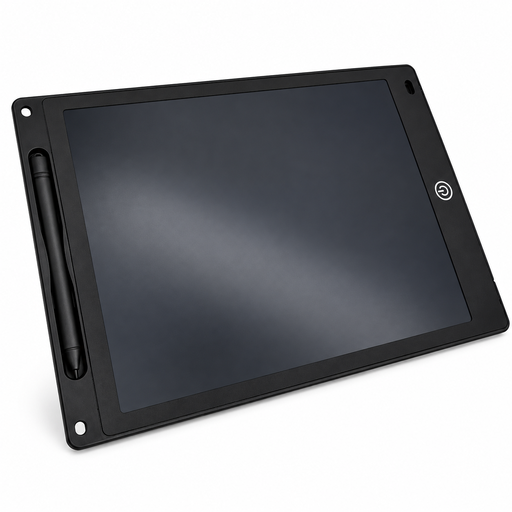
12-inch LCD writing tablet with pen
The stated writing area of 230 × 165 mm gives you room for handwritten sketches; compare it with the space available on your desk.
The description gives the thickness as 5 mm. The erase button clears the entire image.
View at Joybuy
 No image available
TECLAST ArtPad Pro, 12.7-inch, 2K
This standalone tablet with a pen could suit you if you want to work without a connected computer. Check that your geometry app and teaching workflow work on it.
The product title lists Android 15, a 12.7-inch 2K display, a T-Pen and 4096 pressure levels. Pressure levels are no substitute for construction tools in geometry software.
View at Joybuy
Frequently asked questions
Do I need a pen with lots of pressure levels for accurate circles and angles?
No. For defined circles, angles and transformations, the construction tools in your geometry software are what matter. Pressure levels describe a feature of the pen, not the mathematical accuracy of a construction.
How do I set up a pen tablet for explaining things on a computer?
First, check the operating system and connection. For One by Wacom Small, Wacom describes USB connection and driver installation on PC or Mac; XPPen’s Deco 01 V2 instructions flag possible conflicts with existing tablet software. Then test pen input and screen sharing in your teaching software.
What are my rights if a product is faulty or I buy online in Germany?
If a product is faulty, your statutory rights are against the seller and are separate from any voluntary guarantee. Many online purchases of goods generally come with a 14-day right to cancel from the date you receive the goods; the terms of your specific purchase apply.
What should I know about CE marking and disposal?
According to the European Union, CE marking is required for products covered by relevant harmonised EU rules; it is not an independent quality mark. Germany’s Federal Ministry for the Environment advises that waste electrical equipment should be taken to an authorised collection or take-back point in Germany.


