Who creates greeting cards?

Creators with a small desk

If you already use a computer and have little room alongside your study materials, compare the overall dimensions and active drawing area separately. This gives you a better idea of what will fit on your desk and how much room you’ll have to draw.

Illustrating directly on screen

If you want to work on details where they appear on screen, a connected pen display may be a good option. Check that your computer has the necessary connections and that the pen and cables are included with the specific version.

Creators without a dedicated computer

If you want to draw without a connected computer, check that the standalone device and its available apps have the design and export features you need.

What should you look for when buying?

Compact pen tablet without a display

A good fit if: You work with a computer, want to clear your desk afterwards and are happy to look at the monitor while you draw.

Keep in mind: The image isn’t beneath the pen tip, so your computer connection, driver and drawing software all need to be compatible. Huion lists the Inspiroy 2 S as measuring 246 × 152 mm overall.

Larger pen tablet without a display

A good fit if: You’d rather have a larger active drawing area than the smallest possible device, and have enough desk space for it.

Keep in mind: You draw on the tablet and view the result on the connected screen. XPPen lists the Deco 01 V3 as having an active area of 10 × 6.25 inches.

Pen display connected to a computer

A good fit if: You want to draw directly on the image on screen and your computer supports the required video connection.

Keep in mind: Allow for the space and cables you’ll need, and check what’s included with the exact version. The Wacom One 12 version DTC121W3B is sold without a pen or connection cable.

Standalone drawing tablet

A good fit if: You want to create greeting card designs without a connected computer. According to the manufacturer, the XPPen Magic Drawing Pad runs on a standalone Android system; the Samsung Galaxy Tab S10 FE is another type of tablet and comes with an S Pen.

Keep in mind: Check that the available apps support the drawing, text and export features you need.

Buying criterion What to check before buying Who’ll find it particularly important
Space and drawing area Measure the available desk space, including room for your hand, keyboard and cables. Compare overall dimensions and active area separately: Huion lists the Inspiroy 2 S as measuring 246 × 152 mm overall, while XPPen gives the Deco 01 V3 an active area of 10 × 6.25 inches. If my desk has very little free space alongside my study materials, I want to know what will actually fit. Around 25 % of consumers prioritise the footprint and a suitable drawing area.
Control when illustrating Decide whether you’d rather look at the monitor or see the image beneath the pen tip. Check the pen, customisable buttons and pen settings in the app you plan to use. If I want to work on lines and embellishments directly on the image I can see, the way I control each stroke matters more to me than other features. Around 25 % of consumers also put this direct control first.
Print-ready card Check which drawing and layout software you can use and what file formats it can export. Get the specifications for your chosen print product: Onlineprinters, for example, lists 300 dpi and 2 mm bleed on all sides for a specific A5 greeting card. If I want to turn my illustration into a card with text and a suitable print file, I want to consider the whole process through to export. For around 19 % of consumers, this route to a print-ready card comes first.
Working without a computer Check whether the device works independently, which pen is included and whether your preferred app supports the features you need. If I want to create designs without relying on a connected computer, the device needs to handle my drawing and export tasks on its own. Around 12 % of consumers give working without a computer top priority.
Connections and what’s included Check the operating system, connections and model number against your computer. For a pen display, also check the cables, power supply and pen included with the specific version on sale. If I want to keep using the device I already own, I want to know in advance whether the connection, driver and included accessories are compatible. For around 19 % of consumers, this compatibility is the most important buying criterion.

Mistakes to avoid

  • Mistaking a pen display for a standalone computer

    A pen display such as the XPPen Artist 12 (2nd Generation) needs to be connected to another device. Connections and included accessories may vary between model versions.

    Before ordering, check the exact type of device, your computer’s connections and what’s included. Also make sure you have the right cables and power supply for the connection.

  • Assuming your drawing is the same as a print-ready card

    Your chosen print product may have its own requirements for resolution, bleed, margins and colour profile. Pen settings alone won’t create a suitable print file.

    Choose your print product and software first, then set up the file to meet the provider’s specifications.

  • Assuming similar model names mean the same features

    A product range may include different configurations. GAOMON offers a separate S620 (16K) alongside the S620; the Wacom One 12 version DTC121W3B is sold without a pen or cable.

    Compare the full model number and what’s actually included rather than relying on the series name or product image alone.

An overview of relevant brands

Wacom

The models mentioned here represent two different types of device: a pen tablet for use with an existing screen, and a pen display.

  • Wacom describes the One by Wacom Small as a device that connects via USB and requires a driver on Mac or PC.
  • The Wacom One 12 version DTC121W3B includes neither a pen nor a connection cable; this doesn’t necessarily apply to other configurations.

Huion

The Inspiroy 2 S is a compact pen tablet without a display, designed for use with a connected device.

  • Huion lists overall dimensions of 246 × 152 mm, six buttons, a scroll wheel and a battery-free pen for this model.
  • These manufacturer’s specifications don’t prove an independent advantage in stroke control or compatibility with every drawing app.

XPPen

The models mentioned here range from a larger pen tablet and a connected pen display to a standalone Android device.

  • The Deco 01 V3 and Artist 12 (2nd Generation) are designed for different ways of working, while the Magic Drawing Pad is a standalone device.
  • Pen and colour features are manufacturer’s specifications for specific models, not an independent performance comparison.

GAOMON

The S620 is a compact pen tablet designed for use with a connected device.

  • GAOMON lists an active area of 165.1 × 101.6 mm and four programmable buttons for PC mode.
  • Don’t assume the separate S620 (16K) is the same as the standard S620 without checking the specifications.

Samsung

The Galaxy Tab S10 FE is a tablet option that doesn’t rely on a traditional PC pen tablet.

  • Samsung lists an S Pen as included with the series mentioned here.
  • That doesn’t mean a particular drawing or layout app will provide every feature you need for a print file.

Joybuy products

This selection includes reusable LCD writing tablets with a pen for sketching designs.
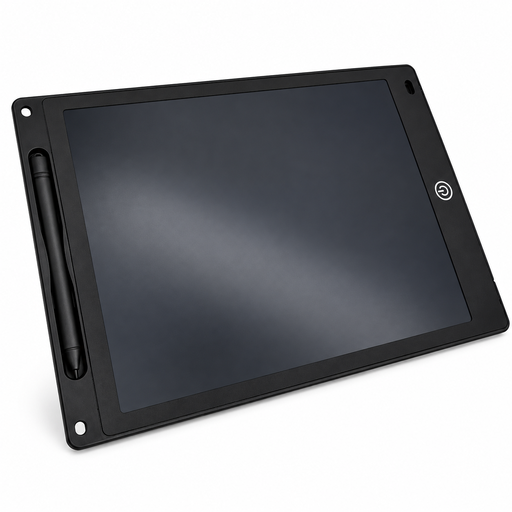
Black 12-inch LCD writing tablet with pen, erase button and lock function

12-inch LCD writing tablet with pen, erase button and lock function, 5 mm, Black

This reusable LCD writing tablet can be used to sketch greeting card designs; it doesn’t replace the need to check your layout software and print export.

The product title lists a pen, erase button, lock function and a thickness of 5 mm. According to the product description, the erase function is powered by a button cell, which may not be included.

View at Joybuy

Frequently asked questions

Can I create greeting cards with a pen tablet that has no screen?

Yes, if you use it with a compatible computer and drawing programme: you draw on the input surface and see the result on screen. Check the connection and driver for the specific model; Wacom lists USB connectivity for the One by Wacom Small, along with a driver for Mac and PC.

What should I check when setting up a pen display?

Check the video connection, cables, power supply and pen for the exact version of the device. XPPen describes the Artist 12 (2nd Generation) as having an HDMI connection via a 3-in-1 cable and a USB-C connection; the Wacom One 12 version DTC121W3B is sold without a pen or cable.

How do I turn my drawing into a print-ready greeting card?

Follow the specifications for your chosen print product and check that your software can export the required file. For a specific A5 greeting card, for example, Onlineprinters lists 300 dpi, 2 mm bleed on all sides and a minimum 4 mm margin between important content and the finished size. These specifications apply to the product mentioned, not to every printer.

What are my rights when shopping online in Germany?

Distance selling contracts generally come with a right of withdrawal under § 312g BGB. The standard period is 14 days under § 355 BGB, although when it starts and any exceptions depend on the contract. If goods are faulty, you’re also entitled to statutory consumer rights against the seller; these are separate from any voluntary manufacturer’s guarantee.

What should I look for in a pen and accessories?

Check what’s included with the exact model version and store the pen somewhere its tip won’t get damaged. Follow the instructions for your specific model when cleaning it or replacing nibs; an example list of accessories may not match what’s actually included.