Sketching by a bright window
If you want to avoid reflections while designing, compare a monitor you already own, an additional pen display and a portable tablet. What matters is how easy the display is to see at your particular workstation.


If you have a monitor you can position suitably, you can draw with a graphics tablet without a screen, without having to set up an extra display by the window. If you’d rather work directly beneath the pen tip, consider a connected pen display. For sketching without a computer, a standalone tablet with a compatible pen is a suitable option. An anti-glare specification alone doesn’t tell you how easy a display will be to see at your particular spot by the window.
If you want to avoid reflections while designing, compare a monitor you already own, an additional pen display and a portable tablet. What matters is how easy the display is to see at your particular workstation.
If you like to work on outlines directly beneath the pen tip, consider the drawing area, space available and computer connections together. With a graphics tablet without a screen, you’ll see your sketch on a separate monitor instead.
If you want to sketch in different places without a computer connected, look for a standalone device and a pen confirmed to be compatible.
A good fit if: You already have a suitable monitor and want to work on a separate drawing surface.
The trade-off: You look at the monitor rather than the pen tip as you draw, and its position still affects how easy it is to see.
A good fit if: You want to draw directly on the displayed sketch and have the right connections and enough space.
The trade-off: An additional display takes up space, and an anti-glare finish alone doesn’t guarantee good visibility by a window.
A good fit if: You want to sketch in other places, without a computer connected.
The trade-off: Check that the pen is compatible and included; when positioning the tablet, its angle to the window still matters.
| Buying priority | What to check before buying | Who it matters most to |
|---|---|---|
| Visibility in daylight by a window | Check the display surface, positioning angle and options for reducing glare at your workstation. | If I sketch right beside a bright window, I want to see my lines without distracting reflections. That’s why visibility in daylight by a window comes first for around 36% of consumers. |
| Drawing directly on the display | Compare the active area, overall dimensions, connection type and power requirements for the exact model. | I want to see outlines directly beneath the pen tip, rather than switching between a drawing surface and a monitor. Around 29% of consumers prioritise drawing directly on the display. |
| Portability and space | Check the overall dimensions, included pen, charging options and drawing app required for the specific version. | If I want to sketch without a fixed computer or clear my workspace afterwards, compact dimensions and a compatible pen matter. For around 21% of consumers, portability or a small footprint is the main priority. |
| Assessing colours and detail | Check the colour mode and calibration options of the display you’ll actually use; set separate requirements for presenting or printing your work. | For colour variations and fine design details, I need a display whose image quality I can assess. Around 14% of consumers prioritise assessing colour and detail. |
An anti-glare surface alone doesn’t prove that you’ll be able to see the display clearly at your spot by the window. The Federal Institute for Occupational Safety and Health points out that glare protection remains important, despite improvements in screen technology.
Check the display in the spot where you plan to use it, choose a suitable angle and add glare protection if needed.
With the Kamvas 13 (Gen 3), video output, data transfer and sufficient power depend on the computer port and cable you use.
Compare the manual with the ports and contents of the exact version. Depending on how you connect it, you may need extra cables or a power supply.
Apple sells the compatible Pencil Pro separately. Samsung lists an S Pen as included with the Galaxy Tab S10+, but doesn’t include a charging adapter.
Check what’s included with the device and accessories before choosing a combination.
A Joybuy page for the Galaxy Tab S10+ described it as a Wi-Fi model, but also listed a 14.6-inch display and 5G. This makes it unclear which version is actually being offered.
Compare the model number, display size, connectivity and what’s included before placing your order.
The examples below cover different types of device. They refer to the product ranges mentioned and don’t indicate whether a specific model is available.
Wacom offers graphics tablets for working with a monitor you already own, as well as pen displays for drawing on an additional screen.
The Kamvas 13 (Gen 3) is a compact pen display that connects to a computer, letting you draw directly on the screen.
The Artist Pro 16 (Gen 2) is a larger pen display that connects to a computer for drawing directly on the screen.
The iPad Air with M4 is a standalone drawing option if you’d rather not work with a computer connected.
Samsung describes the Galaxy Tab S10+ as a standalone Android option with an S Pen.
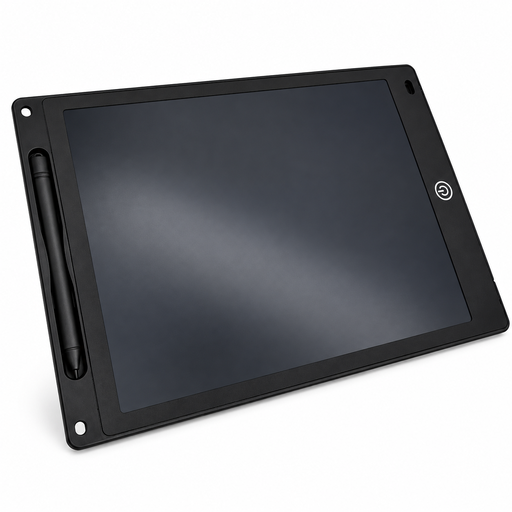
The Joybuy selection below features a reusable LCD drawing surface with a pen and erase button. Check whether this simple way of drawing will meet your fashion design needs.
 No image available
This reusable drawing surface has an erase button and lock function, and is designed for simple sketches. Whether it suits your design process depends on the level of detail you need.
12 inches; 5 mm thin; dark LCD background; built-in pen holder.
According to the product description, the coin-cell battery for the erase function may not be included. Use is intended to be supervised by an adult; keep the battery away from children.
No. It doesn’t automatically mean the display will be easy to see where you plan to use it. Check the positioning and glare protection. The Federal Institute for Occupational Safety and Health points out that glare protection remains important, even with improvements in screen technology. Workplace regulations don’t apply universally to private use outside a home-working setup.
No. For the one-cable setup described, Huion requires a fully functional USB-C cable and a suitable port that supports video output, data transfer and sufficient power delivery. The manual specifies at least 5 V/2 A, as well as USB 3.1 Gen 1 and DisplayPort 1.2 or later. You may need an additional power supply.
Huion lists a cleaning cloth as included with the Kamvas 13 (Gen 3). For anything else, follow the care instructions for the model you’ve bought rather than assuming the same cleaning products or replacement nibs will suit every display surface.
Check whether the pen, cable, stand and power adapter are included with the exact version: Apple sells the compatible Pencil Pro separately, Huion describes certain USB-C cables and the stand as optional, and Samsung lists an S Pen with the Galaxy Tab S10+ but no charging adapter. The consumer advice centre distinguishes your statutory rights against the seller from a voluntary guarantee. For online purchases, the right to cancel generally lasts 14 days; conditions and statutory exceptions apply.