First, check which release methods your exact camera model supports. For a fixed tripod setup, a compatible cable release may be all you need. If you move the flowers between shots, a compatible wireless remote is more practical. If your camera already supports a suitable app, or its self-timer does the job, you may not need any extra accessories. However, a remote release is no substitute for a stable setup or careful focusing.
Who could benefit from a remote release?
Close-ups using a tripod
If you’re photographing delicate details on petals or stems in a fixed spot, a compatible remote release can help you avoid touching the camera when taking a shot. Canon Academy recommends using a tripod for close-up photography. Also check that the connection and release are compatible with your camera.
Changing flower arrangements
If you move the dried flowers between shots and want to take pictures from where you’ve arranged them, a supported wireless remote or camera app could be a good option. Canon Germany states that the BR-E1 has a range of up to 5 metres. This applies to that specific model and requires a compatible camera.
Check the features you already have
Before buying an accessory, check whether your camera already has a remote-control app or a suitable self-timer. Make sure you look up the features for your exact model. Canon Germany describes Camera Connect as being for compatible cameras and mobile devices.
What should you look for when choosing one?
When choosing a remote release for photographing dried flowers by the window, start with the question that matters most to you: compatibility, a steady tripod setup, freedom to move around or a release method you already have.
Cable release
A good fit if: you’re staying in one spot with your tripod and your camera and connection are specifically supported.
Keep in mind: the cable length and connection limit how far you can move around.
Wireless remote
A good fit if: you want to adjust the flowers from your work area and take the shot from there, too.
Keep in mind: camera compatibility and available controls vary by model, and range figures don’t apply to every remote.
Camera app or self-timer
A good fit if: you want to try a remote-control feature or self-timer you already have before buying anything.
Keep in mind: app features depend on the camera and mobile device; a self-timer won’t let you take the shot from beside the arrangement.
| What matters when buying |
What to look for |
Who it matters most to |
| Camera compatibility |
Check your exact camera model against the manufacturer’s list, and consider the connection and any adapters you may need. |
If I want to be sure the release will work with my camera, I’ll check the model and connection first. Around 36% of consumers say compatibility is their top priority. |
| Steady tripod shots |
For a cable release, check the cable length and, where relevant, whether it supports half-pressing and a lock. Set up the camera securely and check your focus. |
When photographing delicate details on petals or stems, I don’t want to touch the camera when taking a shot. Around 29% of consumers say a steady close-up setup is their top priority. |
| Freedom to move around |
Check which remote model is supported and which controls you need. Only rely on range figures for the specific model they refer to. |
If I want to rearrange the flowers and take the shot from beside them, I need a compatible wireless connection. Around 21% of consumers say freedom to move around is their top priority. |
| Release options you already have |
Before buying an accessory, try the supported app-based remote control or the camera’s built-in self-timer. |
Before buying a separate accessory, I want to find out whether an app or self-timer will work for me. Around 14% of consumers want to try a solution they already have first. |
Avoid common buying mistakes
-
Choosing by camera brand or plug shape alone
Manufacturers list compatibility by camera model and connection type. A socket that looks similar doesn’t necessarily mean the release will work.
Check your camera’s full model name against the release’s compatibility list and connection details. For some listed cameras, Fujifilm also specifies a 2.5 mm to 3.5 mm adapter for the RR-100.
If you have one of these camera combinations, you’ll need to factor in the right adapter as well.
-
Assuming the range applies to every wireless model
Canon’s stated range of up to 5 metres applies to the BR-E1. It isn’t a general range figure for wireless remotes.
Choose wireless if you genuinely need to keep your distance in your setup, and check the details for the specific model and your camera.
-
Expecting the remote release alone to give you sharp pictures
A remote release helps you avoid touching the camera when taking a shot, but it won’t prevent every movement or correct incorrectly set focus.
Set up your camera securely and check the focus on fine dried-flower details, whatever release method you use.
-
Buying an accessory before checking the features you already have
Compatible camera apps may let you take pictures remotely, but the features available depend on the devices you’re using.
First, check which app features and self-timer options your camera supports.
Key brands at a glance
Canon
Compatible Canon cameras can be used with a range of release options, including wired releases, Bluetooth remotes and apps.
- Canon Germany lists an E3 remote connection with a 2.5 mm jack for the RS-80E3, and a Bluetooth range of up to 5 metres for the BR-E1.
- Connections and app support don’t automatically apply to every Canon camera, so check your exact model.
Nikon
Nikon lists the MC-DC3 as a cable option for supported Z cameras and the ML-L7 as a Bluetooth remote for compatible cameras.
- Nikon says the MC-DC3 supports half-pressing and has a lock. The ML-L7 includes buttons for taking pictures and recording video, among other controls.
- Compatibility varies by model and doesn’t apply across the board to all Nikon cameras.
Sony
The RMT-P1BT is a Bluetooth remote for Sony cameras that support this accessory.
- Sony says this model can be used without a clear line of sight.
- Before buying, check whether your exact camera model supports the RMT-P1BT. The manufacturer’s claim isn’t an independent real-world test.
Fujifilm
Fujifilm lists the RR-100 as a cable option for selected X and GFX cameras.
- Fujifilm says it supports half-pressing, taking a picture and locking the button for BULB or continuous shooting.
- For certain camera models, the manufacturer specifies that a separate 2.5 mm to 3.5 mm adapter is required.
OM SYSTEM
OM SYSTEM describes the RM-WR2 as a Bluetooth remote for the camera ranges listed on its German website.
- The manufacturer lists several function buttons and a weather-resistant design for this model.
- Compatibility and features apply to the RM-WR2 and the specific cameras listed.
Joybuy products for smartphone photography
The Joybuy options below are smartphone holders or tripods with a remote release. They’re suitable for photographing dried flowers only if you’re using a smartphone instead of a camera. They aren’t listed as camera remote releases.
 No image available
Verbex K60 smartphone grip with detachable Bluetooth remote
For taking smartphone photos from a little further away; the product description specifies a detachable Bluetooth remote for this purpose.
With a 1/4-inch tripod thread.
View at Joybuy
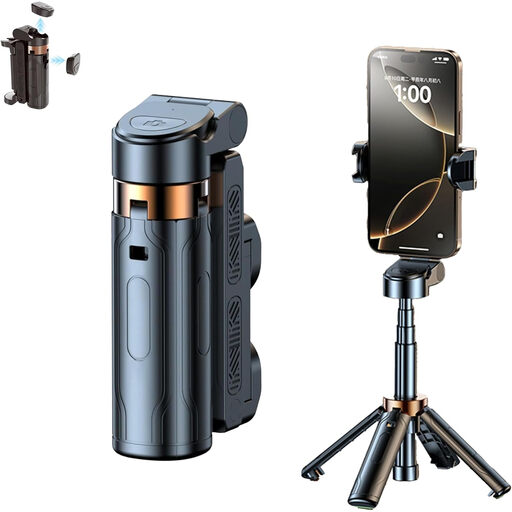 No image available
3-in-1 Bluetooth selfie stick with tripod and rotating smartphone holder
For hands-free smartphone photography; according to the product description, you can use the detachable Bluetooth remote to take pictures.
The product name specifies a 360° rotating holder and an extendable selfie stick with a tripod.
View at Joybuy
 No image available
Magnetic smartphone grip with remote and fill light (Black)
For taking smartphone photos from a little further away; the description specifies a detachable Bluetooth remote.
Product details list a built-in fill light and a 1/4-inch tripod thread.
View at Joybuy
 No image available
KINSI smartphone tripod with Bluetooth remote
For hands-free smartphone photography in a fixed spot; the description specifies wireless shutter release without touching the smartphone.
Described as a folding, height-adjustable tripod.
View at Joybuy
 No image available
Ulanzi JJ02 mini tripod with handgrip and Bluetooth remote
For hands-free smartphone photography; the product description specifies a wireless remote for the smartphone camera.
The product name lists a mini tripod, handgrip and two cold shoe mounts. The description recommends using a stable surface and securely attaching your smartphone.
View at Joybuy
Frequently asked questions
Can a remote release replace a tripod or focusing?
No. A remote release helps you avoid touching the camera when taking a shot, but it’s no substitute for a stable setup or precise focusing. It won’t stop the flowers from moving either.
How do I set up a Bluetooth remote?
First, check that your camera and remote are specifically compatible, then follow the instructions for that exact combination. Pairing steps and available features may vary by model.
Do I need a timer remote release for photographing dried flowers?
Not just because of the subject. For individual shots, the first thing to check is that the release method is compatible with your camera and lets you take the picture without pressing on the camera body. A lock is only useful if you need it for your workflow; Nikon says the MC-DC3 has one for uses including long exposures and continuous shooting.
Might I need an adapter as well as a remote release?
Yes, depending on the camera and release. For certain listed cameras, Fujifilm specifies an additional 2.5 mm to 3.5 mm adapter for the RR-100. Before buying, check the details for your specific camera combination.
What should I look for on the labelling of a wireless remote in Germany?
Devices covered by relevant harmonised EU legislation must meet conformity and labelling requirements. Germany’s Federal Network Agency notes that retailers must ensure affected devices carry the correct CE marking. The marking alone doesn’t confirm that the remote is compatible with your camera.


