What should you look for when buying a reader for use in a café?
First, check the card format and device connection. Then decide whether you need extra hub ports as well as a card reader.
| Priority |
What to check before buying |
Who is it most important for? |
| Card and connection compatibility |
Check that the reader matches your drone’s card format and your device’s USB-A or USB-C port. |
If I want to connect the card directly, without extra adapters, the slot and device connection need to match. Around 33% of consumers pay particular attention to card and connection compatibility. |
| Verifiable backup |
Check the available storage space and file access on the device you’re copying to. Open the copied files before deleting the originals from the card. |
If I want to make a second copy while I’m out, I want to be able to check it before deleting the originals. Around 27% of consumers put a verifiable backup first. |
| Transferring large video files |
Check the card’s UHS standard and the connection on the device you’re copying to, as well as the reader’s specifications. |
When dealing with large files, I want to know whether the card, reader and device I’m copying to can all use the same standard. Around 20% of consumers prioritise transfer speed. |
| Travelling light |
Choose only the card slots and connections you need, and consider whether you need extra charging or ports. |
If I’m packing a reader for a quick copying break, I want to take as little extra kit as possible. Around 20% of consumers prioritise keeping their kit simple over extra hub features. |
Joybuy card readers and hubs
The models below include card readers and USB-C hubs with SD or TF slots for copying files to compatible devices. Before buying, check that the card format and connection suit your drone’s card and the device you’re copying to.
 No image available
Acer 7-in-1 USB-C hub with SD and TF card reader
A good choice if you want to combine card reading with extra ports on a USB-C device.
Features HDMI, three USB 3.0 ports, an SD and TF card reader, and a PD charging port. The title lists HDMI at 4K@30Hz and USB 3.0 at 5 Gbit/s.
View at Joybuy
 No image available
4-in-1 USB-C card reader with USB-A OTG adapter
A good choice if you want to connect SD or microSD cards to a compatible USB-C device and also use a USB-A OTG adapter.
The product description lists USB 2.0, speeds of up to 480 Mbit/s, and support for SD, microSD and SDXC cards.
View at Joybuy
 No image available
HOCO HB45 Spirit 2-in-1 USB 3.0 card reader
A good choice if your device has a compatible USB-A port and you want to read SD or TF cards.
The product description lists USB-A and SD and TF slots, which can be used at the same time.
View at Joybuy
 No image available
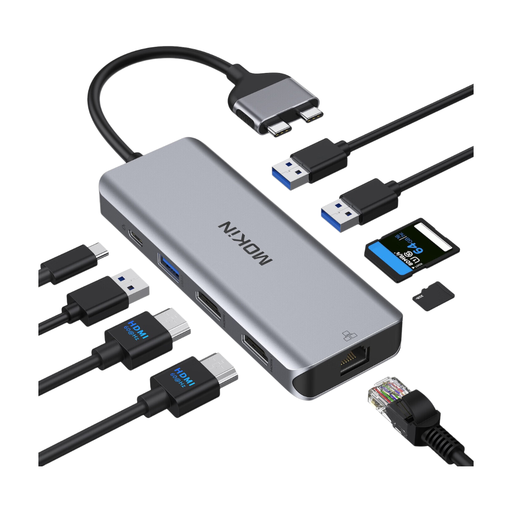
Mokin dual-port USB-C docking hub with HDMI, USB, Ethernet and SD/TF
A good choice if you want to combine card slots with extra ports on a compatible USB-C device.
The product description lists SD/TF slots, HDMI, USB 3.0, USB 2.0, Ethernet and a PD charging port. According to the description, this model isn’t compatible with MacBook models with standard M1, M2 or M3 chips; Intel, M-Pro and M-Max models are listed as compatible.
View at Joybuy
 No image available
Baseus Lite Series USB-A card reader for SD and TF cards, Grey
A good choice if your device uses USB-A and you want to read SD or microSD/TF cards.
The product description lists a maximum transfer rate of up to 104 MB/s. This is a product specification, not a measurement of your particular card, reader and device combination.
View at Joybuy
Frequently asked questions
Does my card reader need to support UHS-II?
No, not simply because you’re copying drone videos. Check your card’s standard: the SD Association describes UHS-II as a faster interface, but how much difference it makes depends on the card and the device you’re copying to.
Can I read my drone’s microSD card directly on an iPhone?
You can, with a suitable card reader or adapter, provided the connection and file access are compatible with your iPhone. Apple Support also highlights requirements for formatting external storage devices.
Can I delete the footage from the card straight after copying it?
Keep the originals on the card for now, and check that the files you need have transferred and can be opened on the device you copied them to. The BSI explains how backup copies can protect against data loss caused by device failure or accidental deletion. The card reader alone doesn’t give you an additional backup.
What are my rights when buying a card reader online in Germany?
When you buy from a business seller in the EU, you’re generally entitled to a minimum two-year legal guarantee from the date you receive the goods, as explained by Your Europe, the European Union’s information portal. Online purchases generally come with a 14-day right to cancel, although exceptions may apply depending on the goods and contract, as set out by the Council of the European Union. A voluntary manufacturer’s warranty doesn’t replace your statutory rights.


