
Lieferung heute & morgen

Qualitätsgarantie

Willkommens-Angebote freischalten: KOSTENLOSE Lieferung | Bis zu 80 % RABATT | Kostenlose 30-Tage-JoyPlus-Testphase
App herunterladen
Finding the right keyboard can be a challenge. Many users of standard membrane keyboards are familiar with the feeling of imprecise keystrokes, a lack of durability, and missing customisation options. This is where a mechanical keyboard comes in, offering an alternative designed for precision, a superior typing feel, and a long lifespan.
This guide is designed to help you understand the different features and models available. We will introduce a selection of keyboards that cater to various needs and budgets, providing you with an informed basis for your decision.
The selection is vast, and technical terms can be confusing. Here are three key aspects to help you navigate your options.
The physical size and key layout are crucial in determining functionality and the amount of space it takes up on your desk.
The defining characteristic of a mechanical keyboard is the individual switches under each key. These determine the typing feel and acoustics. A hot-swap keyboard also allows you to change the switches without soldering, offering maximum flexibility for a custom mechanical keyboard.
The way the plate and PCB assembly is mounted in the case has a significant impact on the typing feel and sound. A modern and sought-after method is the gasket mount. With this design, the plate assembly is suspended between silicone or Poron gaskets. This dampens vibrations, creating a softer typing feel and a fuller, more muted sound.
Based on the criteria mentioned, we have compiled a selection of models that cover different use cases.
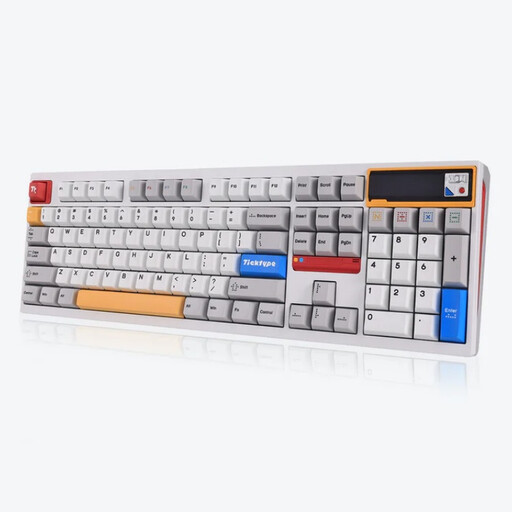
Why it stands out: The Ticktype DP104 is a premium, full-size model that leaves little to be desired. Its powder-coated aluminium case and Leaf Spring Mount structure, a variation of the gasket mount, provide an exceptionally dampened and pleasant typing feel. A special feature is the customisable pixel screen, which can display GIFs, system information, or logos.
Pros:
Who it's for: For power users, programmers, and enthusiasts looking for a no-compromise, full-size wireless mechanical keyboard who value high-quality materials, a rich sound profile, and advanced features.
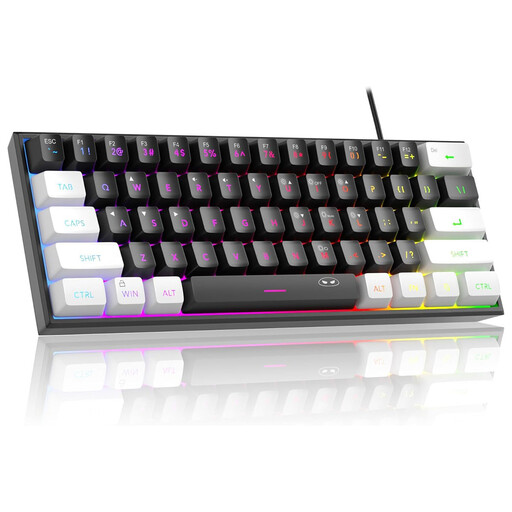
Why it stands out: The MageGee TS91 is a highly affordable option for anyone wanting to enter the world of compact keyboards. It uses membrane technology that, according to the manufacturer, imitates a "mechanical feel." Its ultra-compact 60% layout creates maximum desk space.
Pros:
Who it's for: For beginners and budget-conscious buyers who want to try the 60% form factor or need a simple, space-saving gaming keyboard for occasional use. It is important to note that this is a membrane keyboard, not a true mechanical one.
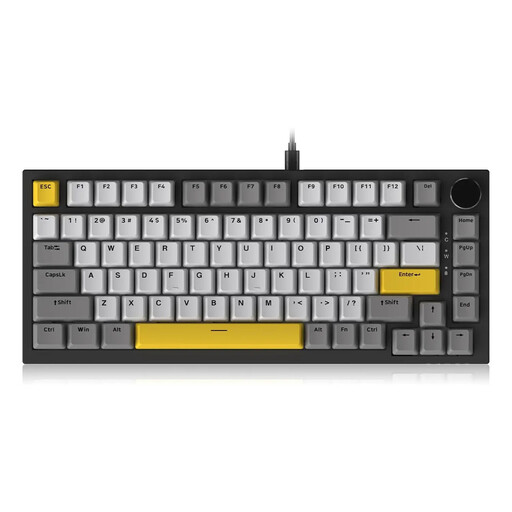
Why it stands out: The AJAZZ AK820 offers an impressive package of modern features in a popular 75% layout. The combination of a gasket mount, multi-layer Poron foam sound dampening, and a flexible PC positioning plate ensures a soft, cushioned typing feel. The CNC-machined rotary knob for volume control is a practical and high-quality detail.
Pros:
Who it's for: For gamers, prolific typists, and tech enthusiasts looking for a modern 75% keyboard with a premium typing experience. It's an excellent choice for anyone who wants features like a gasket mount and a rotary knob in a compact and functional package.
If the right model for you isn't among these recommendations, there are many other variations to discover. Different designs, layouts, and colourways offer a solution for every taste.
Discover more models in our White Computer category.
Mechanical keyboards generally offer higher precision, as each keystroke is consistent and clearly defined. The switches are rated for a high number of actuations (often 50 million or more), making them very durable. Furthermore, they allow for a high degree of customisation through the replacement of switches (hot-swap keyboard) and keycaps.
Yes. A quiet mechanical keyboard can be achieved by choosing the right components. Linear switches are inherently quieter than tactile or clicky variants. Additionally, design features like a gasket mount and the use of dampening materials like Poron foam significantly reduce noise.
Most modern mechanical keyboards are compatible with both Windows PCs and Macs. Many models offer a toggle mode or dedicated keycaps for each operating system. It's advisable to check the product description for explicit compatibility details for PC and Mac, especially regarding the software used to customise the RGB keyboard or macros.