
Lieferung heute & morgen

Qualitätsgarantie

Willkommens-Angebote freischalten: KOSTENLOSE Lieferung | Bis zu 80 % RABATT | Kostenlose 30-Tage-JoyPlus-Testphase
App herunterladen
By the Joybuy Product Recommendation Officer, 29 August 2026
Mechanical keyboards offer a precise and satisfying typing experience that can boost productivity. However, their signature "clicky" sound, prized in gaming circles, is often a distraction in a professional setting—whether in an open-plan office or a home study. The search for a "quiet mechanical keyboard" often leads to a dead end of marketing promises and technical pitfalls. Before you make a purchase, understand the common mistakes that lead to frustration and buyer's remorse.
Common Pitfalls When Buying a Quiet Keyboard:
To make an informed decision that enhances your daily work, focus on three core features. These characteristics define whether a mechanical keyboard is truly suitable for professional use.
The switch beneath each key determines the typing feel and noise level. For a quiet work environment, two types are most relevant:
Additionally, the low-profile mechanical keyboard is gaining popularity. These models use slim (low-profile) switches and keycaps, which results in shorter key travel and promotes a more ergonomic hand posture, similar to a laptop keyboard.
In modern work environments, switching between different devices is standard practice. A high-quality office keyboard for both corporate and home use must meet this demand. Look for the following features:
For users in English-speaking regions, a QWERTY mechanical keyboard layout is essential for efficient work. A wireless keyboard with backlighting also offers a significant advantage in low-light conditions. Smart illumination systems that automatically adjust to ambient brightness and activate when your hands approach help conserve battery life and enhance comfort.
Based on the criteria above, we have identified products that meet the specific needs of professional users.

Why This Fits Their Persona: Ideal for power users, developers, and creatives who switch between multiple systems daily (e.g., a Windows desktop and a MacBook). The low-profile design and quiet switches allow for hours of focused work without fatigue or noise disturbance.
Uses specially designed tactile quiet mechanical switches for tangible feedback without distracting noise. Easy-Switch technology allows seamless switching between up to three devices. It avoids the layout trap by being available in specific regional formats, including QWERTY. Be sure to select the correct layout for your region.
Smart, adaptive backlighting and long battery life (up to 15 days with, or up to 10 months without backlighting). A high-quality aluminium case provides stability and durability.
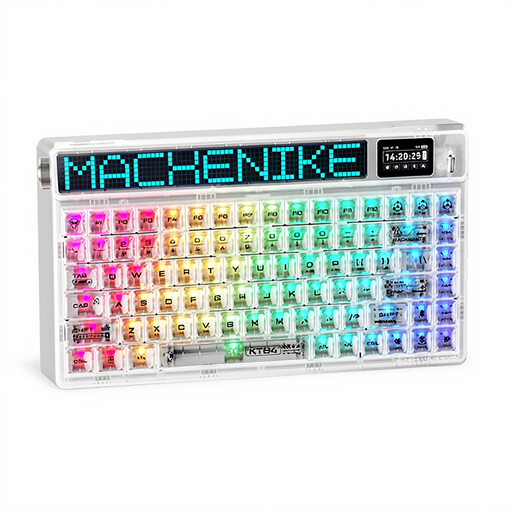
Why This Fits Their Persona: Suitable for programmers or users with limited desk space who prefer a compact 75% layout. The linear switches enable rapid key presses, which can also be beneficial for occasional gaming.
The Gateron Yellow switches are linear switches, making them significantly quieter than clicky variants. Tri-mode connectivity offers maximum flexibility. Important Note: This model has a QWERTY US layout, which requires a conscious decision from the user.
A very compact design that leaves more room for the mouse. The integrated Smart Screen is a unique feature for displaying system information or custom graphics.

Why This Fits Their Persona: A quiet keyboard is only half the battle. This headset complements the setup for users who frequently participate in video conferences and need to ensure clear, disruption-free communication without being distracted by ambient noise.
It addresses the noise problem from the other direction: The noise-cancelling microphone filters out background sounds—including any residual keyboard noise—to ensure your voice is transmitted clearly to the other party.
Simple in-line controls for volume and mute. The universal 3.5mm jack ensures compatibility with most PCs, laptops, and tablets.
We have compiled a complete, real-time list of products that fully satisfy these strict selection criteria and UK safety regulations.
1. Are quiet mechanical keyboards completely silent? No, they are not completely silent. The term "quiet" refers to the absence of the loud, high-frequency click. A quiet mechanical keyboard produces a dampened, lower-pitched sound that is significantly less obtrusive than that of traditional mechanical or even some membrane keyboards. The noise level is generally perfectly acceptable for an office environment.
2. How do I connect a multi-device keyboard to multiple devices? The process is usually very simple. The keyboard has dedicated keys (often called "Easy-Switch") assigned to each device. To pair a device, press and hold the desired key until it blinks rapidly, then select the keyboard in the Bluetooth settings of your computer or tablet. Once paired, you can instantly switch between devices with a short press of the respective key.
3. Does a wireless keyboard with backlighting need frequent charging? This depends heavily on usage intensity and the brightness of the backlighting. Models like the Logitech MX Mechanical offer up to 15 days of battery life with smart illumination enabled. If you disable the backlighting, the battery life can extend to several months (up to 10 months, according to the manufacturer). Thanks to USB-C fast charging, a 15-minute charge is often enough for a full day of work.