If you need to keep both a script and a video call in view, and regularly want to adjust your screens, two independently movable arms could be a good choice. If your monitors usually sit side by side, a mount with a shared post may be enough. Before you buy, check the weight and VESA mounting pattern of both monitors, as well as how the mount attaches to your desk. The DGUV recommends positioning your line of sight parallel to the window front at screen-based workstations. A monitor arm alone is no substitute for suitable glare protection when sunlight is a problem.
Who is this solution for?
Reading scripts during video calls
If you need to follow text and a conversation at the same time, it can be important to position your script and call screens to suit one another. DURABLE describes both a version with flexible arms and one with a shared post.
Workspaces by bright windows
If you work in changing daylight, consider your screen angle and workstation position together. The DGUV recommends positioning your line of sight parallel to the window front when using a screen; additional glare protection may be needed if incoming light is distracting.
Buyers with a fixed desk and monitor setup
What matters is whether your monitors’ mounting patterns and weight, along with the desk’s construction and thickness, are within the limits of the specific mount. Manufacturer specifications can vary by model and mounting method.
What should you look for when buying?
| Consideration |
What to check before buying |
Who it matters most to |
| Positioning your script and call |
Independent adjustment and accessible positions; space behind the desk. |
If I follow a script and a conversation side by side, I want to position both screens to suit one another. This is the top priority for around 31% of consumers. |
| Screen readability by a window |
Screen angle at different times of day; take workstation position and existing sun protection into account. |
In changing light, I don’t want to have to keep adjusting my screens just to counter distracting reflections. Readability by a window is the main concern for around 31% of consumers. |
| Monitor and desk compatibility |
VESA mounting pattern and weight of both monitors; desk thickness and a suitable clamping point. |
If I’m keeping my existing monitors and desk, I want to know that both can be mounted securely with the mount I choose. This compatibility takes priority for around 23% of consumers. |
| Features and service |
Check that the range of adjustment meets your needs; read the warranty terms for the specific model. |
When weighing up cost and service terms, I want to pay only for features that suit how I position my screens. This is a priority for around 15% of consumers. |
Common buying mistakes
-
Expecting a monitor mount to provide complete glare protection
Even if you reposition your monitor, direct sunlight or awkward reflections can still make the screen hard to read.
Start by checking your line of sight, the light from the window and any sun protection already in place. Then choose an arm with the range of movement you need to position your screens.
If a lot of light comes in, you may also need suitable sun protection.
-
Comparing only the advertised screen size
The weight, VESA mounting pattern and desk construction can rule out a mount, even if your screen size is within the stated range.
Check the specifications for both monitors and the desk against those for the exact model variant you’re considering.
-
Assuming a shared post is the same as two independently movable arms
Height adjustment may work differently with a shared post than with two independently movable arms. This affects how flexibly you can position your script and call screens.
Before choosing, consider whether you’ll often move the monitors separately or mainly use them side by side without changing their position.
Key brands at a glance
DURABLE
The SELECT models described differ mainly in whether they have flexible arms or a shared post.
- According to DURABLE, both models reviewed support VESA 75 × 75 and 100 × 100 mm, with a maximum of 8 kg per monitor.
- SELECT is specified for standard monitors up to 27 inches, while SELECT PLUS is specified for monitors up to 32 inches.
- Check the desk and adjustment limits for the specific model; the versions do not offer the same range of movement.
ARCTIC
According to ARCTIC, the Z2-3D (Gen 3) is a dual arm with gas springs for positioning screens separately.
- ARCTIC specifies VESA 75/100, a maximum of 8 kg per arm and a permitted desk thickness of 20–65 mm.
- The stated maximum monitor width applies to two equally wide monitors positioned horizontally. For hollow-core desks, ARCTIC recommends using a reinforcement plate.
Ergotron
According to Ergotron, the LX Dual Monitor Arm with tall pole allows two monitors to be positioned separately.
- For the standard two-monitor configuration, Ergotron specifies a load capacity of 3.2–10 kg per arm.
- Different load limits apply when adding a third or fourth monitor; these specifications should not be confused with those for the two-monitor configuration.
Invision
According to the manufacturer, the MX400 is a gas-assisted dual arm with a choice of clamp or desk grommet mounting.
- Invision specifies a load capacity of 2–9 kg per arm, VESA 75/100 and monitors from 19–32 inches.
- Check which mounting method suits your desk and the setup you want.
Novus Dahle
The Clu-Duo range includes dual arms with gas springs; the generation and mounting option are key considerations.
- The Clu Duo XL C reviewed is marked as discontinued by Novus Dahle, which also mentions a new version.
- Specifications for the previous version, including 2–7 kg per monitor and a desk thickness of 10–50 mm, should not be assumed to apply to the new version without checking.
Joybuy products for your desk
The range includes everything from adjustable dual arms to monitor stands. Decide whether you want to position your screens independently or use a raised platform.
 No image available
AOKCOS monitor stand for 2 monitors, 12–27 inches, height-adjustable, with shelf
Could suit you if you want to position two monitors at an adjustable height and make use of extra shelf space.
Details in the product title: 12–27 inches, with swivel and tilt functions. Check that the dimensions and mounting method suit your monitors and desk.
View at Joybuy
 No image available
AOKCOS monitor stand for 2 monitors, 12–27 inches, height-adjustable
Could suit you if you want to set up two monitors at an adjustable height and change their orientation.
Details in the product title: 12–27 inches, with rotation and tilt functions. Check the dimensions and mounting method against your specific setup.
View at Joybuy
 No image available
Floordirekt gas spring dual monitor arm, 15–32 inches, black
Could suit you if you want to adjust two monitors separately with a gas spring arm.
The product title specifies 15–32 inches. Check the VESA mounting pattern, the weight of both monitors and the desk mounting method that suits your setup.
View at Joybuy
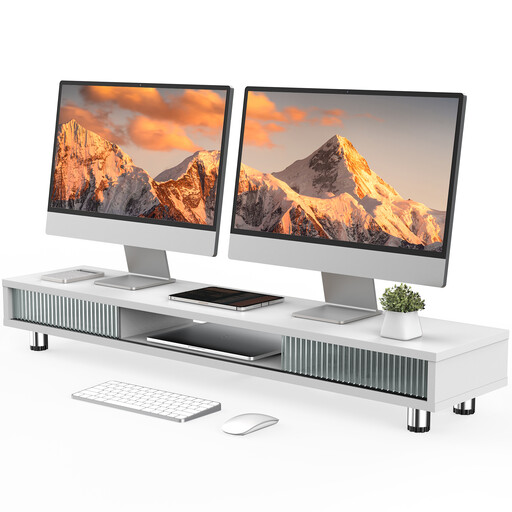 No image available
Monitor stand with 2 glass sliding doors, 108 cm, height-adjustable, white
Could suit you if you want to raise your monitors and add extra storage to your desk.
Details in the product title: 108 cm wide, two glass sliding doors and a height-adjustable design. Check that it will fit on your desk.
View at Joybuy
 No image available
Floordirekt monitor stand for 2 monitors, 80–108 cm, MDF, black
Could suit you if you want to position two monitors side by side or at an angle and adjust the width of the stand.
The product title specifies a width of 80–108 cm and MDF construction. The height is stated as a fixed 10.4 cm; check that this position suits your seating and screen height.
View at Joybuy
Frequently asked questions
Will an adjustable monitor arm protect against sunlight and reflections?
Not necessarily. The DGUV recommends positioning your line of sight parallel to the window front at screen-based workstations; extra glare protection may be needed if the light changes. So remember to consider the position of your window and any existing sun protection.
How can I check that the mount will fit before buying?
Check the mounting pattern and weight of both monitors against the specifications for the specific mount. Also check your desk’s thickness and construction. For hollow-core desks, ARCTIC recommends a reinforcement plate to help prevent damage from clamping.
Are a manufacturer’s warranty and statutory rights the same thing?
No. The Verbraucherzentrale distinguishes between your statutory claim against the seller and a voluntary warranty. The manufacturer’s specific terms and conditions apply to its warranty.
Is a particular type of dual monitor arm required for a screen-based workstation by a window?
ASR A6 does not require you to buy a particular type of monitor mount. The Federal Institute for Occupational Safety and Health describes its scope as covering screen-based workstations in workplaces and at telework workstations; the specific classification depends on how the workstation is used. It does not apply to screen use solely in a private setting outside a telework workstation.


