For viewing a presentation and notes side by side, a dual arm with independently adjustable arms is an obvious choice, provided your desk edge and desktop allow for a suitable clamp or grommet mount. If not, a freestanding dual stand is an option, though it takes up desk space; a wall mount requires a suitable wall. You’ll also need to check each monitor’s VESA pattern and weight, as well as the limits of the specific mount model.
Who can benefit from a dual monitor mount?
People who regularly switch between slides and notes
If you want to position both screens independently and keep them within easy reach as you switch between views, focus on the range of adjustment and the position of the screens you actually use. Manufacturers’ specifications describe the adjustment options for dual arms; they don’t prove a general productivity boost.
People with limited desk-mounting options
If a clamp or grommet mount isn’t suitable, consider whether there’s room for a desk stand or whether wall mounting is an option. The Neomounts FPMA-D550DDBLACK and FPMA-W960D models represent these different mounting types.
Owners of monitors in different sizes
If you’re using two different screens, check the VESA pattern, weight and clearance needed for each monitor separately. The screen size in inches alone doesn’t tell you whether both monitors will fit the same mount.
What should you look for when choosing one?
Manufacturer specifications help you compare positioning, VESA compatibility and mounting space. The German Social Accident Insurance (DGUV) studied tasks using one or two screens; this doesn’t establish a general productivity boost.
| Buying consideration |
What to look for |
Who it matters most to |
| Positioning presentations and notes |
Check that each screen can be adjusted independently for height and depth, and that there’s enough room to move both. |
If I switch between slides and notes, I want to position both views to suit me. Around 33% of consumers are likely to prioritise independent positioning. |
| Mounting both monitors |
Check each monitor’s VESA pattern and weight against the limits of the model you’ve chosen. |
If you use two different screens, you need a mount that suits both. Around 27% of consumers are likely to prioritise monitor compatibility. |
| Desk mounting |
Check the desktop’s thickness and construction, access to the desk edge, and the space behind the desk. |
If space is limited, the mount must suit the desktop and the arms need enough room to move. Around 20% of consumers are likely to prioritise a suitable desk mount. |
| Avoiding clamps or wall mounting |
Check the space required and the stand’s load capacity, as well as the height you want for both screens. |
If you don’t want to mount anything to your desk or wall, you’ll need a freestanding stand and enough clear space. Around 20% of consumers are likely to prefer this type of setup. |
Avoiding common buying mistakes
-
Focusing only on the advertised screen size
A suitable screen size alone doesn’t guarantee that the VESA pattern and weight are within the arm’s limits. For the Neomounts DS70-250BL2, the manufacturer also distinguishes between flat and curved screens.
Check the VESA pattern and weight of both monitors in their respective documentation, then compare them with the full specifications for the model you’ve chosen.
-
Ordering a clamp mount without checking your desktop
Mounting limits vary by model. For the ARCTIC Z2-3D (Gen 3), the manufacturer specifies a desktop thickness of 20 to 65 mm and recommends a reinforcement plate for hollow-core desktops to prevent clamp damage.
Check your desktop’s thickness and construction against the instructions for the specific mount. If the clamp won’t fit, consider a freestanding stand or another mounting option that suits your room.
A suitable reinforcement plate may be needed for a hollow-core desktop.
-
Assuming a stand will always save space
A freestanding dual stand avoids the need for a clamp or wall mount, but it does take up space on your desk.
Before choosing one, check the space on and behind your desk with both screens mounted and the arms’ full range of movement in mind.
Brands to consider
Neomounts
The DS70-250BL2, FPMA-D550DDBLACK and FPMA-W960D models represent gas-spring dual arms, a desk stand and a wall mount.
- The manufacturer specifies a maximum of 8 kg per screen for the FPMA-D550DDBLACK stand, and a maximum of 6 kg per screen for the FPMA-W960D wall mount.
- These load limits apply to different models and aren’t interchangeable.
ARCTIC
The Z2-3D (Gen 3) is a gas-spring dual arm with an integrated USB hub, designed for suitable desk mounting.
- ARCTIC specifies 8 kg per arm and VESA 75 × 75 and 100 × 100 mm.
- According to the manufacturer, the maximum monitor width of 820 mm applies to two monitors of equal width positioned horizontally. ARCTIC recommends a reinforcement plate for hollow-core desktops.
Ergotron
The LX Dual Side-by-Side, part number 45-491-216, is described as a dual arm for side-by-side screens.
- The international manufacturer’s website specifies 3,2–9,1 kg per monitor, VESA 75 × 75 and 100 × 100 mm, and a desk clamp for edges up to 66 mm thick.
- These specifications apply to a US version. Check the contents and conditions of the specific version offered in Germany separately.
HUANUO
The HNDS6 is described as a dual arm with clamp or grommet mounting.
- For its US listing, the manufacturer specifies 13–32 inches and 4,4–19,8 lb per arm.
- These specifications don’t confirm availability or warranty terms for a product offered in Germany.
ICY BOX
The IB-MS314-T is described as a dual arm with clamp or grommet mounting and removable VESA adapters.
- The English-language manufacturer’s website specifies two screens up to 32 inches, VESA 75 × 75 and 100 × 100 mm, and up to 8 kg.
- German-language page titles refer to both the IB-MS314-T and IB-MS304-T. Before ordering, check the full model number and specifications for the version on offer.
Joybuy products at a glance
These Joybuy products range from freestanding monitor stands to a dual arm for desk mounting. Before choosing, check which design suits your desk and both monitors.
 No image available
AOKCOS monitor stand for two monitors, 12–27 inches
A suitable option if you want to position two screens independently.
VESA 75 × 75 or 100 × 100 mm; up to 10 kg per arm; height adjustment from 120 to 927 mm.
View at Joybuy
 No image available
AOKCOS monitor stand with wooden shelf, 12–27 inches
The described combination of two adjustable arms and a wooden shelf may suit you if you want extra storage as well as adjustable monitor positions.
VESA 75 × 75 or 100 × 100 mm; up to 10 kg per arm.
View at Joybuy
 No image available
Floordirekt monitor stand for two monitors, black
According to the description, the side platforms swivel independently and the width can be adjusted to suit your setup.
MDF; width 80–108 cm; fixed height of 10,4 cm.
View at Joybuy
 No image available
Floordirekt gas-spring dual monitor arm, 15–32 inches
For two independently adjustable monitors, if a clamp or grommet mount is suitable for your desk.
VESA 75 × 75 or 100 × 100 mm; 2–10 kg per arm. Both mounting options require a suitable desk edge or grommet hole.
View at Joybuy
 No image available
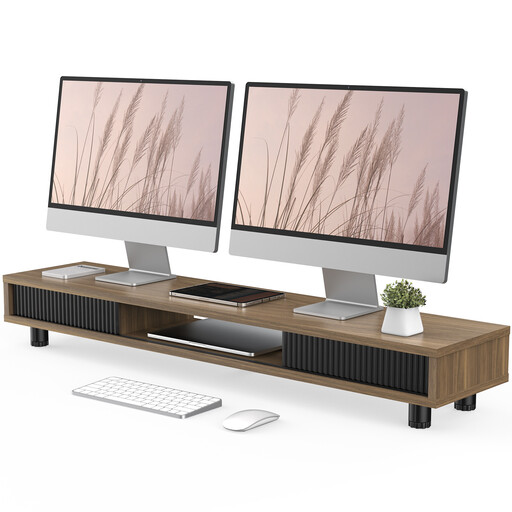
Monitor stand with two glass sliding doors, 108 cm, brown
With its compartments, this monitor stand could also help you organise desk accessories. Check that the surface area and dimensions suit your monitors.
108 cm wide; three compartments; levelling via screw feet.
View at Joybuy
Frequently asked questions
Can I fit any 32-inch monitor to a mount advertised for 32-inch screens?
No, the screen size alone isn’t enough. For each monitor, also check its VESA pattern and weight against the limits of the specific arm. For example, Neomounts specifies 1–9 kg per screen for the DS70-250BL2, and a maximum of 8 kg for curved screens.
What should I bear in mind with a hollow-core desktop?
For the ARCTIC Z2-3D (Gen 3), ARCTIC recommends a reinforcement plate for honeycomb or sandwich desktops with hollow cores to prevent clamp damage. Also check the fitting instructions for your specific mount and the construction of your desktop.
What can I do if a monitor arm I bought online is faulty?
Your statutory rights against the seller are separate from any voluntary manufacturer’s warranty. If there’s a fault, repair or replacement may initially be available as a remedy; the consumer advice centre explains that the seller covers the relevant transport, labour and material costs. For a distance purchase made by a consumer, you’ll generally also have a right to cancel within 14 days of receiving the goods; exceptions and the specific contract should be taken into account.
Do workplace screen regulations automatically apply to every home office?
No. Among other things, the Workplace Ordinance defines a teleworking workstation as a screen-based workstation permanently set up by an employer in a private home, with agreed working hours and duration. Section 1(4) of the Ordinance specifies which rules apply to such workstations. You can’t determine whether these conditions are met simply from the term ‘home office’; ASR A6 doesn’t impose a general approval requirement for monitor mounts bought for private use.


