If you regularly reconcile accounts and invoices and want to position your two monitors differently, a dual arm with a suitable desk clamp or grommet mount offers flexibility. If you can’t or don’t want to attach anything to your desk, a freestanding dual stand is an option, provided you have enough space. With either type, check the VESA pattern and weight of each monitor, as well as the space needed for your preferred setup.
Which option is right for you?
For reconciling accounts and invoices
If you use two views at once, you can position the one you read more often to suit the task. The German Social Accident Insurance (DGUV), Institute for Occupational Safety, reports that results with dual screens vary depending on the task and screen configuration.
For a home office with limited desk space
If there’s little room alongside your keyboard and two monitors, a dual arm attached to the desk can free up the space beneath the screens. First, check that the clamp or grommet mount is suitable for your desk.
For a desk without a suitable clamping point
If you can’t or don’t want to use a desk clamp or grommet mount, a freestanding dual stand is a possible alternative. Make sure you allow for the space the base will take up.
What should you look for when buying?
Dual arm with desk mount
A better fit if: you often want to position the screens differently while reconciling information, and your desk can accommodate a suitable clamp or grommet mount.
Bear in mind: your desk needs a suitable mounting point, with enough room behind or beside it to move the screens.
Freestanding dual stand
A better fit if: you don’t want to attach anything to your desk and have room for a base on the desktop.
Bear in mind: the base takes up desk space, so check its dimensions and make sure it allows for your preferred screen positions.
Your choice depends on which view you read more often and whether your desk can accommodate a mount or has enough room for a stand base.
| What you need |
What to check |
Who should consider this? |
| Positioning accounts and invoices |
Check the range of adjustment and spacing to make sure both of your monitors will fit in the positions you want. |
If you switch between two views when reconciling information, you’ll want to position the one you read more often accordingly. Around 40% of consumers prioritise flexible positioning. |
| Mounting your monitors |
Check the VESA pattern and weight of each monitor against the specifications of the exact model. |
If you want to keep using your existing screens, both need to be mechanically compatible with the mount. Around 30% of consumers put screen compatibility first. |
| Mounting on your desk |
Check the desk edge, desktop construction and the maximum desktop thickness allowed by the mount. For a stand, check the available space. |
If your desk doesn’t have a suitable place for a clamp or grommet mount, you’ll need a different mounting option. Around 20% of consumers prioritise being able to mount a screen on their existing desk. |
| Cables and accessories |
Check the cable management, what’s included and whether you’ll need adapters for your monitors or desk. |
If the arms move, the cables need to remain suitably routed in the positions you want to use. Around 10% of consumers focus mainly on cables, accessories and potential extra costs. |
Avoid common buying mistakes
-
Choosing based only on screen size
A suitable screen size in inches doesn’t necessarily mean that the VESA pattern and weight of each monitor are compatible with the mount.
Weigh both monitors without their stands and check the VESA fittings on each one against the specifications of the exact model.
Some desktops may need a suitable reinforcement plate; alternatively, you could choose a different type of mount.
-
Judging the space you need by the clear desk area alone
A freestanding stand needs room for its base. An arm needs a mounting point and space to move the screens.
Measure the base area, desk edge and distance from the wall at your workstation before making a decision.
-
Confusing a warranty with your statutory rights
A warranty is a voluntary promise. Statutory rights have a separate legal basis and, if there’s a fault, apply against the seller.
Check the warranty terms separately and keep a record of the seller and your purchase. The Consumer Advice Centre explains the difference between a warranty and statutory rights.
Key brands at a glance
Neomounts
The DS70-810BL2 and DS45-600BL2 offer different ways to support two screens: a dual arm and a freestanding dual stand.
- Neomounts lists a load capacity of 1–9 kg per screen for the DS70-810BL2, with clamp and grommet mounting options.
- For the DS45-600BL2, the manufacturer specifies a maximum of 6 kg per screen; the freestanding stand needs desk space.
Invision
The MX400 is a dual gas-spring arm for buyers who want to move each screen independently.
- Invision lists VESA 75 × 75 or 100 × 100 mm, 2–9 kg per arm, and clamp or grommet mounting.
- Check that the mounting option and stated weight limits are suitable for your desk and each monitor.
Ergotron
The LX Dual Side-by-Side 45-491-216 is designed for two monitors positioned side by side, with a desk clamp.
- For the white version, Ergotron lists 3,2–9,1 kg per monitor, VESA 75 × 75 or 100 × 100 mm, and a clamp for desk edges up to 66 mm thick.
- The manufacturer lists a grommet mount as an accessory, so check which mounting option and accessories are included in the specific offer.
ARCTIC
The Z2 (Gen 3) is a fixed dual arm with a USB-2.0 hub, suited to workstations where the monitors mostly stay in one set position.
- ARCTIC lists VESA 75 × 75 and 100 × 100 mm, and a desktop thickness of 20–60 mm. For two equally wide monitors positioned horizontally, the manufacturer specifies a maximum monitor width of 880 mm.
- The stated load capacity varies between sources. Check the permitted load for your specific setup before choosing this model.
HUANUO
The HNDS6 is a dual gas-spring arm with clamp or grommet mounting.
- HUANUO lists screen sizes of 13–32 inches and 4,4–19,8 lb per arm for the HNDS6.
- Check the manufacturer’s screen size and weight specifications against both monitors and the desk mount you plan to use.
Joybuy products for your workspace
This selection includes freestanding dual stands, a dual arm with a desk mount, and monitor risers with extra storage space.
 No image available
AOKCOS dual monitor stand, 12–27 inches, with storage shelf
For two monitors you want to position independently; the description lists swivel, tilt and rotation.
Specifications include 12–27 inches, VESA 75 × 75 and 100 × 100 mm, and up to 10 kg per arm.
View on Joybuy
 No image available
AOKCOS dual monitor stand, 12–27 inches, with metal base
For two screens you want to position differently; the description lists tilt, swivel and 360° rotation.
Specifications include 12–27 inches, VESA 75 × 75 and 100 × 100 mm, and up to 10 kg per arm.
View on Joybuy
 No image available
Floordirekt gas-spring dual arm, 15–32 inches
For two monitors you want to reposition as needed; the description lists tilt, swivel and rotation.
Specifications include 15–32 inches, VESA 75 × 75 and 100 × 100 mm, and 2–10 kg per arm. Clamp and grommet mounting options, as well as cable management, are also listed.
View on Joybuy
 No image available
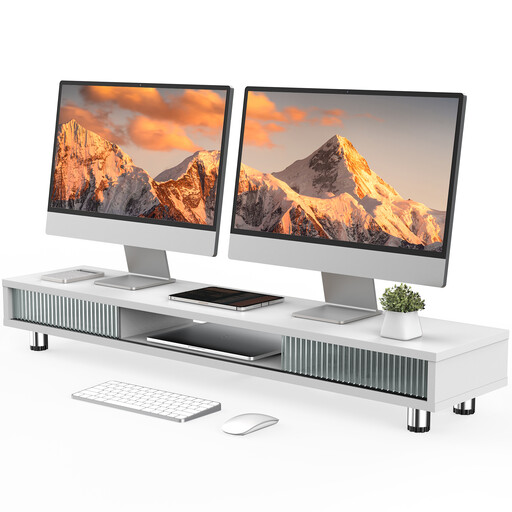
Monitor riser with two sliding glass doors, 108 cm
Described as a monitor riser with extra storage space; the product description lists compartments and a drawer.
The stated width is 108 cm. Built-in cable management and sliding doors are also listed.
View on Joybuy
 No image available
Floordirekt monitor stand for 2 monitors, 80–108 cm
For two monitors you want to position straight or at an angle; the description lists independently swivelling side platforms.
The width is adjustable from 80 to 108 cm, according to the description. The height is fixed at 10,4 cm.
View on Joybuy
Frequently asked questions
Do accounts and invoices need to be shown on monitors positioned at the same angle?
No. The DGUV study doesn’t establish one arrangement that works for everyone. Results varied depending on the task and screen configuration. Position the view you read more often so it’s comfortable to look at, and check the second view as you reconcile the information.
What should I check before fitting a mount?
Compare the weight and VESA pattern of each monitor with the specifications for the exact mount model. If you’re using a clamp, also check the desk edge, desktop thickness and construction; for a stand, make sure you have enough space. And allow enough slack for the cables.
When shopping online, what’s the difference between a warranty and statutory rights?
If an item is faulty, your statutory rights apply against the seller. A warranty is a voluntary additional promise, so check its terms separately. The Consumer Advice Centre says that online orders generally come with a 14-day cancellation period from the day you receive the goods; statutory exceptions may apply.
Are you required to use a particular type of monitor arm in a German home office?
Government regulations don’t specify a particular brand or type of mount for this purchase. The Federal Institute for Occupational Safety and Health describes the scope of ASR A6 as covering, among other things, screen-based workstations in workplaces and telework workstations; this doesn’t mean that every instance of private working from home is automatically covered. If your employer has set up a telework workstation, the applicable health and safety requirements should be taken into account.


