What to consider when buying
A monitor arm won’t solve the problem of powering your screens if you have few spare sockets. You’ll need to consider both the right range of movement and mounting method, and plan your connections separately.
| What you need |
What to check before buying |
Who prioritises this |
| Position notes alongside slides |
Check whether you can adjust each screen separately for height, distance and angle, and whether there’s enough room to swivel them. |
If I use slides and notes at the same time, I want to be able to position the notes screen to suit me; around 31% of consumers put screen positioning first. |
| Limited number of sockets |
Check monitor power, available sockets, video outputs and USB ports for peripherals separately. |
If sockets are in short supply, I want to know which connections can actually be used for my USB devices; around 25% of consumers prioritise making the most of limited sockets. |
| Fit for both monitors |
For each screen, compare the VESA mounting pattern, weight without its original stand and dimensions with the limits for the specific model. |
If I want to mount two existing monitors, I want to be sure both are within the stated limits; around 25% of consumers put monitor compatibility first. |
| Fitting to your existing desk |
Check the desktop thickness, suitable edge or cable access hole, desk construction and the space behind the monitors. |
If my desk is short on space or has a delicate construction, I want to choose a suitable fixing; around 19% of consumers prioritise desk mounting. |
Joybuy products for two screens
The Joybuy products below include adjustable dual arms and stands for two screens. Even if a model has an integrated USB hub, you’ll still need to plan separately for monitor power.
 No image available
AOKCOS dual monitor stand with storage shelf
A good option if you want to position two screens differently and adjust their height.
According to the product details, it’s suitable for monitors from 12 to 27 inches, with VESA 75 × 75 or 100 × 100 mm; up to 10 kg per arm.
The height is adjustable from 120 to 927 mm, according to the description; the arms can be tilted, swivelled and rotated through 360°.
Joybuy
 No image available
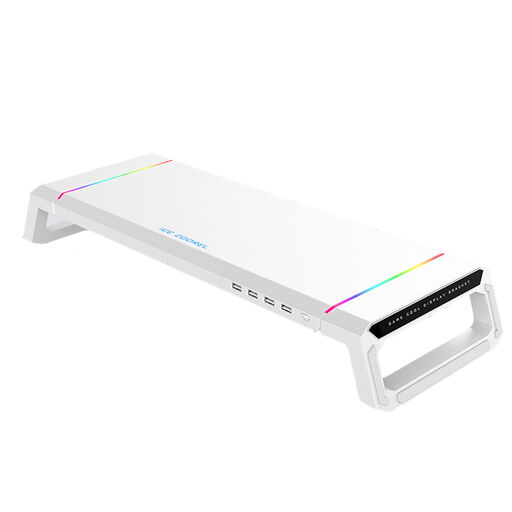
Monitor stand with USB hub, drawer and RGB lighting
Worth considering if you want to connect USB peripherals at your desk and could use extra storage beneath the stand.
The product description lists an integrated 4-port USB 2.0 hub and a load capacity of up to 30 kg; check what type of load this refers to before choosing it.
The hub isn’t specified as a replacement for the monitors’ power supply or video signal.
Joybuy
 No image available
AOKCOS dual monitor stand with wooden shelf
A good option if you want to position two monitors differently and would find an extra shelf useful for storage.
According to the product details, it’s suitable for monitors from 12 to 27 inches, with VESA 75 × 75 or 100 × 100 mm; up to 10 kg per arm.
According to the description, the arms can be tilted, swivelled and rotated through 360°.
Joybuy
 No image available
Floordirekt monitor stand, 80–108 cm, black
A good option if you want to set up one or two monitors and adjust the angle of each side independently.
The product description lists an adjustable width of 80 to 108 cm, a fixed height of 10.4 cm and a cable clip.
The shelf beneath the stand provides extra storage; the description also mentions non-slip, scratch-protective pads.
Joybuy
 No image available
Floordirekt gas spring dual monitor arm, 15–32 inches
A good option if you want to mount two screens using a desk clamp or through-desk fixing and position them differently.
According to the product details, it’s suitable for monitors from 15 to 32 inches, weighing 2–10 kg, with VESA 75 × 75 or 100 × 100 mm.
The description lists a gas spring, tilt, swivel and rotation functions. Check that the fixing method and desktop thickness are right for your workspace.
Joybuy
Frequently asked questions
Does a dual monitor arm save a power socket for the screens?
No, not by virtue of holding the monitors. ARCTIC describes the hub on the Z2 (Gen 3) as a USB 2.0 hub with limited output, not as a power supply or video signal source for two monitors. Check your screens’ power requirements separately.
How can I check whether my two monitors will fit an arm?
For each screen, compare its VESA mounting pattern, weight and size with the specifications for the exact model. Then check your desktop thickness and fixing method. Limits vary, for example, between the DURABLE SELECT 509523 and SELECT PLUS 509723.
What should I consider with a hollow-core desktop?
For the Z2 (Gen 3), ARCTIC recommends a reinforcement plate for honeycomb or sandwich desktops with hollow cores to help prevent clamp damage. This fitting recommendation applies to the model mentioned.
What applies to defects and manufacturer warranties in Germany?
For purchases covered by German consumer law, your statutory rights against the seller are separate from any voluntary warranty. The Verbraucherzentrale (German consumer advice centre) explains that, if a product is faulty, the first step is to seek a remedy from the seller; any additional manufacturer’s warranty is subject to its own terms.
Do I have to buy a particular arm for a two-screen workstation?
The workplace safety guidance referred to here doesn’t establish a general requirement to buy a particular dual monitor arm. The Federal Institute for Occupational Safety and Health describes the scope of ASR A6 for workplaces and teleworking; purely private use isn’t automatically covered. The German Social Accident Insurance (DGUV) notes that the benefits of using multiple screens can vary depending on the task and screen setup.


